Vimeo is really nice: great UI, much less cluttered than YouTube.
We are putting up our videos there now.
Vimeo is really nice: great UI, much less cluttered than YouTube.
We are putting up our videos there now.
The transcript at the Wall Street Journal is extensive, and makes for great reading. Here are some of our favorite bits:
On whether Apple is too frugal:
My definition of a depression-era mentality wouldn’t be of a company investing a pair of tens over two years. [“tens” refers to $10 billion.]
On Einhorn’s lawsuit and Apple’s Proposal 2:
You’re not gonna see us do campaign mailing, you’re not gonna see a “yes on 2” in my front yard. This is a waste of shareholder money, it’s a distraction, and it’s not a seminal issue for Apple.
On innovation:
If there was a formula, a lot of companies would have bought their ability to innovate…
Consumers want an elegant experience where the technology flows to the background
These skills, this isn’t something you can just go write a check for. This is decades of experience
On specs:
Do you know the speed of an AX processor? You probably don’t. Does it matter? You want a fantastic experience
On iPad market share:
I have no idea what market share is, we’re the only company that really reports the units we sell.
On cannibalization:
I think if a company ever begins to use cannibalization as a primary or even a major factor of what products to go to, it’s the beginning of the end.
On iPad Mini:
I think this is gonna be the mother of all markets.
On the value of Apple Stores:
The tablet was ingrained in their mind as this heavy thing the Hertz guy held. But our store is the place to go and discover and try it out and see what it can do.
On being a good corporate citizen:
I’m very proud that we’re out front, that we have a spine on supply responsibility.
Cool! We just got our application approved, and now you can download Kerika from the Google Apps Marketplace.
The process was relatively smooth, and we are particularly impressed by the responsiveness of the Google team that deals with feedback from users — turnaround to our questions was just a few hours.
We will have a longer blog post soon with details.
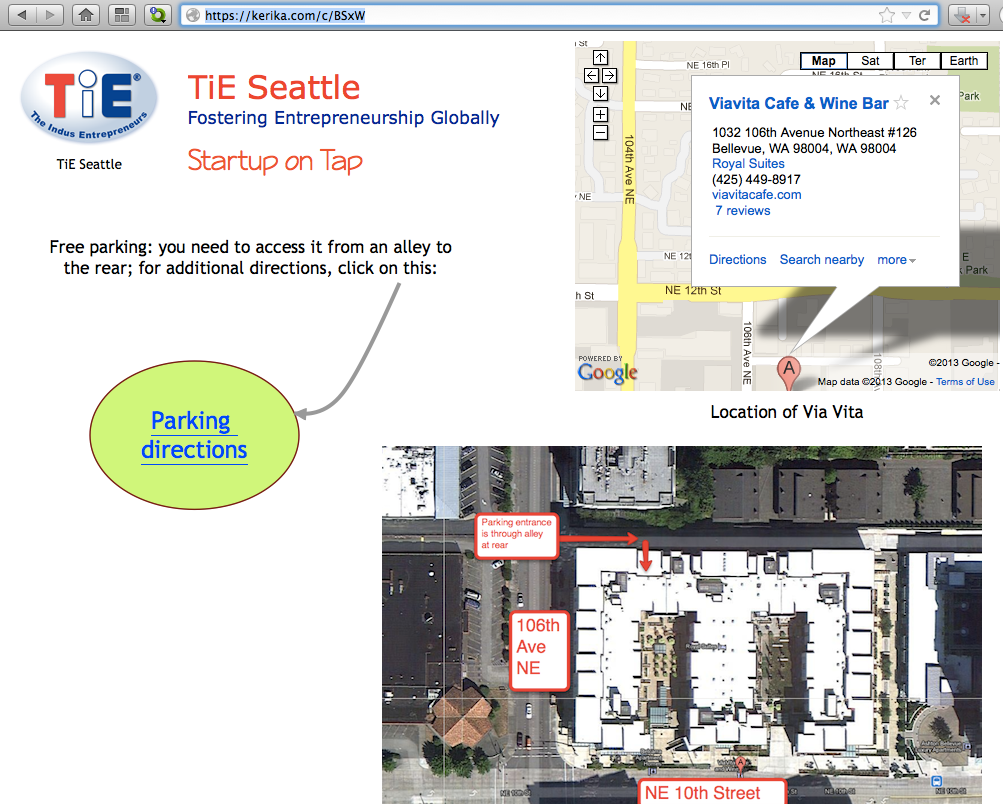
Here’s a really great example of how you can easily create rich Web pages using Kerika:

This page was created in just minutes, and can be changed in real-time. The page is an example of Kerika’s Whiteboard projects, being used by the Seattle chapter of The Indus Entrepreneurs (TiE).
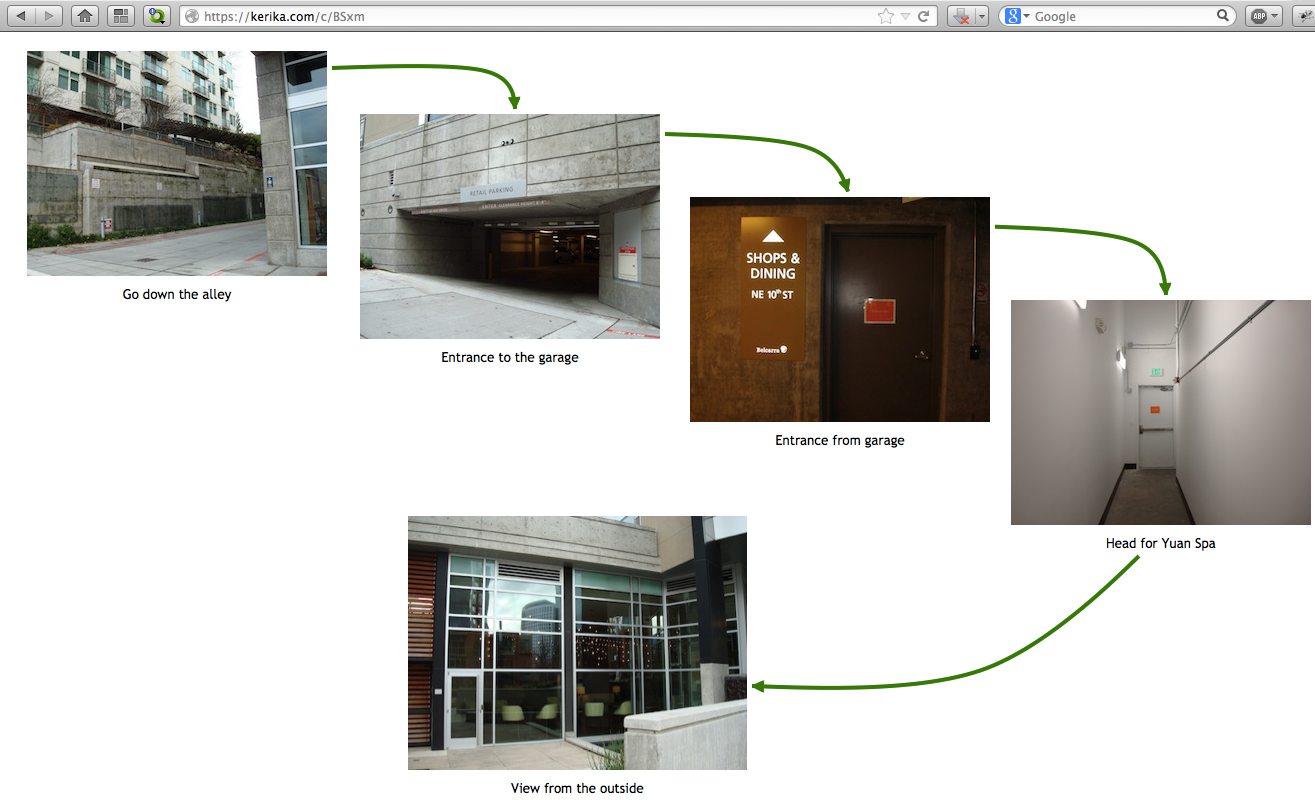
This page is also a great example of you can create pages within pages: just click on the “Parking Directions” shape, and you get taken to another page that’s organized as a picture board:

Publishing these web pages is easy and instantaneous: just take the URL of your Kerika project page, and replace the “/m/” in the middle with “/c/” and you will have a real-time Web page that anyone can access, from anywhere, even if they don’t use the Kerika software.
(In this example, the project page is at kerika.com/m/BSxW, and the published page is at kerika.com/c/BSxW)
Want to learn more about how to create these great canvases? Check out this video.
We are now listed in the Chrome Web Store (and, hopefully, soon in the Google Apps Marketplace as well). If you are using Chrome, it’s a handy way to get it installed as part of your browser’s app.
Try it out today — even if you are already a Kerika user! (You will be sent to the account you already have.) And, please rate and review the app as well.
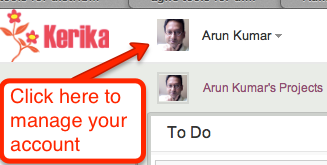
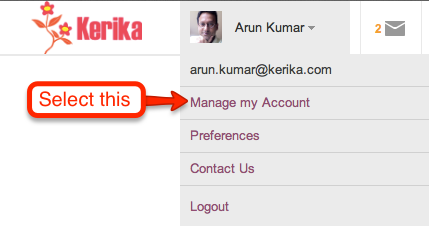
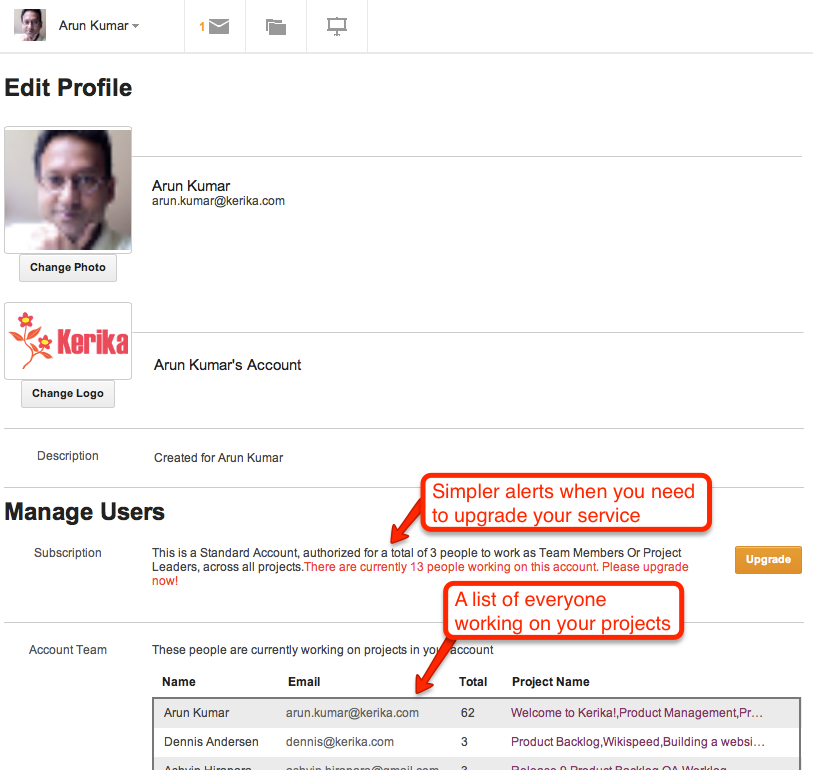
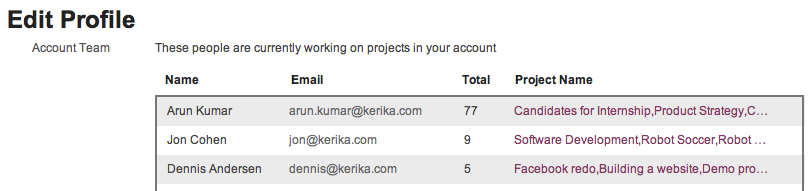
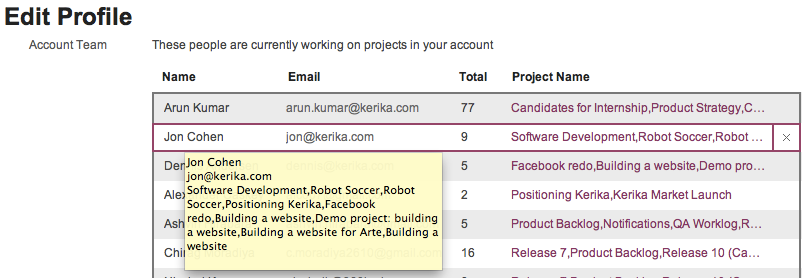
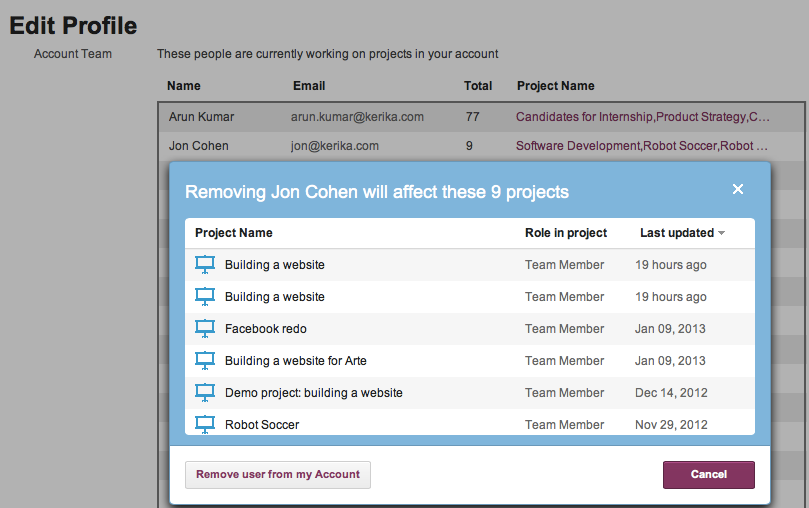
Our latest version includes a bunch of usability improvements, as usual, but the biggest changes are to the billing mechanism and account management:

Our thanks to everyone who has been giving us feedback!
Next up: Kerika will be available from the Google Apps Marketplace and the Chrome Web Store.
A great article from the Wall Street Journal on which social media channels have the most potential to help small businesses: a survey they did resulted in just 3% picking Twitter as the most effective tool.
41% picked LinkedIn, 16% picked YouTube, and 14% picked Facebook. Google+ came in at 7%.

This matches our own sense for what works, and doesn’t, although the 7% that Google+ grabbed seems surprisingly high. Is this because of the increasingly tight integration that Google is enforcing between their search engine results and your usage of Google+? We haven’t seen any benefits at all from our Google+ efforts, and remain frustrated that we still don’t have a custom URL like plus.google.com/kerika…
Kerika uses a ton of Javascript, and by the word “ton”, we mean “well over a hundred thousand lines of Javascript”. It is one of the most sophisticated user interfaces ever developed for the browser, and it delivers a fantastic, real-time, desktop-like experience right inside the browser. And it does so on Internet Explorer, Safari, Chrome and Firefox.
The problem has always been with Internet Explorer: versions before IE9 have very poor support for Javascript and HTML5 in general. In years past Microsoft gave lip-service to the idea of supporting the (then-emerging) HTML5 standards, but their pre-IE9 versions did a very halfhearted job of supporting Web standards. Too many people at Microsoft were still fixated on the idea of maintaining a proprietary lock-in by encouraging their users to stick with the Microsoft-specific extensions that ran only on IE Server and the IE browsers. Things turned around only with IE9, spurred, no doubt, by the surprising inroads that were being made by Firefox and Chrome. Now, happily, the thinking at Microsoft has really come around to supporting Web standards!
Well, Kerika doesn’t run on pre-IE9 versions of Internet Explorer. This was a critical design decision we made when we first started coding in 2010, based on the assumption that IE9 — which was then in beta form but already looking reasonably robust — would be quickly launched and vigorously promoted by Microsoft, and as quickly adopted by the IE user base.
That doesn’t seem to have happened, at least not as far and as widely as we had hoped, and a call this afternoon with a user who was stumped trying to make Kerika work on his office PC, which still runs IE8, prompted us to look at NetApplications data on browser market share and adoption curves. The data are, frankly, dismal.
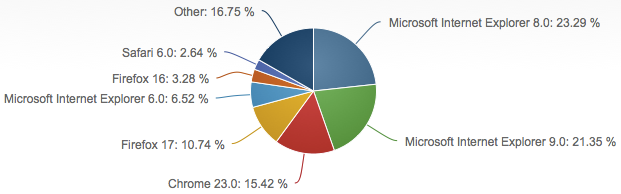
First of call, let’s look at overall browser market share, as of Dec 2012:

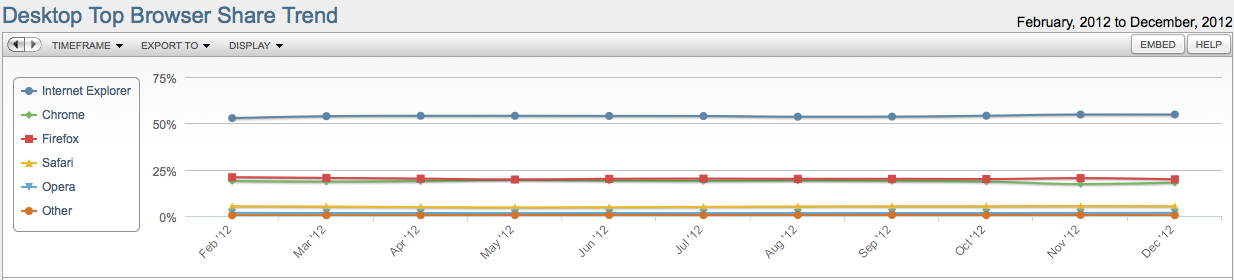
Overall, Microsoft is in a position to say they are still the most common browser out there, but not by much: total market share for Internet Explorer, across all versions, is 54.77%. The following graph, however, really puzzles us: it suggests that browser market share hare remained essentially static for most of 2012, which doesn’t quite jive with anecdotal evidence we have been getting from users suggesting that Chrome is making surprising inroads among both Mac and Windows users:

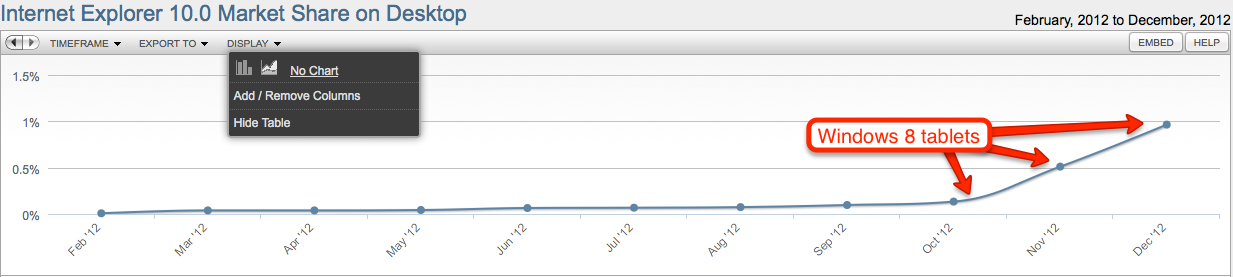
Looking at specific versions of Internet Explorer shows some data that matches our intuition and general market understanding:

But there’s other data that are really puzzling: why would IE6’s market share rise in mid-2012? Were a bunch of old laptops suddenly taken out of storage and donated? No new machines could have come into the market with IE6, nor could many machines have downgraded to IE6 (unless everyone has been saving their installation disks for Windows XP and decided to collectively reinstall their desktop operating systems in July…)


Perhaps the data aren’t so reliable after all, although NetApplications has long been the most highly cited source for data on browser market share.
We need some of those curves to start bending soon…
Jim Collins, acclaimed author of Build to Last and other well-received books, wrote an interesting blog post about 10 years ago on the importance of creating a Stop Doing list.
Mr. Collins emphasized the importance of deciding not to continue doing something any longer as key to successful prioritization:
A great piece of art is composed not just of what is in the final piece, but equally important, what is not. It is the discipline to discard what does not fit — to cut out what might have already cost days or even years of effort — that distinguishes the truly exceptional artist and marks the ideal piece of work, be it a symphony, a novel, a painting, a company or, most important of all, a life.
He cited the example of Darwin Smith of Kimberly-Clark making the critical decision to sell off the company’s paper-mills, which provided the bulk of the company’s revenues and had been in existence for 100 years (!), in order to focus on the new consumer business of paper towels.
This article has inspired us to create a new task board template called “Weekly Prioritization”: it lets you organize your work in a different way from the traditional “To Do / In Progress / Done” taxonomy of Kanban, by using columns organized as:
Let us know how useful this proves to you! (Hat tip to Eitan Nguyen for the suggestion…)
And, as usual, we will continue building new process templates to help our disparate users with their projects.
We should be wrapping up yet another new version of Kerika in the next few days: we have been focusing on how to make it easier for people to get to all of their projects, across all the accounts they are working in.
Some quick background: Kerika lets you create projects in your own account, of course, but also in the accounts of other people who have added you to their project teams. This means that over time you can end up creating, and working on, projects that are owned by several different accounts. Our users have asked for this to be improved in two ways:
Here’s what we are doing to help: first, make it clear to you which account is being used to create your new project. The dialog for creating a new project will look like this:
So, right up front you can see the name of the account you will be creating your new project in, and the face of the account owner. If you want to create your project in a different account, you can switch right on this dialog with one easy action.
The second big change is to create what we call a “unified inbox” view of all your projects, similar to how email clients work that let you see all your emails in one place, across all your accounts.
When you are looking at your projects, the “My Projects” link will show you all your projects, across all your accounts:
Just below the “My Projects” link are all the accounts that you have access to, starting with your own (which is always called “My Account”), and followed by the accounts that have projects that were updated most recently. This makes it easier for you to access not just all your projects, but also the accounts that are most active.
This improvement, like everything else we have done, has been driven by valuable user feedback! Next up, once we get this version wrapped up, is simpler billing system and integration with the Google Apps Marketplace and the Google Chrome Web Store.