Click the image above to open the live template in a new tab
Starting a new business in the Pine Tree State can feel like a massive logistical hurdle, especially when you are faced with the administrative overhead of navigating Maine’s specific rules and paperwork. For many founders, the real friction lies in understanding the sequence of filings missing one local permit or state tax registration can derail your momentum before you even serve your first customer.
But don’t worry, this guide is here to help! We designed this template to simplify the complex process of business formation, providing a visual, structured workspace for your entire team. Ready to launch your Maine business with confidence? Let’s get started!
1. Who Can Use This
This template is built to support various types of professionals and organisations looking to establish a firm legal and operational footing in Maine:
- Solo Entrepreneurs: Individuals looking for a clear roadmap to handle every task on their own without missing critical state requirements.
- Partnership Founders: Small groups needing a shared workspace to divide responsibilities and track progress collaboratively.
- Startup Teams: Growing teams that require a “single source of truth” for complex state compliance and setup to ensure nothing falls through the cracks.
2. What it includes
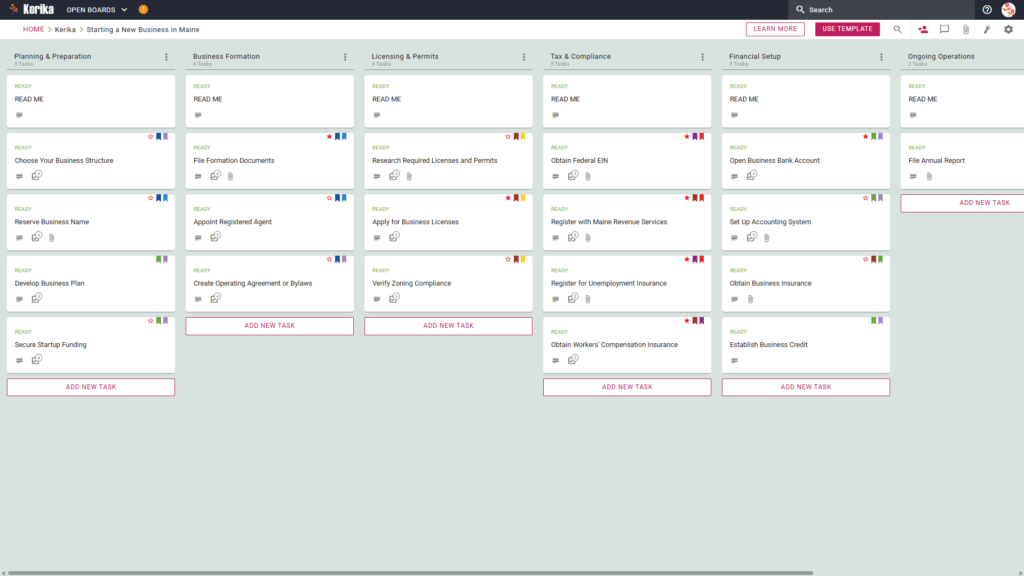
The template provides a comprehensive starting point with a pre-configured, visual layout designed to manage the specific workflow of a Maine startup. Based on our experience consulting with small businesses, we have structured the Six-Column Workflow to cover every angle:
- Planning & Preparation: Focus on foundational steps such as choosing a business structure, reserving your name, and securing startup funding.
- Business Formation: Track the filing of formation documents, appointing a Registered Agent, and creating essential governance documents like operating agreements.
- Licensing & Permits: Maine requires a careful eye on both state and local requirements. This column helps you manage research for state licences and navigate municipal complexities like Zoning Compliance, which often varies significantly between Maine towns.
- Tax & Compliance: Handle essential registrations including your Federal EIN and unemployment insurance. Crucially, this section includes the mandatory task to Register with Maine Revenue Services.
- Financial Setup: Organise the opening of business bank accounts, setting up accounting systems, and establishing business credit.
- Ongoing Operations: This column ensures your business stays in good standing for the long haul by tracking recurring requirements, such as the need to File Annual Report with the Secretary of State.
3. When You Should Use This
This workspace provides the most value in high-stakes environments where organization and security are critical:
- Beginning Your Entrepreneurial Journey: Use this template when you need a repeatable, reliable process to navigate official requirements from Start a Business | Office of Business Development, the official resource site from the Maine State government.
- Navigating State Compliance: This is the perfect solution when you need to ensure compliance with Maine state law from day one. It helps you avoid the risk of missing critical obligations, like registering with Maine Revenue Services or obtaining Workers’ Compensation Insurance.
- High-Stakes Document Security: Use this when your business launch requires strict access control. Kerika is the only task management tool that leaves file ownership entirely with you by storing sensitive legal and tax documents in your own Google Drive, OneDrive, or Box account.
4. How To Use It
Managing your business launch is straightforward with these Kerika features. In our experience, this visual clarity is what prevents the “compliance panic” that many new founders face when deadlines loom.
- The READ ME Card: You will find a “READ ME” card at the top of every column. Always check these first; they contain specific rules and criteria that act as a quality gate before you advance your tasks.
- Advancing the Workflow: Simply drag and drop task cards between columns as milestones are achieved. This eliminates the “email chain nightmare” where status updates get lost in buried threads, everyone can see exactly where the launch stands at a glance.
- The CHECKLIST Tab: Open any card and navigate to the CHECKLIST tab to manage granular sub-tasks. This is where you track the “nitty-gritty” details, such as specific municipal filing dates or document requirements, so no detail is ever missed.
- The ATTACHMENTS Tab: Use the ATTACHMENTS tab to upload formation documents or licences directly to the relevant card. These files stay secure in your own Google Drive or OneDrive account, ensuring your sensitive legal documents are never trapped in a proprietary silo.
Conclusion
Using a visual board ensures your Maine business launch is supported by professional, organised preparation. By moving to a visual system, you can eliminate messy email chains and keep all your formation documents in one central, accessible place.
Because Kerika integrates seamlessly with Google Workspace and Microsoft 365, access rights are managed automatically. Team members receive the read+write access they need to build the business, while external advisors like your accountant or lawyer can be added as “Visitors” with read-only access to review your progress without altering your workflow.
Need Something Different?
If this template isn’t exactly what you need, let us know at support@kerika.com and we will create a custom version for you, free!