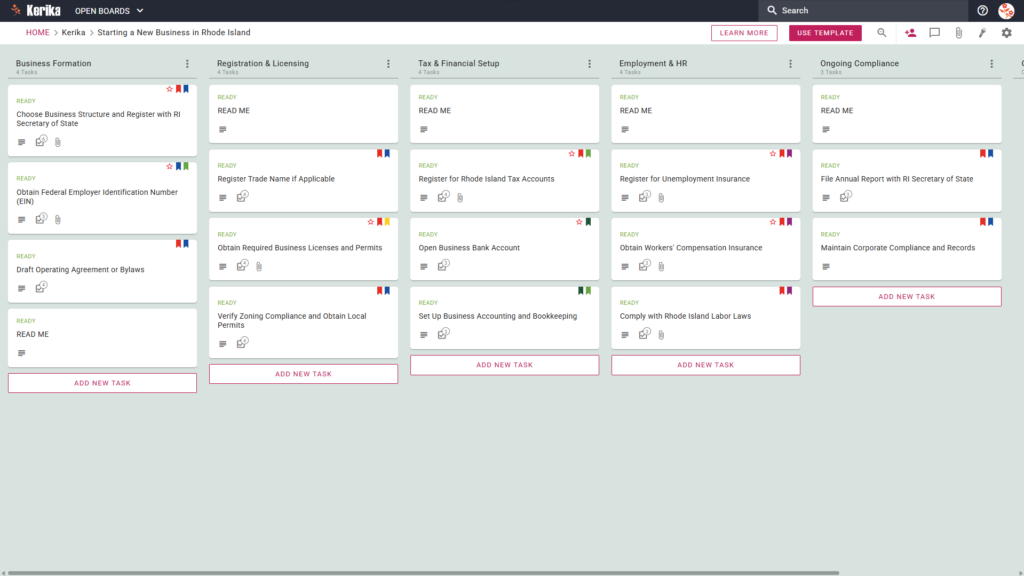
Click the image above to open the live template in a new tab
Starting a new business in Rhode Island is an exciting venture, but the administrative burden of navigating state regulations and paperwork can be overwhelming. From initial filings to complex tax registrations, the sheer volume of tasks often feels like a barrier to actually getting your work started.
But don’t worry, this guide is here to help you organise the chaos and focus on what matters. Our Kerika template is the perfect solution for visualising the entire launch process, offering clarity and a massive boost to your productivity. We have laid out every essential step so you can move forward with confidence. Ready to turn your vision into a reality? Let’s get started!
1. Who Can Use This
- Solo Entrepreneurs: If you are launching a venture on your own, you are responsible for every single detail. This board ensures you can manage the complex “to-do” list of state requirements without feeling lost or missing a critical deadline.
- Partnership Founders: Building a business with others requires seamless coordination. This template allows multiple founders to share the workload, assign specific tasks, and maintain clear accountability as you move through the registration stages together.
- Startup Teams: As your team grows, collaboration across different functional areas like HR, Finance, and Legal becomes vital. This workspace allows your team to communicate in real-time, ensuring everyone stays aligned on the path to becoming fully operational.
2. What it includes
The template is built around a specialised Five-Column Workflow designed to take you from a concept to a compliant business. It organises the chaos into a logical progression that mirrors the requirements of the Ocean State.
- Business Formation: Focuses on establishing your legal identity, including critical steps like obtaining your Federal Employer Identification Number (EIN) and drafting your Operating Agreement or Bylaws.
- Registration & Licensing: Manages the permits and trade names required for your specific industry and location.
- Tax & Financial Setup: Organises your fiscal responsibilities, including banking foundations and state-level tax accounts.
- Employment & HR: Covers the essential steps for hiring, protecting your workforce, and meeting labour law requirements.
- Ongoing Compliance: Ensures you are prepared for future obligations like annual reports and corporate record-keeping.
3. When You Should Use This
This workspace provides the most value during these critical phases:
- Beginning Your Entrepreneurial Journey: Use this as your central hub the moment you start consulting resources like business.ri.gov. It transforms abstract advice into an actionable project plan.
- Navigating State Compliance: Rhode Island law requires precise adherence to specific filing rules. This template acts as a safety net, helping you follow the law accurately to avoid unnecessary fines or delays.
- High-Stakes Document Security: When handling sensitive formation documents, security is paramount. Kerika is the ideal choice because it stores your files directly in your own Google Drive, OneDrive, or Box account, ensuring you maintain total ownership of your data.
4. How To Use It
- The READ ME Card At the top of every column, you will find a “READ ME” card. We recommend checking these first, as they contain the specific rules and criteria that should be met before you add new tasks or move existing ones to the next stage.
- Advancing the Workflow Managing your progress is as simple as dragging cards from left to right. As you complete milestones, such as obtaining your EIN from the IRS, move the card to show exactly where you stand in the process.
- The CHECKLIST Tab For more granular details, open any card and navigate to the CHECKLIST tab. You can use this to track specific dates, figures, or minor sub-tasks, ensuring that even the smallest detail is captured and managed effectively.
- The ATTACHMENTS Tab Keep all your paperwork in one place by using the ATTACHMENTS tab. You can upload PDF permits, registration confirmations, and other vital documents directly to the relevant task card for easy retrieval whenever you need them.
Conclusion
By moving away from messy email chains to a visual board, you can simplify Rhode Island’s business requirements while maintaining secure, centralised control through Google Workspace or Microsoft 365. This template provides the exact structure you need to get your venture off the ground professionally and efficiently.
Need Something Different?
If this template isn’t exactly what you need, let us know at support@kerika.com, and we will create a custom version for you, free!