Monthly Archives: August 2026

How to Streamline Your Wyoming Business Launch with Kerika

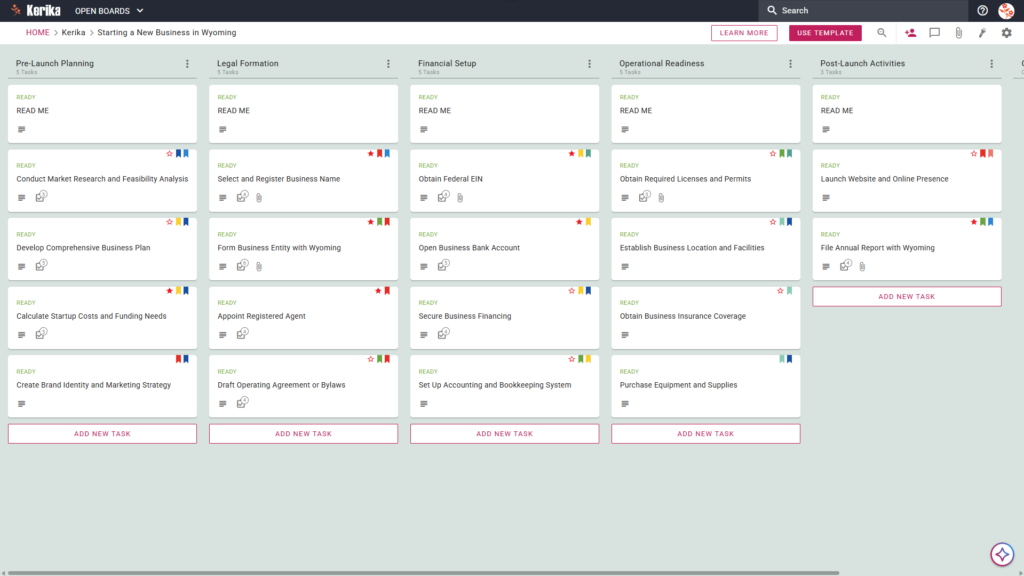
Banner titled "Starting a New Business in Wyoming" featuring a screenshot of a Kerika Kanban board with task columns for Pre-Launch Planning, Legal Formation, Financial Setup, Operational Readiness, and Post-Launch Activities.

Click the image above to open the live template in a new tab

Launching a new venture often feels like navigating a maze of state regulations, complex filings, and fragmented logistics. For many entrepreneurs, the friction of managing administrative hurdles can stall a great idea before it even gets off the ground. This is especially true in Wyoming, a state renowned for its zero state income tax and robust privacy laws, yet one that requires meticulous attention to compliance to maintain those very benefits.

Our “Starting a New Business in Wyoming” template is designed to eliminate this friction by providing a structured, visual workspace that guides you through every necessary step. We have simplified the process of tracking filing deadlines and compliance risks so you can focus on building your brand. But don’t worry, this guide is here to help!

Ready to launch your Wyoming venture with confidence? Let’s get started!

1. Who Can Use This?

This template is built to support the various professionals and founders involved in the business formation process:

  • Aspiring Entrepreneurs:  Individuals ready to turn a business idea into a legal entity in Wyoming using a clear, professional roadmap.
  • Small Business Owners:  Those expanding operations into Wyoming who need to ensure all state-specific compliance steps are met correctly.
  • Legal and Financial Advisors:  Professionals assisting clients with the administrative hurdles of business formation and entity registration.
  • Distributed Founding Teams:  Partners working across different locations who need a “single source of truth” to track their launch progress in real-time.

2. What it includes?

The Wyoming Business Startup template provides a comprehensive layout to manage your launch from conception to compliance:

  • A Six-Column Workflow:  Your progress is tracked through the Pre-Launch Planning, Legal Formation, Financial Setup, Operational Readiness, Post-Launch Activities, and Completed columns.
  • Foundational Planning Tasks:  Pre-configured cards help you organize your strategy, including Conduct Market Research and Feasibility Analysis, Develop Comprehensive Business Plan, Calculate Startup Costs and Funding Needs.
  • Legal and Registration Milestones:  The template guides you through critical state requirements. Crucially, these cards include direct links to the Wyoming Secretary of State resources to ensure your filings are accurate. Key cards include Select and Register Business Name, Form Business Entity with Wyoming, Appoint Registered Agent, Draft Operating Agreement or Bylaws
  • Operational and Financial Essentials:  Detailed cards are provided for high-priority logistics including Obtain Federal EIN, Open Business Bank Account, Obtain Required Licenses and Permits, Obtain Business Insurance Coverage.

3. When You Should Use This?

This workspace provides the most value when organization and security are critical to your business success:

  • Navigating Wyoming-Specific Requirements:  Use this template when you need a structured path to handle state-level obligations. This includes essential Post-Launch tasks like the File Annual Report with Wyoming card, ensuring your business stays in good standing long after the initial filing.
  • Managing Remote Launch Teams:  If your partners or staff are spread across different locations, Kerika handles time zone adjustments automatically and provides a visual workspace so everyone stays in sync regardless of geography.
  • Ensuring Data Sovereignty and Security:  For founders with strict IT security needs, Kerika is the only task management tool that stores your documents in your own Google Drive, OneDrive, or Box account, leaving file ownership and data sovereignty entirely with you.

4. How To Use It?

Managing your startup process is straightforward when you follow these active steps:

  1. Check the READ ME Cards:  Every column begins with a READ ME card. Always check these first, as they contain specific rules and criteria that must be met for that stage of the startup process.
  2. Advance the Workflow:  Move cards through the columns only when the specific criteria are met for example, moving from Legal Formation to Financial Setup only once your entity is officially recognized.
  3. Utilize the CHECKLIST Tab:  Open every card and use the CHECKLIST tab to manage sub-tasks. Checking these off one-by-one ensures that no detail, such as a specific permit or filing fee, is overlooked.
  4. Manage Documents via the ATTACHMENTS Tab:  Upload your filings, business plans, and EIN confirmations directly to the relevant cards. This keeps your essential documents in one secure place, linked directly to the tasks they support.

Conclusion

Using the Kerika Wyoming Business Startup Template ensures your new venture is built on a foundation of organized, professional preparation. Because Kerika integrates seamlessly with Google Workspace and Microsoft 365, managing access is both simple and secure.

One of the most powerful features for a growing startup is that when you change a user’s role in Kerika, their file access in your cloud storage is updated instantly. Founders can grant different access levels based on roles: give partners “read+write” access to build the business together, while providing advisors or visitors “read-only” access to review progress. By moving to a visual board, you eliminate messy email chains and keep your entire team focused on a successful launch.

Need Something Different?

If this template isn’t exactly what you need, let us know at support@kerika.com,  and we will create a custom version for you, free!

How to Launch Your Wisconsin Business with Kerika’s Startup Template

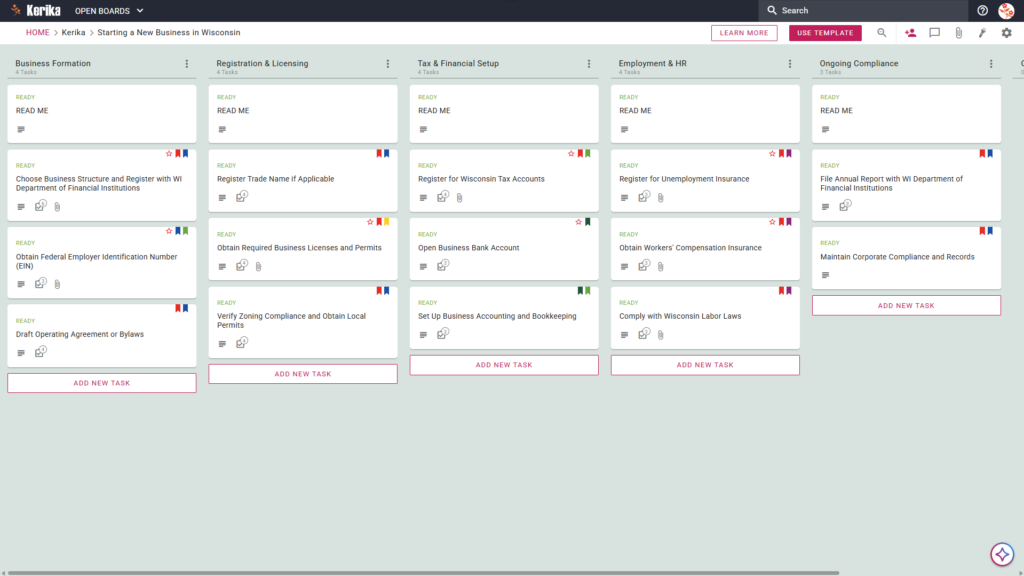
Banner titled "Starting a New Business in Wisconsin" featuring a screenshot of a Kerika Kanban board with task columns for Business Formation, Registration & Licensing, Tax & Financial Setup, Employment & HR, and Ongoing Compliance.

Click the image above to open the live template in a new tab

Launching a business in Wisconsin is an exciting milestone, but the initial logistical hurdles can be daunting. Navigating the specific registration requirements of the Department of Financial Institutions (DFI), managing various tax accounts, and ensuring local permit compliance often feels like wading through endless red tape. This administrative overhead is a common friction point that can distract you from what matters most: building your brand and serving your customers.

But don’t worry, this guide is here to help! The Wisconsin Business Startup template provides the visual, structured workspace you need to manage these moving parts effectively. By transforming a complex list of state mandates into a clear, manageable roadmap, you can reclaim your time and focus on growth.

Ready to launch your Wisconsin venture? Let’s get started!

1. Who Can Use This?

This template is designed to support the diverse needs of founders and their professional support teams:

  • Solo Entrepreneurs:  Individuals who need a clear, step-by-step path to navigate the jump from a business idea to a fully registered legal entity.
  • Partnerships and Legal Teams:  Collaborative groups that require a “single source of truth” while Drafting Operating Agreements or Bylaws.
  • Administrative Leads: Professionals responsible for the heavy lifting of securing Wisconsin state permits and ensuring local zoning compliance.
  • Distributed Founding Teams: Partners working from different locations who need real-time updates on the status of state filings and registration.

2. What it includes?

The template provides a comprehensive, pre-configured framework based on Wisconsin’s specific business and financial requirements:

  • A Six-Column Workflow:  Your progress is tracked through the Business Formation, Registration & Licensing, Tax & Financial Setup, Employment & HR, Ongoing Compliance, and Completed columns.
  • State-Specific Registration Tasks:  The board includes pre-configured cards for essential steps such as Choose Business Structure and Register with WI Department of Financial Institutions and Register Trade Name If Applicable.
  • Financial & Tax Foundations:  Dedicated cards are provided for Register for Wisconsin Tax Accounts, Open Business Bank Account, and Set Up Business Accounting and Bookkeeping.
  • Federal and Local Compliance:  Manage broader requirements with dedicated cards for Obtain Federal Employer Identification Number (EIN) and Verify Zoning Compliance and Obtain Local Permits.
  • HR and Insurance Requirements:  Stay compliant with employment laws using cards to manage Register for Unemployment Insurance, Obtain Workers’ Compensation Insurance, and Comply with Wisconsin Labor Laws.
  • Official Documentation Resources:  Every card is designed to host the necessary WI government resources, providing seamless access to official state paperwork directly within your workflow.

3. When You Should Use This?

Using this structured workspace is particularly valuable for any organisation operating in high-stakes environments where oversight is critical:

  • Initial Formation Phase:  Use this template when you require a repeatable, reliable process to ensure you never miss a state-level deadline, a mandatory filing fee, or an annual report with the DFI.
  • Scaling the Team:  This is the ideal tool when you begin the transition from a solo venture to an employer. It helps you manage the complexities of Unemployment Insurance and Workers’ Comp without losing track of your legal obligations.
  • Secure Document Management:  When handling sensitive legal documents, security is paramount. Kerika is the only task management tool that ensures you maintain full ownership of your data by storing files directly in your own Google Drive, OneDrive, or Box account.

4. How To Use It?

Follow these steps to move your business from concept to reality:

  1. Initiate Your Board:  Start by loading the template and reviewing the READ ME cards at the top of every column. These cards contain the specific “rules” and criteria that must be met before a task can be moved to the next stage.
  2. Assemble Your Team:  Invite your partners or legal advisors to the board. Start assigning specific registration tasks to ensure clear accountability across the team.
  3. Include Stakeholders: If you are working with external consultants or accountants, add them as ‘Visitors.’ This grants them read-only access to compliance documents without allowing them to alter your workflow.
  4. Methodically Progress:  Move cards from Business Formation through to Ongoing Compliance only when the specific Wisconsin state-specific criteria defined in the READ ME cards have been fully met.
  5. Facilitate Communication:  Use the card comments feature to discuss specific Wisconsin Department of Financial Institutions requirements, keeping all relevant conversations linked to the specific task.
  6. Monitor Advancements:  Use the CHECKLIST tab within each card to track vital sub-tasks, such as the individual steps required for EIN filing or local permit applications.

Conclusion

By adopting a visual board for your Wisconsin startup, you can eliminate messy email chains and ensure every stakeholder is perfectly aligned. Kerika’s seamless integration with Google Workspace and Microsoft 365 ensures that as your team grows or roles change, access rights are updated instantly.

Starting a business is a significant undertaking, but with the right tools, you can ensure your venture is built on a foundation of professional, organised preparation. We wish you the very best of luck with your new Wisconsin business journey!

Need Something Different?

If this template isn’t exactly what you need, let us know at support@kerika.com, and we will create a custom version for you, free!
How to Launch Your West Virginia Startup with Kerika’s New Business Template

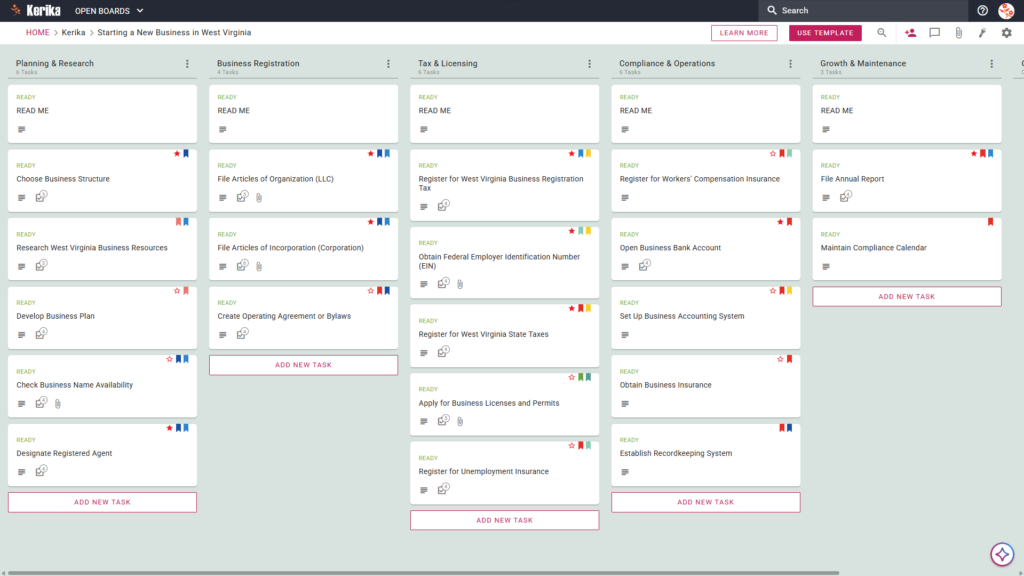
Starting a New Business in West Virginia." The board features a left-to-right workflow with columns for Planning & Research, Business Registration, Tax & Licensing, Compliance & Operations, and Growth & Maintenance, containing specific task cards like "Choose Business Structure" and "Register for West Virginia Business Registration Tax

Click the image above to open the live template in a new tab

Launching a new venture in the Mountain State is an exciting milestone. However, the initial logistical hurdle of navigating state-specific regulations can often feel like a climb up Spruce Knob. Between the legal filings and tax registrations required by the WV One Stop Business Portal, the administrative friction can quickly dampen your entrepreneurial spirit. But don’t worry, this guide is here to help you navigate the complexity with ease.

We designed this template to provide a visual, structured workspace that bridges the gap between a business idea and a fully registered entity. It serves as your command center, ensuring no regulatory detail is overlooked while you build your foundation.

This template transforms a daunting checklist into a manageable, transparent workflow for your entire team. Ready to turn your West Virginia business dream into reality? Let’s get started!

1. Who Can Use This?

  • First-Time Entrepreneurs: This is for those needing a clear, step-by-step roadmap. You can navigate West Virginia’s unique multi-agency registration process without getting lost in the paperwork.
  • Legal and Financial Advisors: Professionals like lawyers or CPAs can use this to manage the formal assembly of Articles of Organization or Operating Agreements. It keeps client communications organized and professional.
  • Business Partners: Co-founders require a “single source of truth” to track progress. This ensures everyone is aligned on what has been filed with the Secretary of State and what is still pending.

2. What it includes?

The West Virginia Business Template provides a comprehensive starting point with a pre-configured layout based on specific state requirements:

  • Planning & Research: Focus on the groundwork of your venture. This includes Choose Business Structure, Research West Virginia Business Resources, Develop Business Plan, Check Business Name Availability, and Designate Registered Agent.
  • Business Registration: This column handles your formal legal establishment. It features File Articles of Organization (LLC), File Articles of Incorporation (Corporation), and Create Operating Agreement or Bylaws.
  • Tax & Licensing: Manage the state’s specific tax and permit requirements. Cards include Register for West Virginia Business Registration Tax, Obtain Federal Employer Identification Number (EIN), Register for West Virginia State Taxes, Apply for Business Licenses and Permits, and Register for Unemployment Insurance.
  • Compliance & Operations: Build a sustainable foundation with Register for Workers’ Compensation Insurance, Open Business Bank Account, Set Up Business Accounting System, Obtain Business Insurance, and Establish Recordkeeping System.
  • Growth & Maintenance: Stay in good standing with the state long-term. This section includes File Annual Report and Maintain Compliance Calendar.

3. When You Should Use This?

  • Navigating State Portals: Use this when you feel overwhelmed by the WV One Stop Business Portal. While the portal is a filing system, Kerika is a project management system. It lets you track exactly what has been submitted versus what is pending with a visual clarity that state websites lack.
  • High-Stakes Compliance: Organization is vital when handling sensitive documents like tax IDs. Kerika is the only task management tool that stores documents directly in your own Google Drive, OneDrive, or Box account. Your sensitive filings stay under your own IT control, not on a third-party server.
  • Team Collaboration: Use this when multiple stakeholders lawyers, accountants, and founders need to coordinate. It prevents document version confusion and ensures everyone is working from the same draft.

4. How To Use It?

  1. Initiate Your Board: Open the template and review the READ ME cards at the top of each column. These contain the specific “rules of the road” and criteria for each registration phase.
  2. Assemble Your Team: Invite your co-founders and advisors to the board. This centralizes your launch efforts and ensures everyone has immediate access to the plan.
  3. Include Stakeholders: Add external partners like your accountant to specific cards. They can upload certifications or review filings directly within the workspace.
  4. Methodically Progress: Move cards from Planning through to Tax & Licensing only when tasks are marked “Ready.” This disciplined flow ensures no legal step is skipped.
  5. Facilitate Communication: Use the CHECKLIST tab on cards to manage granular sub-tasks, such as local permit requirements. Use the built-in chat to eliminate messy email chains.
  6. Monitor Advancements: Use the visual Kanban layout to see your progress at a glance. You will know exactly what is completed and what requires your immediate attention.

Conclusion

By adopting a visual workspace, you eliminate fragmented communication and provide your team with a clear roadmap. Kerika’s seamless integration with Google Workspace and Microsoft 365 ensures your files remain secure and accessible.

By using a visual board, you ensure your West Virginia startup maintains the highest professional standards from day one.

Need Something Different?

If this template isn’t exactly what you need, let us know at support@kerika.com, and we will create a custom version for you, free!
How to Launch Your Washington State Business with Kerika’s New Template

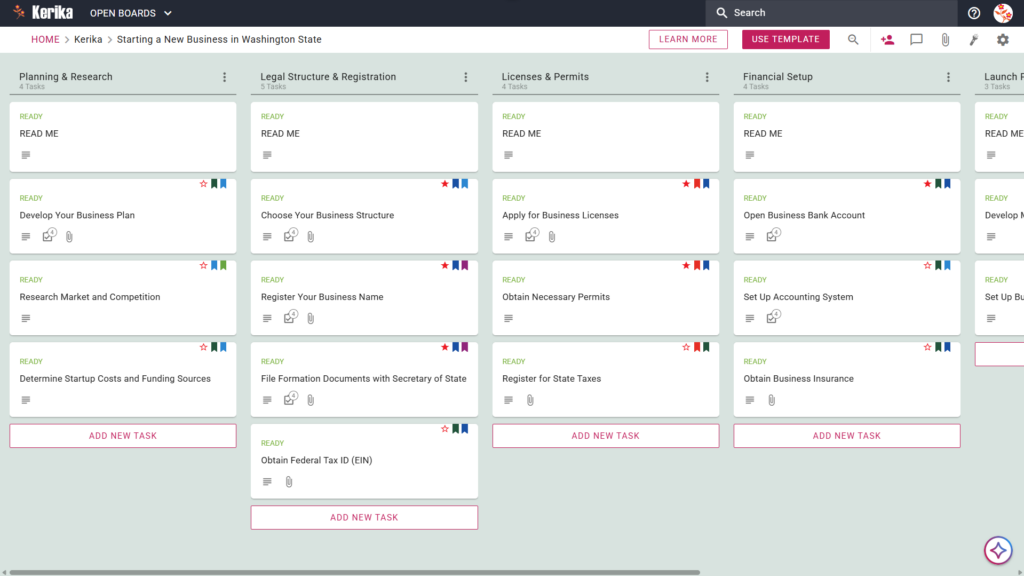
Banner titled "Starting a New Business in Washington State" featuring a screenshot of a Kerika Kanban board with task columns for Planning & Research, Legal Structure & Registration, Licenses & Permits, Financial Setup, and Launch Preparation.

Click the image above to open the live template in a new tab

Launching a business in the Evergreen State is an exciting milestone, but the logistical hurdles can often feel like a massive hurdle. Navigating Washington State’s specific requirements such as those detailed in the official WA Small Business Guide frequently creates friction for new owners trying to manage legal filings, tax registrations, and licensing all at once.

But don’t worry, this guide is here to help you! We have designed this template to remove the guesswork and simplify the transition from a great idea to a fully operational legal entity. By translating static documentation into a dynamic workspace, we help you focus on your vision while we handle the roadmap. Ready to launch your dream in the Evergreen State? Let’s get started!

1. Who Can Use This?

This template is built to support a variety of professionals and founders navigating the Washington business landscape:

  • Aspiring Entrepreneurs:  Individuals planning their first venture who need a clear, step-by-step path through state-specific regulations.
  • Business Partners:  Co-founders who require a shared, collaborative workspace to divide responsibilities and track progress in real-time.
  • Consultants and Advisors:  Professionals such as lawyers, accountants, or business coaches who are guiding clients through the complexities of WA-specific compliance.

2. What it includes?

The Starting a New Business in Washington State template provides a comprehensive starting point with a pre-configured, visual layout:

  • A Six-Column Workflow:  Your launch progress is tracked through the Planning & Research, Legal Structure & Registration, Licenses & Permits, Financial Setup, Launch Preparation, and Completed columns.
  • Foundational Tasks:  Pre-configured cards include the Develop Your Business Plan, Research Market and Competition, and Determine Startup Costs and Funding Sources.
  • Legal and Registration Milestones:  Dedicated cards are ready for the Choose Your Business Structure, Register Your Business Name, File Formation Documents with Secretary of State, and Obtain Federal Tax ID (EIN)

3. When You Should Use This?

This workspace provides the most value when you encounter the specific “pain points” of business formation:

  • When you need a step-by-step roadmap:  Use this to ensure no critical legal requirement, such as your Washington Secretary of State filing, is missed during the rush of starting up.
  • When transitioning from an idea to a formal entity:  If you feel overwhelmed by the “Small Business Guide: Start” documentation, this template translates those static instructions into actionable tasks.
  • When you need to centralize documents:  Use Kerika to keep your EIN confirmation, state licenses, and formation papers in one secure, shared location rather than buried in messy email attachments.

4. How To Use It?

As a technical strategist, I recommend following these six steps to manage your business launch with professional precision:

  1. Initiate Your Board:  Start by checking the READ ME cards at the top of every column. These contain the “ground rules” and criteria that must be met before you move tasks to the next stage.
  2. Assemble Your Team:  Invite partners or legal advisors to the board. This ensures everyone has a single source of truth and eliminates the administrative overhead of constant status updates.
  3. Include Stakeholders:  You can add specialized roles, such as your accountant, to specific cards within the “Financial Setup” column to handle banking and insurance tasks.
  4. Methodically Progress:  Use the internal checklists on each card to manage sub-tasks. Move cards from left to right only after requirements are met. Successfully moving a card to the “Completed” column is your final signal that a phase of your launch is officially secured.
  5. Facilitate Communication:  Use the card comments to discuss specific WA state requirements. This keeps your strategy organized and ensures that all historical context stays attached to the relevant task.
  6. Monitor Advancements:  Use the visual layout to see at a glance how close you are to the “Launch Preparation” phase and identify any bottlenecks before they delay your opening day.

Conclusion

Using a visual, structured workspace transforms the complex process of business formation into a series of manageable, professional steps. By moving your launch to a Kerika board, you gain an environment that keeps your team aligned and your documents secure. Because Kerika integrates directly with Google Drive, OneDrive, or Box, you maintain full ownership and control of your sensitive EIN and formation documents at all times. You have the vision for your business; now you have the professional roadmap to make it a reality.

Need Something Different?

If this template isn’t exactly what you need, let us know at support@kerika.com,  and we will create a custom version for you, free!
How to Start a New Business in Virginia with Kerika’s Virginia Business Startup Template

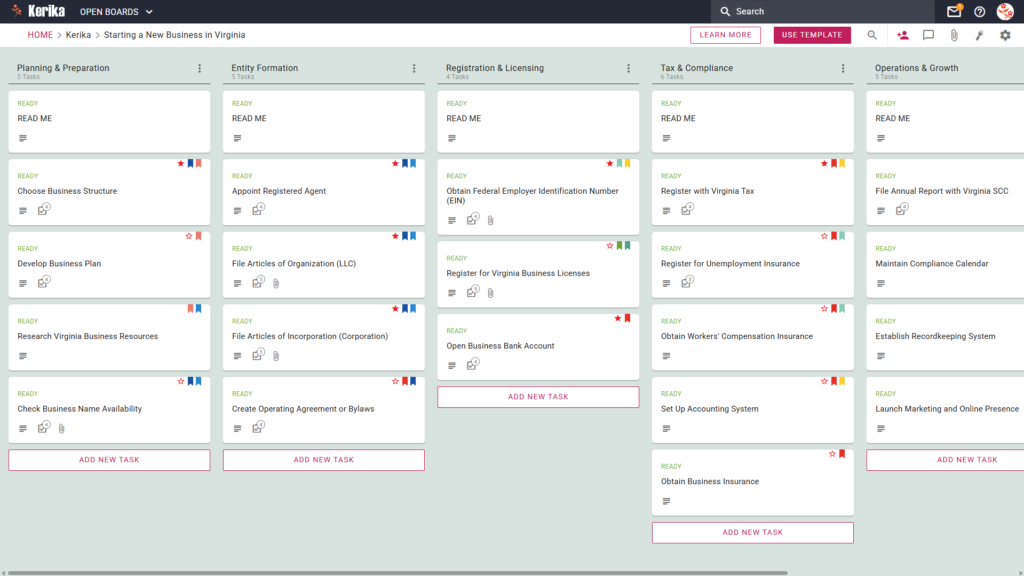
Banner titled "Starting a New Business in Virginia" featuring a screenshot of a Kerika Kanban board with task columns for Planning & Preparation, Entity Formation, Registration & Licensing, Tax & Compliance, and Operations & Growth.

Click the image above to open the live template in a new tab

Navigating the administrative landscape of a new startup can feel like an uphill struggle. From deciphering complex state regulations to managing a mountain of paperwork, the sheer amount of “friction” involved in launching a business often distracts founders from their core vision. Whether you are dealing with the Virginia State Corporation Commission (SCC) or local authorities, the burden of staying compliant can be overwhelming and lead to significant operational delays.

But don’t worry, this guide is here to help! We have designed this template to remove the guesswork from your launch, providing a structured, visual roadmap to get your venture off the ground. Instead of getting lost in spreadsheets or buried under messy checklists, you can organise your entire launch in one secure, collaborative space that keeps your team aligned and focused.

Ready to turn your vision into a reality? Let’s get started!

1. Who Can Use This

This template is built to support a diverse range of entrepreneurial setups, ensuring that no matter your scale, your path to compliance is clear and professional.

  • Solo Entrepreneurs:  If you are building your dream alone, you need a comprehensive roadmap to handle all state requirements without the luxury of a dedicated legal team. This template acts as your personal project manager, ensuring nothing falls through the cracks.
  • Partnership Founders:  When multiple stakeholders are involved, a “single source of truth” is vital for operational harmony. This workspace allows partners to share responsibilities and track progress in real-time, preventing the confusion of overlapping tasks.
  • Startup Teams:  For growing companies, this template makes it easy to scale and delegate complex tasks such as arranging insurance or launching marketing campaigns to specific team members while maintaining full executive oversight.

2. What it includes

The Virginia Business Startup template provides a pre-configured, visual Kanban board that maps out the essential lifecycle of your business launch.

  • A Five-Column Workflow:  Your progress is tracked through the Planning & Preparation, Entity Formation, Registration & Licensing, Tax & Compliance, and Operations & Growth columns.
  • Planning & Formation:  Pre-configured cards include Develop Business Plan, Appoint Registered Agent, and File Articles of Organization (LLC).
  • Registration & Tax Setup:  Dedicated cards are ready for Register for Virginia Business Licenses, Register with Virginia Tax, and Register for Unemployment Insurance.
  • Compliance & Operations:  To ensure a successful opening, the template includes cards for Obtain Workers’ Compensation Insurance, File Annual Report with Virginia SCC, and Establish Recordkeeping System.

3. When You Should Use This

This workspace provides the most value when you need a repeatable and secure process to manage high-stakes business documentation and state-specific deadlines.

  • Beginning Your Entrepreneurial Journey:  Use this template as soon as you visit the ‘Virginia SCC – Start a New Business’ portal. It serves as the perfect companion to translate official state requirements into actionable, manageable steps.
  • Navigating State Compliance:  This is essential when dealing with specific Virginia laws. It ensures you don’t miss critical registration requirements or filings that could result in unnecessary fines or the loss of your corporate standing.
  • High-Stakes Document Security:  Use this when you need to keep sensitive legal filings secure. Kerika is the only task management tool that leaves file ownership entirely with you by storing documents in your own Google Drive, OneDrive, or Box account.

4. How To Use It

As an operations expert, I recommend following these four steps to maintain professional standards and ensure your startup remains audit-ready.

  1. The READ ME Card:   At the top of every column, you will find a “READ ME” card. Always check these first; they act as your coaching manual, containing specific rules and the quality criteria that must be met before you move a task to the next stage of the workflow.
  2. Advancing the Workflow:   As you complete your tasks, move the cards from left to right across the board. This visual progression gives you an instant snapshot of your status and, more importantly, prevents operational bottlenecks by highlighting exactly where a process has stalled.
  3. The CHECKLIST Tab:   Open any card and navigate to the CHECKLIST tab to manage smaller sub-tasks. By checking these off one by one, you ensure audit-ready compliance where no detail such as a specific filing date or a required signature is ever overlooked.
  4. The ATTACHMENTS Tab:  Use the ATTACHMENTS tab to store your legal documents and your official business licence directly within the relevant cards. Because your files stay in your own secure cloud storage, they are protected from loss and remain easily accessible for future regulatory reviews.

Conclusion

By moving your startup process to a visual board, you can eliminate messy email chains and ensure your new venture maintains the highest professional standards from day one. Because Kerika integrates seamlessly with Google Workspace and Microsoft 365, all access rights are managed for you automatically.

When you add team members to your board, Kerika ensures they have the correct permissions to view or edit documents in your cloud storage instantly. This level of organisation allows you to focus on growing your business while the template handles the logistical heavy lifting and manages your professional “Visitor” and contributor roles.

Need Something Different?

If this template isn’t exactly what you need, let us know at support@kerika.com,  and we will create a custom version for you, free!
How to Organise a New Business Startup in Vermont with Kerika’s Vermont Business Startup Template

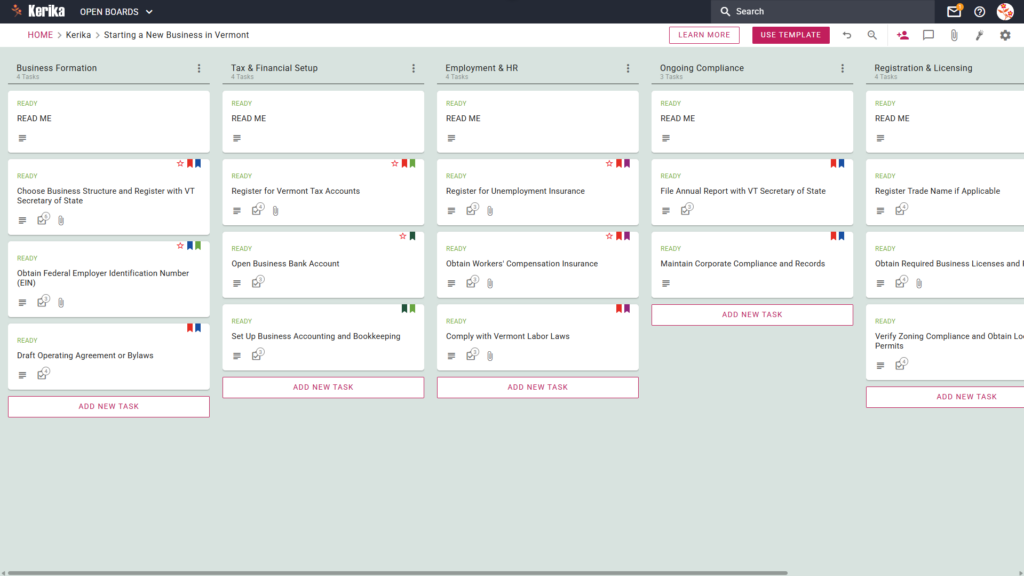
Banner titled "Starting a New Business in Vermont" featuring a screenshot of a Kerika Kanban board with task columns for Business Formation, Tax & Financial Setup, Employment & HR, Ongoing Compliance, and Registration & Licensing.

Click the image above to open the live template in a new tab

Establishing a new venture in the Green Mountain State is an ambitious goal, but the administrative landscape presents a significant regulatory hurdle that can derail a launch before it begins. Navigating Vermont-specific requirements, from local zoning permits to state tax registrations, requires impeccable timing and precise record-keeping.

Without a centralised workflow, critical documents often vanish into fragmented email chains and disconnected spreadsheets. We designed this template to eliminate that friction by providing a visual, structured workspace for your entire team to manage the state-specific business formation process from start to finish.

But don’t worry, this guide is here to help! By adopting a visual board, you can ensure every regulatory milestone is achieved with professional precision and zero guesswork. Ready to launch your Vermont business with confidence? Let’s get started!

1. Who Can Use This

This template is designed to support the diverse range of professionals and founders looking to establish a presence in Vermont:

  • Solo Entrepreneurs:  If you are launching a venture on your own, this template acts as your digital project manager to track every state-specific requirement. It ensures you never miss a deadline while managing multiple roles, providing a clear path from initial formation to ongoing compliance.
  • Partnership Founders:  For businesses with multiple owners, the template provides a “single source of truth” to keep the leadership team aligned. It allows partners to delegate responsibilities clearly, ensuring tasks like tax registration and legal filings are handled without any duplication of effort.
  • Startup Teams:  Small teams can use this structured workflow to collaborate in real-time, whether working locally or distributed across different locations. It ensures that as the team grows, the complete history of every state filing and legal document remains perfectly organised and accessible.

2. What it includes

The Vermont Business Startup template provides a comprehensive, pre-configured layout based on a Five-Column Workflow:

  • Business Formation:  This initial stage focuses on your legal foundation. It includes critical tasks such as “Choose Business Structure and Register with VT Secretary of State”, obtaining your “Federal Employer Identification Number (EIN)”, and drafting your operating agreement.
  • Registration & Licensing:  This column covers the permissions needed to operate legally. You will find cards for registering trade names and obtaining required business permits or local zoning clearances.
  • Tax & Financial Setup:  Manage your fiscal responsibilities by following tasks to Register for Vermont Tax Accounts, open business bank accounts, and establish your accounting infrastructure.
  • Employment & HR:  If you plan to hire, this section guides you through registering for unemployment insurance, workers’ compensation, and complying with Vermont labour laws.
  • Ongoing Compliance:  To ensure your business remains in good standing, use this column to track recurring requirements, such as the mandate to File Annual Report with VT Secretary of State.

3. When You Should Use This

This workspace provides the most value during high-stakes phases where organisation and security are critical:

  • Beginning Your Entrepreneurial Journey:  Use this template the moment you decide to launch to navigate “business-services” for new setups. It provides a repeatable, reliable process that ensures no foundational step is overlooked during the excitement of a new launch.
  • Navigating State Compliance:  This is essential when you need to ensure your setup adheres strictly to Vermont law. The structured columns prevent the accidental oversight of mandatory state filings and local permits.
  • High-Stakes Document Security:  Use Kerika when your security requirements demand strict access control over sensitive legal documents. Kerika is unique because file ownership remains entirely with you, storing all your filings in your own Google Drive, OneDrive, or Box account.

4. How To Use It

Managing your Vermont business launch is straightforward with these functional steps:

  1. The READ ME Card:  You will find a “READ ME” card at the top of the columns. Always check these first, as they contain the Workflow Policies, the specific rules and criteria that must be met before adding or moving tasks to the next stage of the setup process.
  2. Advancing the Workflow:  As you complete requirements, move task cards from left to right. Moving a card from Business Formation to Registration & Licensing provides the whole team with instant status updates, allowing everyone to see exactly how far the launch has progressed at a glance.
  3. The CHECKLIST Tab:  Open every card and navigate to the CHECKLIST tab to manage sub-tasks. You can use this to track granular details, such as the steps for EIN verification. Kerika allows you to assign individual checklist items to different team members, ensuring clear accountability for every detail.
  4. The ATTACHMENTS Tab:  Use the ATTACHMENTS tab to upload state filings, tax documents, or spreadsheets directly to the relevant card. Because Kerika uses your own cloud storage, there are no file size limits and no data silos; your files stay in your secure storage and are shared automatically with the authorised team.

Conclusion

Using the Kerika Vermont Business Startup Template ensures your new venture is supported by professional, organised preparation. By moving to a visual board, you eliminate the confusion of email threads and ensure your organisation maintains the highest professional standards from day one.

Because Kerika integrates seamlessly with Google Workspace and Microsoft 365, access rights are managed automatically. Team members get the read and write access they need to build the business, while external advisors can be added as “Visitors” with read-only access to review your progress.

Need Something Different?

If this template isn’t exactly what you need for your specific industry or state, let us know! Contact us at support@kerika.com,  and we will create a custom version for you, free of charge.

How to Launch Your Company with Kerika’s Starting a New Business in Utah Template

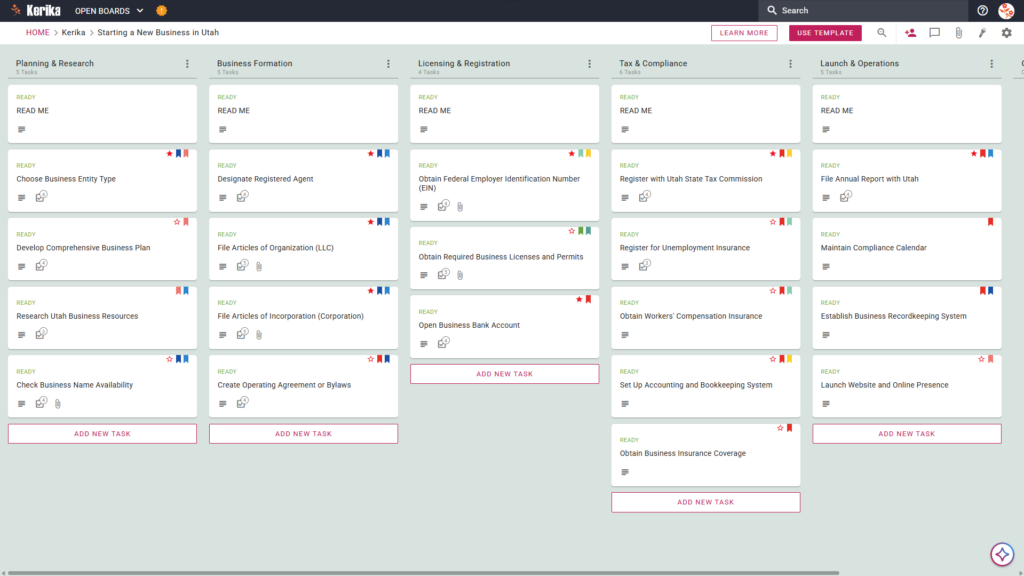
Banner titled "Starting a New Business in Utah" featuring a screenshot of a Kerika Kanban board with task columns for Planning & Research, Business Formation, Licensing & Registration, Tax & Compliance, and Launch & Operations.

Click the image above to open the live template in a new tab

Launching a new company in Utah can feel like a massive logistical hurdle, especially when you are navigating state-specific regulations and a mountain of paperwork. Between choosing the right entity type and ensuring you meet all compliance deadlines, the administrative overhead of starting a business can quickly become overwhelming for any founder.

But don’t worry, this guide is here to help! We designed the Kerika Starting a New Business in Utah template to simplify the launch process and provide a visual, structured workspace for your team. This template acts as your roadmap, ensuring you stay organized from your initial research through your official launch. Ready to reclaim your time and productivity? Let’s get started!

1. Who Can Use This

This template is built to support the diverse group of entrepreneurs and professionals ready to launch their business in Utah:

  • Solo Entrepreneurs: This is for individuals navigating the Utah market alone who need a clear, structured roadmap to ensure no regulatory step is missed. It provides a visual guide so you can move from a “side hustle” to a legitimate corporation with confidence.
  • Partnership Founders: This provides a shared workspace for partners who need to divide responsibilities, such as legal filing and financial setup. Partners can use the board to collaborate in real-time on critical tasks like the Create Operating Agreement or Bylaws card, ensuring everyone is aligned on company governance.
  • Startup Teams: This is designed for small teams needing a “single source of truth” for complex tasks. As you scale, the board helps manage team-wide milestones like obtaining required business licenses or working through the Obtain Workers’ Compensation Insurance card found in your compliance column.

2. What it includes

The Starting a New Business in Utah template provides a comprehensive, pre-configured layout to track your progress from ideation to operations.

  • A Five-Column Workflow: Your progress is tracked through the Planning & Research, Business Formation, Licensing & Registration, Tax & Compliance, and Launch & Operations columns.
  • Planning & Formation: Pre-configured cards include Develop Comprehensive Business Plan, Designate Registered Agent, and File Articles of Organization (LLC).
  • Registration & Tax Setup: Dedicated cards are ready for Obtain Required Business Licenses and Permits, Register with Utah State Tax Commission, and Register for Unemployment Insurance.
  • Compliance & Operations: To ensure a successful opening, the template includes cards for Obtain Workers’ Compensation Insurance, File Annual Report with Utah, and Establish Business Recordkeeping System

3. When You Should Use This

This workspace provides the most value during high-stakes phases of business development:

  • Beginning Your Entrepreneurial Journey: As seen in the “Home” breadcrumb on the board, you should use this template at the very start of your journey to map out your business plan and research entity types before committing to legal filings.
  • Navigating State Compliance: Use this when you need to meet specific Utah laws and state-level requirements, such as Register for Unemployment Insurance or setting up your official accounting systems.
  • High-Stakes Document Security: Use this when your business requires strict control over your legal documents. Kerika is the only task management tool that leaves file ownership entirely with you by keeping your files in your own Google Drive, OneDrive, or Box account.

4. How To Use It

Managing your business launch is straightforward with these steps:

  1. The READ ME Card: You will find “READ ME” cards located at the top of columns. These contain the “rules of the road” for the workflow, explaining the specific criteria that should be met before moving a task to the next stage.
  2. Advancing the Workflow: Move task cards across the board (for example, from Planning & Research to Business Formation) only when the requirements for that stage are satisfied. This visual movement helps you track exactly how close you are to your official launch date.
  3. The CHECKLIST Tab: Open any card and navigate to the CHECKLIST tab to manage sub-tasks. For example, within the card for Check Business Name Availability, you can check off individual steps to ensure no detail is missed during your trademark and availability search.
  4. The ATTACHMENTS Tab: Use the ATTACHMENTS tab to upload important documents, such as your Articles of Organization, directly to the relevant card. These files remain in your secure cloud storage, and Kerika manages the access rights automatically.

Conclusion

By moving to a visual Kanban board, you can eliminate messy email chains and fragmented notes. This structured approach allows you to see the “big picture” of your launch while managing the minute details of state compliance and operations.

Kerika integrates seamlessly with Google Workspace and Microsoft 365, meaning access rights are managed for you. When you add a team member to your board, they get the read+write access they need to contribute to your launch documents instantly. Meanwhile, external stakeholders can be added as Visitors, giving them read-only access to view progress without altering your data.

Starting a business is a major milestone. Using this structured template ensures your organization maintains professional standards and remains compliant with Utah regulations from day one.

Need Something Different?

If this template isn’t exactly what you need, let us know at support@kerika.com,  and we will create a custom version for you, free!