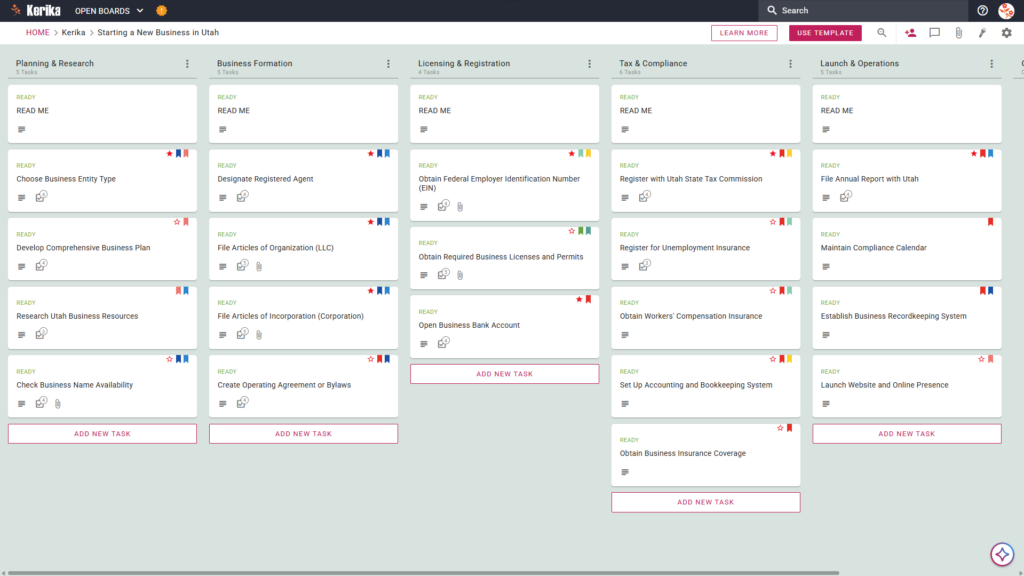
Click the image above to open the live template in a new tab
Launching a new company in Utah can feel like a massive logistical hurdle, especially when you are navigating state-specific regulations and a mountain of paperwork. Between choosing the right entity type and ensuring you meet all compliance deadlines, the administrative overhead of starting a business can quickly become overwhelming for any founder.
But don’t worry, this guide is here to help! We designed the Kerika Starting a New Business in Utah template to simplify the launch process and provide a visual, structured workspace for your team. This template acts as your roadmap, ensuring you stay organized from your initial research through your official launch. Ready to reclaim your time and productivity? Let’s get started!
1. Who Can Use This
This template is built to support the diverse group of entrepreneurs and professionals ready to launch their business in Utah:
- Solo Entrepreneurs: This is for individuals navigating the Utah market alone who need a clear, structured roadmap to ensure no regulatory step is missed. It provides a visual guide so you can move from a “side hustle” to a legitimate corporation with confidence.
- Partnership Founders: This provides a shared workspace for partners who need to divide responsibilities, such as legal filing and financial setup. Partners can use the board to collaborate in real-time on critical tasks like the Create Operating Agreement or Bylaws card, ensuring everyone is aligned on company governance.
- Startup Teams: This is designed for small teams needing a “single source of truth” for complex tasks. As you scale, the board helps manage team-wide milestones like obtaining required business licenses or working through the Obtain Workers’ Compensation Insurance card found in your compliance column.
2. What it includes
The Starting a New Business in Utah template provides a comprehensive, pre-configured layout to track your progress from ideation to operations.
- A Five-Column Workflow: Your progress is tracked through the Planning & Research, Business Formation, Licensing & Registration, Tax & Compliance, and Launch & Operations columns.
- Planning & Formation: Pre-configured cards include Develop Comprehensive Business Plan, Designate Registered Agent, and File Articles of Organization (LLC).
- Registration & Tax Setup: Dedicated cards are ready for Obtain Required Business Licenses and Permits, Register with Utah State Tax Commission, and Register for Unemployment Insurance.
- Compliance & Operations: To ensure a successful opening, the template includes cards for Obtain Workers’ Compensation Insurance, File Annual Report with Utah, and Establish Business Recordkeeping System
3. When You Should Use This
This workspace provides the most value during high-stakes phases of business development:
- Beginning Your Entrepreneurial Journey: As seen in the “Home” breadcrumb on the board, you should use this template at the very start of your journey to map out your business plan and research entity types before committing to legal filings.
- Navigating State Compliance: Use this when you need to meet specific Utah laws and state-level requirements, such as Register for Unemployment Insurance or setting up your official accounting systems.
- High-Stakes Document Security: Use this when your business requires strict control over your legal documents. Kerika is the only task management tool that leaves file ownership entirely with you by keeping your files in your own Google Drive, OneDrive, or Box account.
4. How To Use It
Managing your business launch is straightforward with these steps:
- The READ ME Card: You will find “READ ME” cards located at the top of columns. These contain the “rules of the road” for the workflow, explaining the specific criteria that should be met before moving a task to the next stage.
- Advancing the Workflow: Move task cards across the board (for example, from Planning & Research to Business Formation) only when the requirements for that stage are satisfied. This visual movement helps you track exactly how close you are to your official launch date.
- The CHECKLIST Tab: Open any card and navigate to the CHECKLIST tab to manage sub-tasks. For example, within the card for Check Business Name Availability, you can check off individual steps to ensure no detail is missed during your trademark and availability search.
- The ATTACHMENTS Tab: Use the ATTACHMENTS tab to upload important documents, such as your Articles of Organization, directly to the relevant card. These files remain in your secure cloud storage, and Kerika manages the access rights automatically.
Conclusion
By moving to a visual Kanban board, you can eliminate messy email chains and fragmented notes. This structured approach allows you to see the “big picture” of your launch while managing the minute details of state compliance and operations.
Kerika integrates seamlessly with Google Workspace and Microsoft 365, meaning access rights are managed for you. When you add a team member to your board, they get the read+write access they need to contribute to your launch documents instantly. Meanwhile, external stakeholders can be added as Visitors, giving them read-only access to view progress without altering your data.
Starting a business is a major milestone. Using this structured template ensures your organization maintains professional standards and remains compliant with Utah regulations from day one.
Need Something Different?
If this template isn’t exactly what you need, let us know at support@kerika.com, and we will create a custom version for you, free!