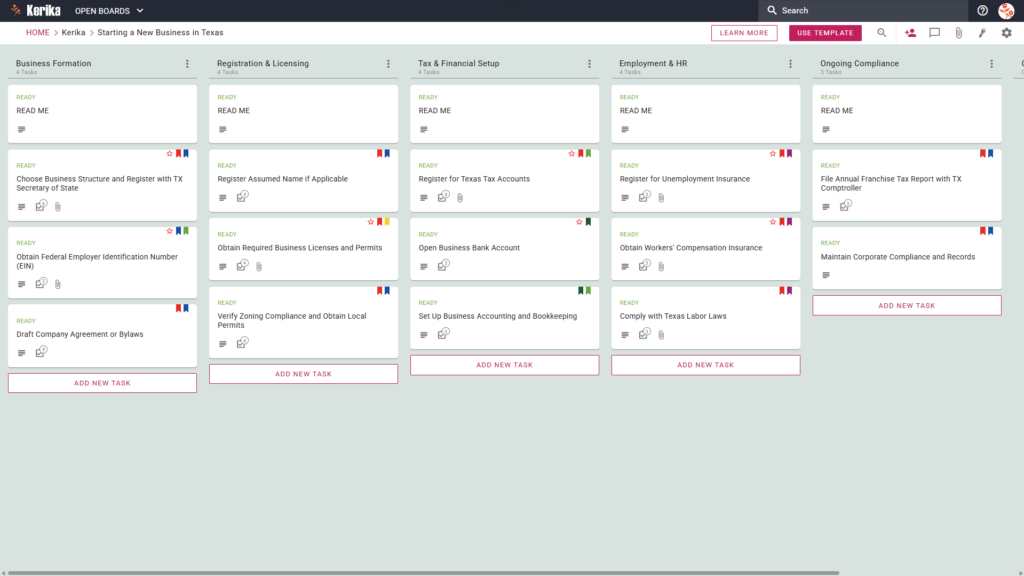
Click the image above to open the live template in a new tab
Launching a company can feel like a massive logistical hurdle, especially when you are navigating the administrative overhead of starting a business in Texas. Many entrepreneurs find themselves overwhelmed by the “multi-agency shuffle” required to coordinate filings between the Texas Comptroller and the Secretary of State. Without proper workflow optimization, it is easy to lose track of critical deadlines and legal requirements.
But don’t worry, this guide is here to help! We designed this template to simplify the complex process of state-specific business formation. It provides a visual, structured workspace for your entire team, ensuring that every legal and financial requirement is addressed with professional precision.
Ready to reclaim your time and productivity? Let’s get started!
1. Who Can Use This
This template is built to support the diverse group of professionals responsible for establishing a compliant business entity in the Lone Star State:
- Solo Entrepreneurs: Individual founders can use this template to maintain total organisation while managing the diverse administrative requirements of a Texas launch. It ensures that critical steps, such as filing with the Texas Secretary of State, are never overlooked during the solo journey.
- Partnership Founders: For those starting a venture together, this template provides a central workspace to assign duties and track progress. Partners can use the Draft Company Agreement or Bylaws card to ensure early alignment on governance and Texas law compliance.
- Startup Teams: As teams grow, the template supports the coordination of complex needs such as Employment & HR. It provides a structured environment where multiple stakeholders can manage high-stakes document security while setting up state-specific tax accounts.
2. What It Includes
The template provides a comprehensive starting point for your launch with a pre-configured Five-Column Workflow:
- Business Formation: This column covers foundational legal steps, including the task to Choose Business Structure and Register with TX Secretary of State.
- Registration & Licensing: Manage your permits here to ensure your business has the correct licence to operate. This includes the high-value task to Verify Zoning Compliance and Obtain Local Permits.
- Tax & Financial Setup: This section includes critical milestones such as the requirement to Register for Texas Tax Accounts.
- Employment & HR: Use this column to manage your hiring paperwork, unemployment insurance, and labour law compliance.
- Ongoing Compliance: This ensures the long-term health of your business with tasks like File Annual Franchise Tax Report with TX Comptroller.
3. When You Should Use This
This workspace provides the most value in high-stakes environments where organisation and security are paramount:
- Beginning Your Entrepreneurial Journey: Use this template as soon as you decide to launch to coordinate your initial filings with the Texas Secretary of State.
- Navigating State Compliance: This is the ideal tool for ensuring your operations remain in strict adherence to Texas law at every stage of your growth.
- High-Stakes Document Security: Kerika keeps your sensitive files secure by storing them directly in your own Google Drive, OneDrive, or Box account, ensuring you maintain full ownership of your data.
4. How To Use It
Managing your Texas business launch is straightforward with these four steps:
- The READ ME Card: You will find a READ ME card at the top of every column. Always check these first, as they contain Texas-specific filing links and statutory requirements that must be met before moving tasks to the next stage.
- Advancing the Workflow: Move task cards from left to right as you reach each milestone. This visual progression ensures the entire team knows exactly which stage of the formation process the business is currently in.
- The CHECKLIST Tab: Open any card and navigate to the CHECKLIST tab to manage sub-tasks. Checking these off one-by-one ensures that no detail, such as a specific state filing fee or local deadline, is ever missed.
- The ATTACHMENTS Tab: Use the ATTACHMENTS tab to upload signed documents or certificates directly to the relevant card. These files remain centralised in your secure cloud storage (Google Drive, OneDrive, or Box) while being easily accessible to your team.
Conclusion
Using this template ensures your new venture is supported by professional, organised preparation. Because Kerika integrates seamlessly with Google Workspace and Microsoft 365, your access rights and file permissions are managed automatically across your entire suite of tools.
Team members get the read+write access they need to build the business, while external advisors or legal counsel can be added as Visitors with read-only access. By moving to a visual board, you can eliminate messy email chains and ensure your new Texas business maintains the highest professional standards through effective workflow optimisation.
Need Something Different?
If this template is not exactly what you need for your specific industry or state, we are happy to assist. Please email support@kerika.com, and we will create a custom version for you, free of charge!