Monthly Archives: April 2026

What a customer from Uruguay said today…

“Muchas gracias Arun, considero que es una muy buena plataforma y en servicios, para el perfil de mi empresa se adapta a nuestras necesidades.

En las reseñas, mediante IA proponen en primer lugar a ClickUp , Trello o Monday, pero a mi juicio la variable conveniencia, calidad, precio y sobretodo sencillez operativa me hacen elegirla.

Te aclaro que el segmento de mercado en el que yo trabajo, no hay ningún servicio en el mundo que le de un resultado integral, creo que Kerika podría hacer la diferencia y tener su lugar de destaque. “

“Thank you very much Arun, I consider it a very good platform and in services, for the profile of my company it adapts to our needs.

In the reviews, through AI they propose first of all ClickUp, Trello or Monday, but in my opinion the variable convenience, quality, price and above all operational simplicity make me choose it.

I clarify that the market segment in which I work, there is no service in the world that gives a comprehensive result, I think Kerika could make a difference and have its prominent place.”
You can now import your Board

Kerika’s AI Helper just got better: you can now import a variety of files that contain the tasks you want to include in building a new Task Board.

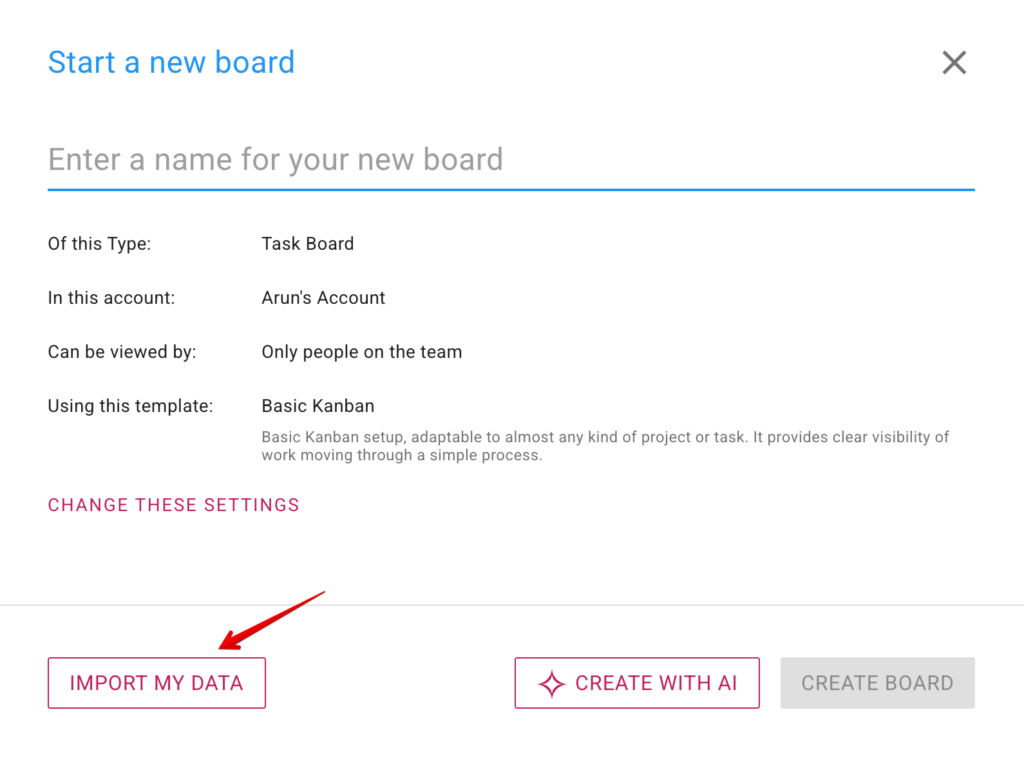
Image shows a screenshot of Kerika's Start New Board dialog, with an arrow pointing to the IMPORT MY DATA button.

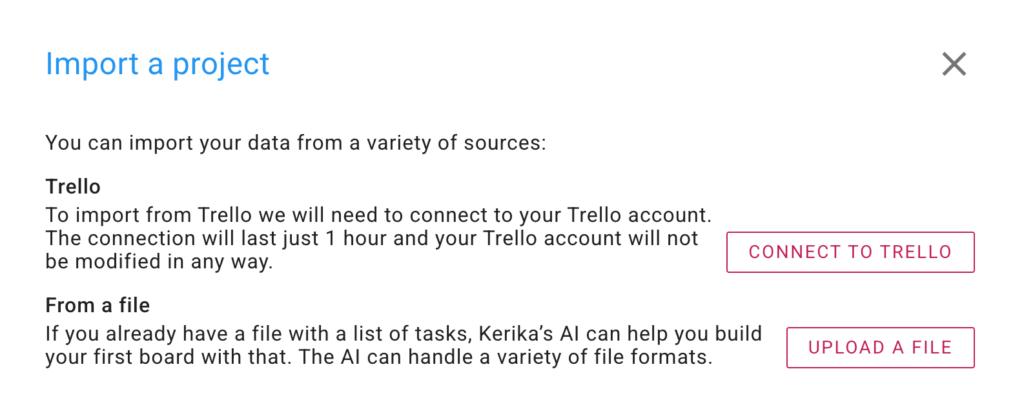
What had previously been an IMPORT FROM TRELLO button is now a more general IMPORT MY DATA. Clicking on it brings up your import options: from Trello, as before, and now also by uploading a file:

Image shows a screenshot of a Kerika dialog box containing options for importing data from Trello or by uploading a file.

For refugees from Trello, the CONNECT TO TRELLO option is the best way to bring all, or just some, of your Trello boards into Kerika. Pressing this button results in Trello asking if it is OK for Kerika to have access to your Trello account for an hour. (Actually, we just need a few minutes, but Trello’s minimum access is 1 hour.)

If you have tasks in a Microsoft Word or Excel document, the UPLOAD A FILE option is best for you: pick a file and Kerika’s AI Helper will read it and figure out how to make a board with its contents.

Give it a try and let us know what you think!

Our AI Helper just got better

Our AI Helper just got better at creating new boards and templates: although it looks the same as before, behind the scenes it now can do Web searches to find relevant material to use for building what you need.

This means that you can now make more general requests to the AI Helper, like “make a board for me to learn about AI agents”. To build this board, the AI Helper will automatically do a Web search to find the best articles out there that cover AI agents, and then build a learning board for you.