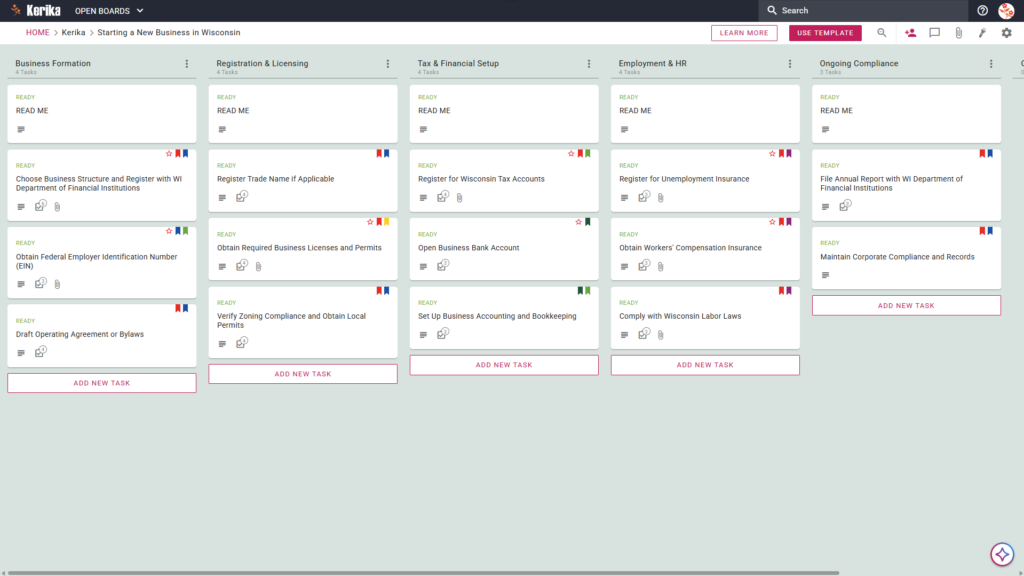
Click the image above to open the live template in a new tab
Launching a business in Wisconsin is an exciting milestone, but the initial logistical hurdles can be daunting. Navigating the specific registration requirements of the Department of Financial Institutions (DFI), managing various tax accounts, and ensuring local permit compliance often feels like wading through endless red tape. This administrative overhead is a common friction point that can distract you from what matters most: building your brand and serving your customers.
But don’t worry, this guide is here to help! The Wisconsin Business Startup template provides the visual, structured workspace you need to manage these moving parts effectively. By transforming a complex list of state mandates into a clear, manageable roadmap, you can reclaim your time and focus on growth.
Ready to launch your Wisconsin venture? Let’s get started!
1. Who Can Use This?
This template is designed to support the diverse needs of founders and their professional support teams:
- Solo Entrepreneurs: Individuals who need a clear, step-by-step path to navigate the jump from a business idea to a fully registered legal entity.
- Partnerships and Legal Teams: Collaborative groups that require a “single source of truth” while Drafting Operating Agreements or Bylaws.
- Administrative Leads: Professionals responsible for the heavy lifting of securing Wisconsin state permits and ensuring local zoning compliance.
- Distributed Founding Teams: Partners working from different locations who need real-time updates on the status of state filings and registration.
2. What it includes?
The template provides a comprehensive, pre-configured framework based on Wisconsin’s specific business and financial requirements:
- A Six-Column Workflow: Your progress is tracked through the Business Formation, Registration & Licensing, Tax & Financial Setup, Employment & HR, Ongoing Compliance, and Completed columns.
- State-Specific Registration Tasks: The board includes pre-configured cards for essential steps such as Choose Business Structure and Register with WI Department of Financial Institutions and Register Trade Name If Applicable.
- Financial & Tax Foundations: Dedicated cards are provided for Register for Wisconsin Tax Accounts, Open Business Bank Account, and Set Up Business Accounting and Bookkeeping.
- Federal and Local Compliance: Manage broader requirements with dedicated cards for Obtain Federal Employer Identification Number (EIN) and Verify Zoning Compliance and Obtain Local Permits.
- HR and Insurance Requirements: Stay compliant with employment laws using cards to manage Register for Unemployment Insurance, Obtain Workers’ Compensation Insurance, and Comply with Wisconsin Labor Laws.
- Official Documentation Resources: Every card is designed to host the necessary WI government resources, providing seamless access to official state paperwork directly within your workflow.
3. When You Should Use This?
Using this structured workspace is particularly valuable for any organisation operating in high-stakes environments where oversight is critical:
- Initial Formation Phase: Use this template when you require a repeatable, reliable process to ensure you never miss a state-level deadline, a mandatory filing fee, or an annual report with the DFI.
- Scaling the Team: This is the ideal tool when you begin the transition from a solo venture to an employer. It helps you manage the complexities of Unemployment Insurance and Workers’ Comp without losing track of your legal obligations.
- Secure Document Management: When handling sensitive legal documents, security is paramount. Kerika is the only task management tool that ensures you maintain full ownership of your data by storing files directly in your own Google Drive, OneDrive, or Box account.
4. How To Use It?
Follow these steps to move your business from concept to reality:
- Initiate Your Board: Start by loading the template and reviewing the READ ME cards at the top of every column. These cards contain the specific “rules” and criteria that must be met before a task can be moved to the next stage.
- Assemble Your Team: Invite your partners or legal advisors to the board. Start assigning specific registration tasks to ensure clear accountability across the team.
- Include Stakeholders: If you are working with external consultants or accountants, add them as ‘Visitors.’ This grants them read-only access to compliance documents without allowing them to alter your workflow.
- Methodically Progress: Move cards from Business Formation through to Ongoing Compliance only when the specific Wisconsin state-specific criteria defined in the READ ME cards have been fully met.
- Facilitate Communication: Use the card comments feature to discuss specific Wisconsin Department of Financial Institutions requirements, keeping all relevant conversations linked to the specific task.
- Monitor Advancements: Use the CHECKLIST tab within each card to track vital sub-tasks, such as the individual steps required for EIN filing or local permit applications.
Conclusion
By adopting a visual board for your Wisconsin startup, you can eliminate messy email chains and ensure every stakeholder is perfectly aligned. Kerika’s seamless integration with Google Workspace and Microsoft 365 ensures that as your team grows or roles change, access rights are updated instantly.
Starting a business is a significant undertaking, but with the right tools, you can ensure your venture is built on a foundation of professional, organised preparation. We wish you the very best of luck with your new Wisconsin business journey!
Need Something Different?
If this template isn’t exactly what you need, let us know at support@kerika.com, and we will create a custom version for you, free!