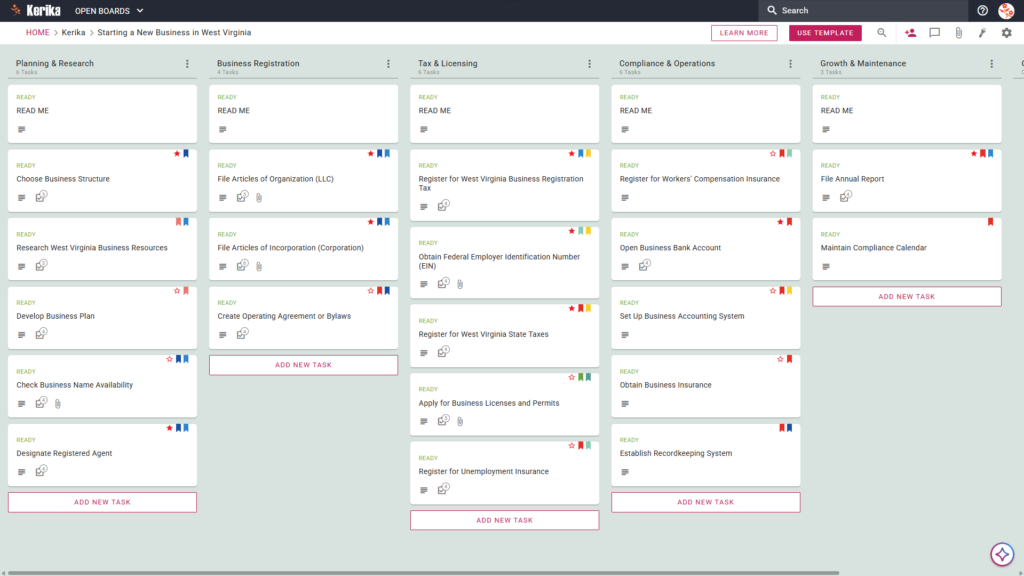
Click the image above to open the live template in a new tab
Launching a new venture in the Mountain State is an exciting milestone. However, the initial logistical hurdle of navigating state-specific regulations can often feel like a climb up Spruce Knob. Between the legal filings and tax registrations required by the WV One Stop Business Portal, the administrative friction can quickly dampen your entrepreneurial spirit. But don’t worry, this guide is here to help you navigate the complexity with ease.
We designed this template to provide a visual, structured workspace that bridges the gap between a business idea and a fully registered entity. It serves as your command center, ensuring no regulatory detail is overlooked while you build your foundation.
This template transforms a daunting checklist into a manageable, transparent workflow for your entire team. Ready to turn your West Virginia business dream into reality? Let’s get started!
1. Who Can Use This?
- First-Time Entrepreneurs: This is for those needing a clear, step-by-step roadmap. You can navigate West Virginia’s unique multi-agency registration process without getting lost in the paperwork.
- Legal and Financial Advisors: Professionals like lawyers or CPAs can use this to manage the formal assembly of Articles of Organization or Operating Agreements. It keeps client communications organized and professional.
- Business Partners: Co-founders require a “single source of truth” to track progress. This ensures everyone is aligned on what has been filed with the Secretary of State and what is still pending.
2. What it includes?
The West Virginia Business Template provides a comprehensive starting point with a pre-configured layout based on specific state requirements:
- Planning & Research: Focus on the groundwork of your venture. This includes Choose Business Structure, Research West Virginia Business Resources, Develop Business Plan, Check Business Name Availability, and Designate Registered Agent.
- Business Registration: This column handles your formal legal establishment. It features File Articles of Organization (LLC), File Articles of Incorporation (Corporation), and Create Operating Agreement or Bylaws.
- Tax & Licensing: Manage the state’s specific tax and permit requirements. Cards include Register for West Virginia Business Registration Tax, Obtain Federal Employer Identification Number (EIN), Register for West Virginia State Taxes, Apply for Business Licenses and Permits, and Register for Unemployment Insurance.
- Compliance & Operations: Build a sustainable foundation with Register for Workers’ Compensation Insurance, Open Business Bank Account, Set Up Business Accounting System, Obtain Business Insurance, and Establish Recordkeeping System.
- Growth & Maintenance: Stay in good standing with the state long-term. This section includes File Annual Report and Maintain Compliance Calendar.
3. When You Should Use This?
- Navigating State Portals: Use this when you feel overwhelmed by the WV One Stop Business Portal. While the portal is a filing system, Kerika is a project management system. It lets you track exactly what has been submitted versus what is pending with a visual clarity that state websites lack.
- High-Stakes Compliance: Organization is vital when handling sensitive documents like tax IDs. Kerika is the only task management tool that stores documents directly in your own Google Drive, OneDrive, or Box account. Your sensitive filings stay under your own IT control, not on a third-party server.
- Team Collaboration: Use this when multiple stakeholders lawyers, accountants, and founders need to coordinate. It prevents document version confusion and ensures everyone is working from the same draft.
4. How To Use It?
- Initiate Your Board: Open the template and review the READ ME cards at the top of each column. These contain the specific “rules of the road” and criteria for each registration phase.
- Assemble Your Team: Invite your co-founders and advisors to the board. This centralizes your launch efforts and ensures everyone has immediate access to the plan.
- Include Stakeholders: Add external partners like your accountant to specific cards. They can upload certifications or review filings directly within the workspace.
- Methodically Progress: Move cards from Planning through to Tax & Licensing only when tasks are marked “Ready.” This disciplined flow ensures no legal step is skipped.
- Facilitate Communication: Use the CHECKLIST tab on cards to manage granular sub-tasks, such as local permit requirements. Use the built-in chat to eliminate messy email chains.
- Monitor Advancements: Use the visual Kanban layout to see your progress at a glance. You will know exactly what is completed and what requires your immediate attention.
Conclusion
By adopting a visual workspace, you eliminate fragmented communication and provide your team with a clear roadmap. Kerika’s seamless integration with Google Workspace and Microsoft 365 ensures your files remain secure and accessible.
By using a visual board, you ensure your West Virginia startup maintains the highest professional standards from day one.
Need Something Different?
If this template isn’t exactly what you need, let us know at support@kerika.com, and we will create a custom version for you, free!