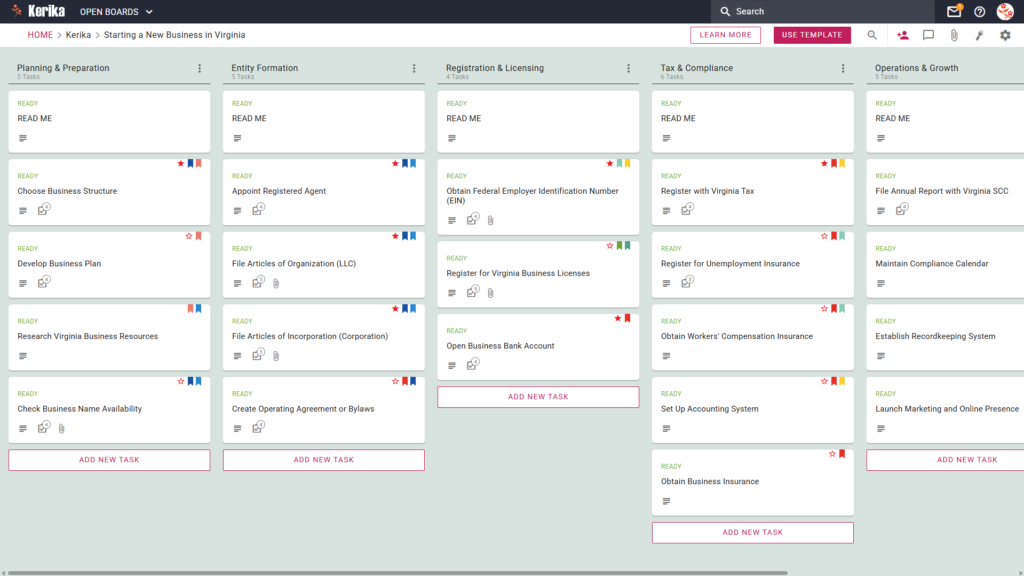
Click the image above to open the live template in a new tab
Navigating the administrative landscape of a new startup can feel like an uphill struggle. From deciphering complex state regulations to managing a mountain of paperwork, the sheer amount of “friction” involved in launching a business often distracts founders from their core vision. Whether you are dealing with the Virginia State Corporation Commission (SCC) or local authorities, the burden of staying compliant can be overwhelming and lead to significant operational delays.
But don’t worry, this guide is here to help! We have designed this template to remove the guesswork from your launch, providing a structured, visual roadmap to get your venture off the ground. Instead of getting lost in spreadsheets or buried under messy checklists, you can organise your entire launch in one secure, collaborative space that keeps your team aligned and focused.
Ready to turn your vision into a reality? Let’s get started!
1. Who Can Use This
This template is built to support a diverse range of entrepreneurial setups, ensuring that no matter your scale, your path to compliance is clear and professional.
- Solo Entrepreneurs: If you are building your dream alone, you need a comprehensive roadmap to handle all state requirements without the luxury of a dedicated legal team. This template acts as your personal project manager, ensuring nothing falls through the cracks.
- Partnership Founders: When multiple stakeholders are involved, a “single source of truth” is vital for operational harmony. This workspace allows partners to share responsibilities and track progress in real-time, preventing the confusion of overlapping tasks.
- Startup Teams: For growing companies, this template makes it easy to scale and delegate complex tasks such as arranging insurance or launching marketing campaigns to specific team members while maintaining full executive oversight.
2. What it includes
The Virginia Business Startup template provides a pre-configured, visual Kanban board that maps out the essential lifecycle of your business launch.
- A Five-Column Workflow: Your progress is tracked through the Planning & Preparation, Entity Formation, Registration & Licensing, Tax & Compliance, and Operations & Growth columns.
- Planning & Formation: Pre-configured cards include Develop Business Plan, Appoint Registered Agent, and File Articles of Organization (LLC).
- Registration & Tax Setup: Dedicated cards are ready for Register for Virginia Business Licenses, Register with Virginia Tax, and Register for Unemployment Insurance.
- Compliance & Operations: To ensure a successful opening, the template includes cards for Obtain Workers’ Compensation Insurance, File Annual Report with Virginia SCC, and Establish Recordkeeping System.
3. When You Should Use This
This workspace provides the most value when you need a repeatable and secure process to manage high-stakes business documentation and state-specific deadlines.
- Beginning Your Entrepreneurial Journey: Use this template as soon as you visit the ‘Virginia SCC – Start a New Business’ portal. It serves as the perfect companion to translate official state requirements into actionable, manageable steps.
- Navigating State Compliance: This is essential when dealing with specific Virginia laws. It ensures you don’t miss critical registration requirements or filings that could result in unnecessary fines or the loss of your corporate standing.
- High-Stakes Document Security: Use this when you need to keep sensitive legal filings secure. Kerika is the only task management tool that leaves file ownership entirely with you by storing documents in your own Google Drive, OneDrive, or Box account.
4. How To Use It
As an operations expert, I recommend following these four steps to maintain professional standards and ensure your startup remains audit-ready.
- The READ ME Card: At the top of every column, you will find a “READ ME” card. Always check these first; they act as your coaching manual, containing specific rules and the quality criteria that must be met before you move a task to the next stage of the workflow.
- Advancing the Workflow: As you complete your tasks, move the cards from left to right across the board. This visual progression gives you an instant snapshot of your status and, more importantly, prevents operational bottlenecks by highlighting exactly where a process has stalled.
- The CHECKLIST Tab: Open any card and navigate to the CHECKLIST tab to manage smaller sub-tasks. By checking these off one by one, you ensure audit-ready compliance where no detail such as a specific filing date or a required signature is ever overlooked.
- The ATTACHMENTS Tab: Use the ATTACHMENTS tab to store your legal documents and your official business licence directly within the relevant cards. Because your files stay in your own secure cloud storage, they are protected from loss and remain easily accessible for future regulatory reviews.
Conclusion
By moving your startup process to a visual board, you can eliminate messy email chains and ensure your new venture maintains the highest professional standards from day one. Because Kerika integrates seamlessly with Google Workspace and Microsoft 365, all access rights are managed for you automatically.
When you add team members to your board, Kerika ensures they have the correct permissions to view or edit documents in your cloud storage instantly. This level of organisation allows you to focus on growing your business while the template handles the logistical heavy lifting and manages your professional “Visitor” and contributor roles.
Need Something Different?
If this template isn’t exactly what you need, let us know at support@kerika.com, and we will create a custom version for you, free!