Skip to content

Get More Done, With Kerika

Task Management for Remote and Distributed Teams

  • KERIKA.COM
  • FEATURES
  • USERS
  • PRICING
  • ABOUT US

How to create a new Google ID

January 9, 2014TechnologyAccountuser

(Updated April 6, 2014 to reflect changes by Google)

If you are going to use Kerika for business, and don’t have a premium Google Apps account, make sure you create a new Google ID that maps to your existing (business) email ID.

For example, if you are someone@somecompany.com, you can create a new Google ID that is “someone@somecompany.com”: it works just like any other Google ID, and it doesn’t require you to switch to Gmail or anything like that.

First, sign out of your old Google account:
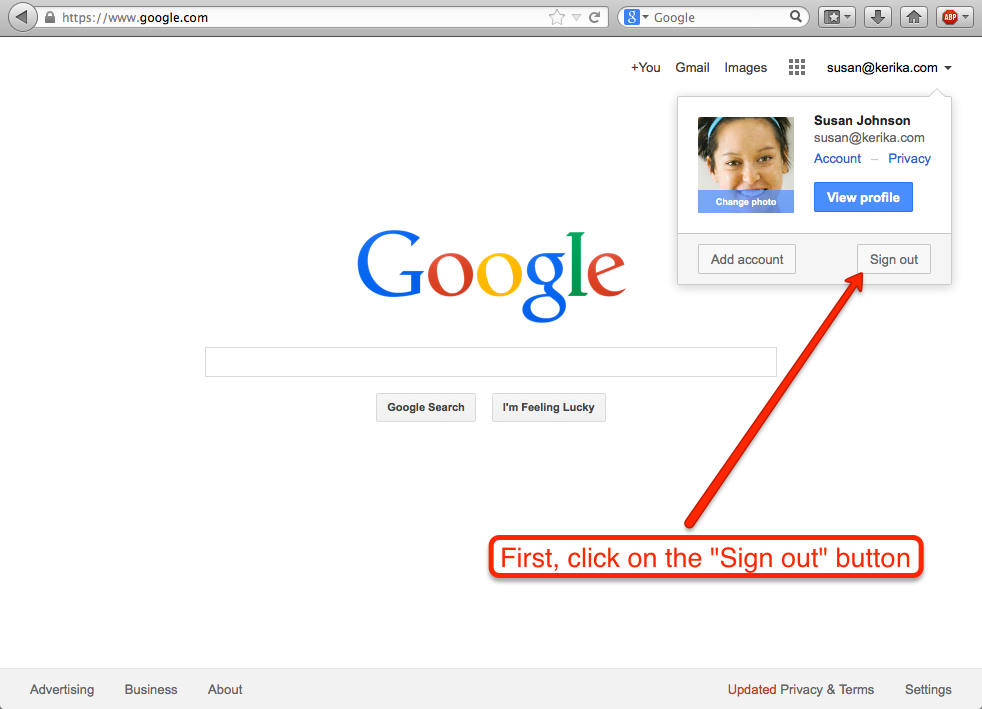
First, click on the Sign out button

Then, click on the Sign In button at the top-right:
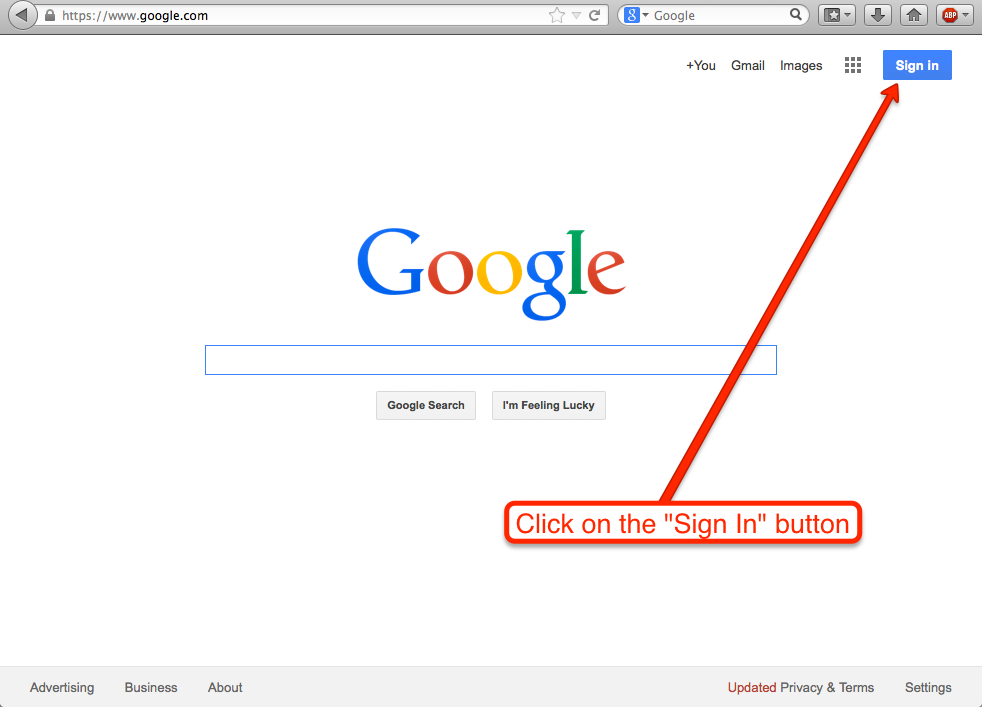
Click on the Sign In button

Before you create a new Google ID, you need to make sure you have completely signed out of your old Google ID. To do that, click on Sign in with a different account:
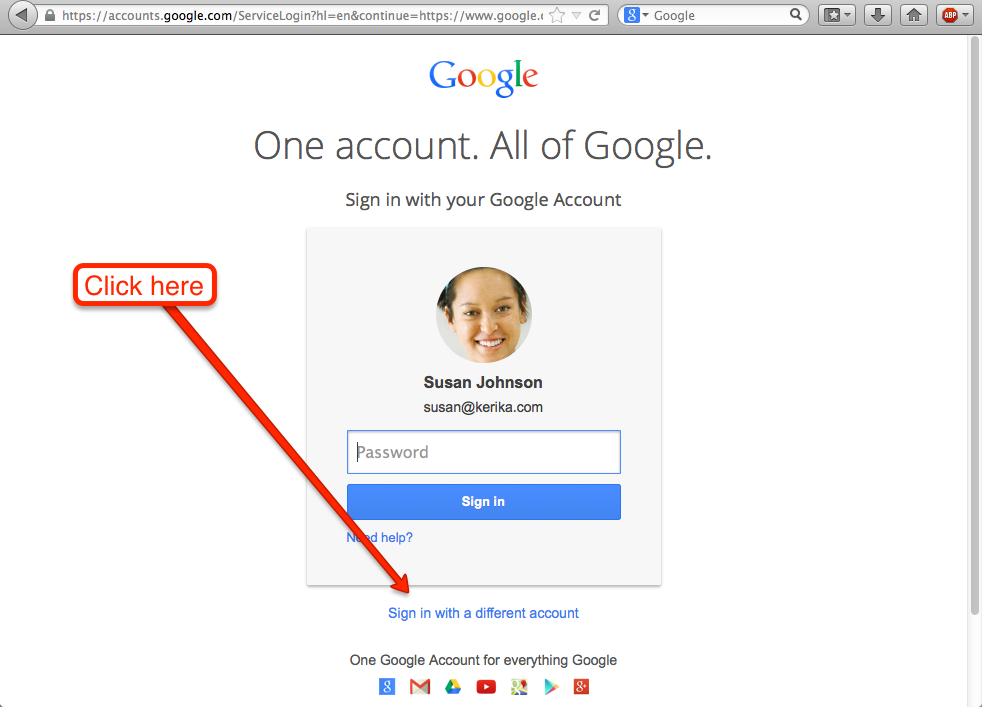
 

Click on Sign in with a different account

This step is scary-looking (intentionally?), but you need to Remove your account first. This doesn’t mean that you are actually closing or deleting your old Google account, it just means you are finally removing Google’s cookie from your browser.
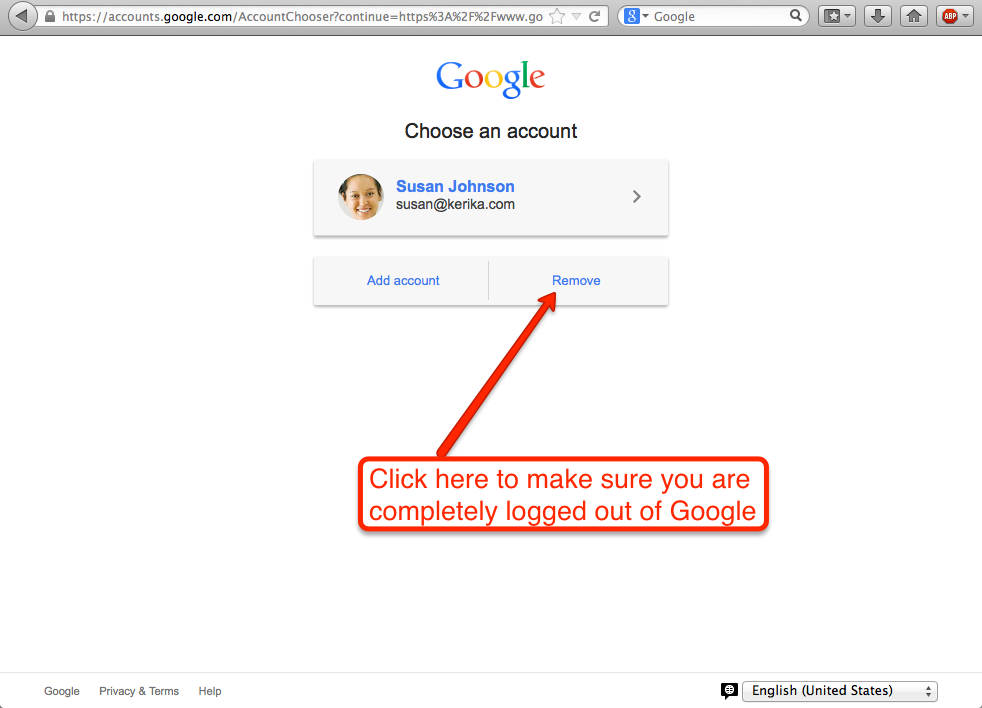
Click here to make sure you are completely logged out

Clicking on Remove brings up this screen:
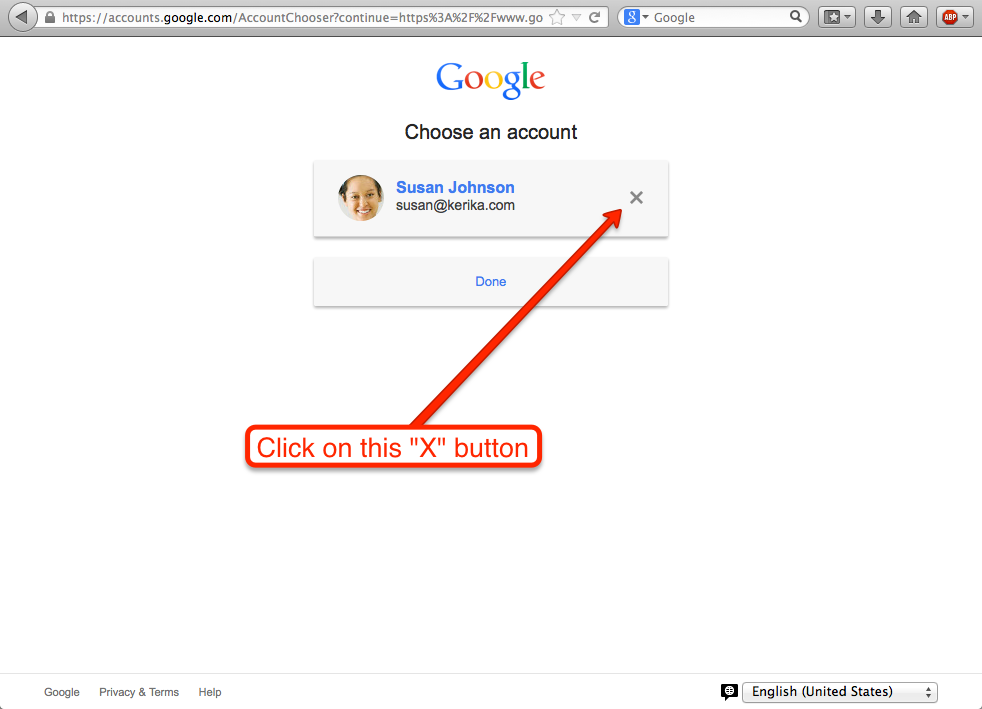
Click on the X button

Now you are finally logged out of Google!
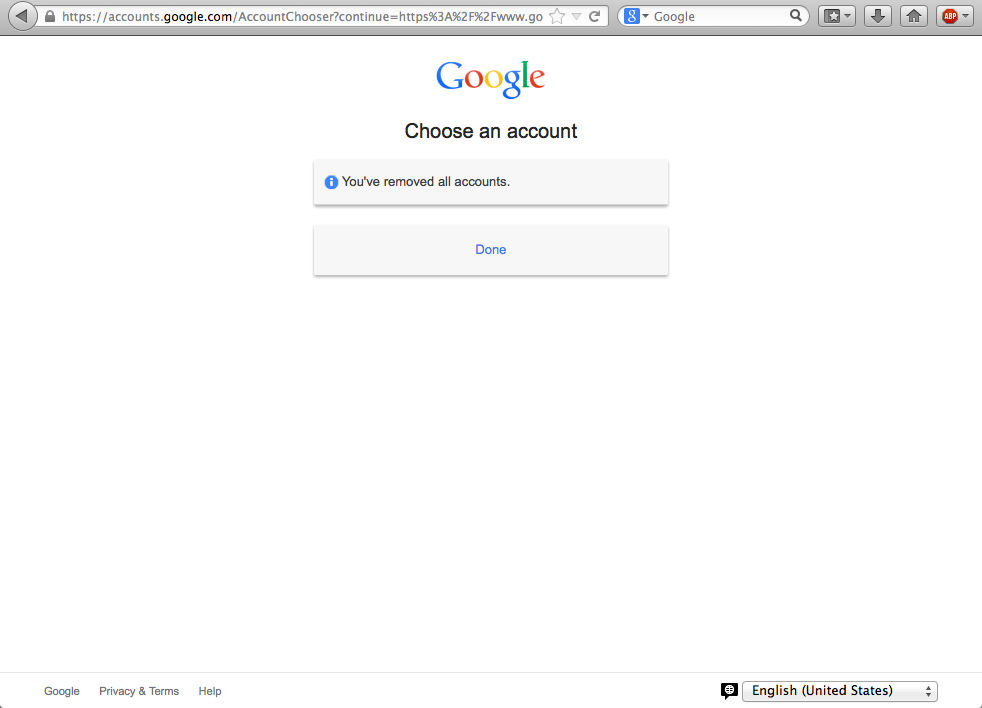
Now you are finally logged out of Google

Now, you are ready to set up a new Google account. Click on the Create an account link:
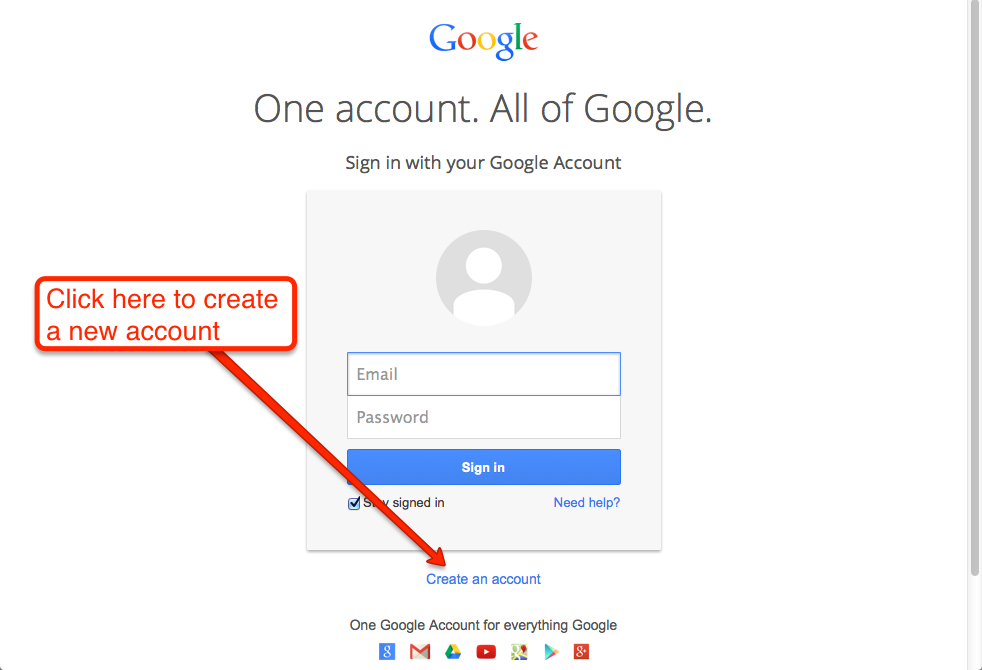
Click here to create a new account

Click on I prefer to use my current email address
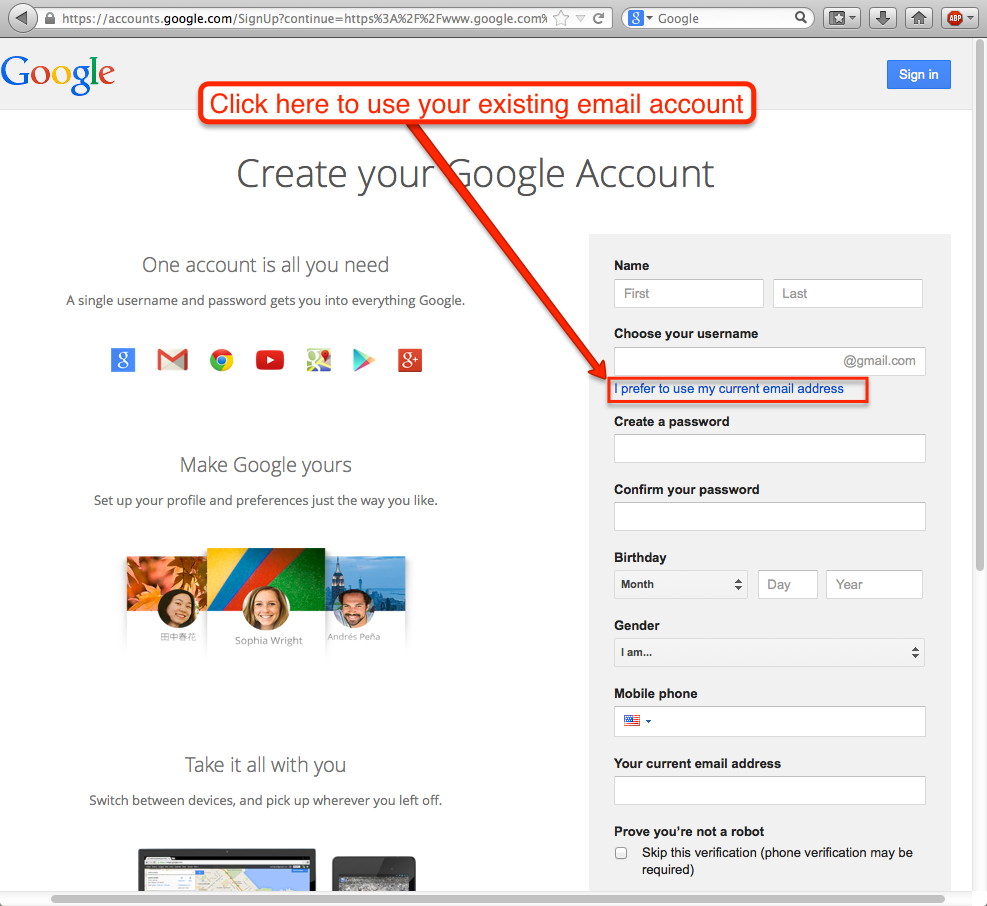
Click here to use your existing email account

And, you are finally ready to create a new Google ID, that maps to an existing business email. This could be an email ID from anywhere: you can use a Yahoo email or a Hotmail ID, as well as any email ID from your employer.
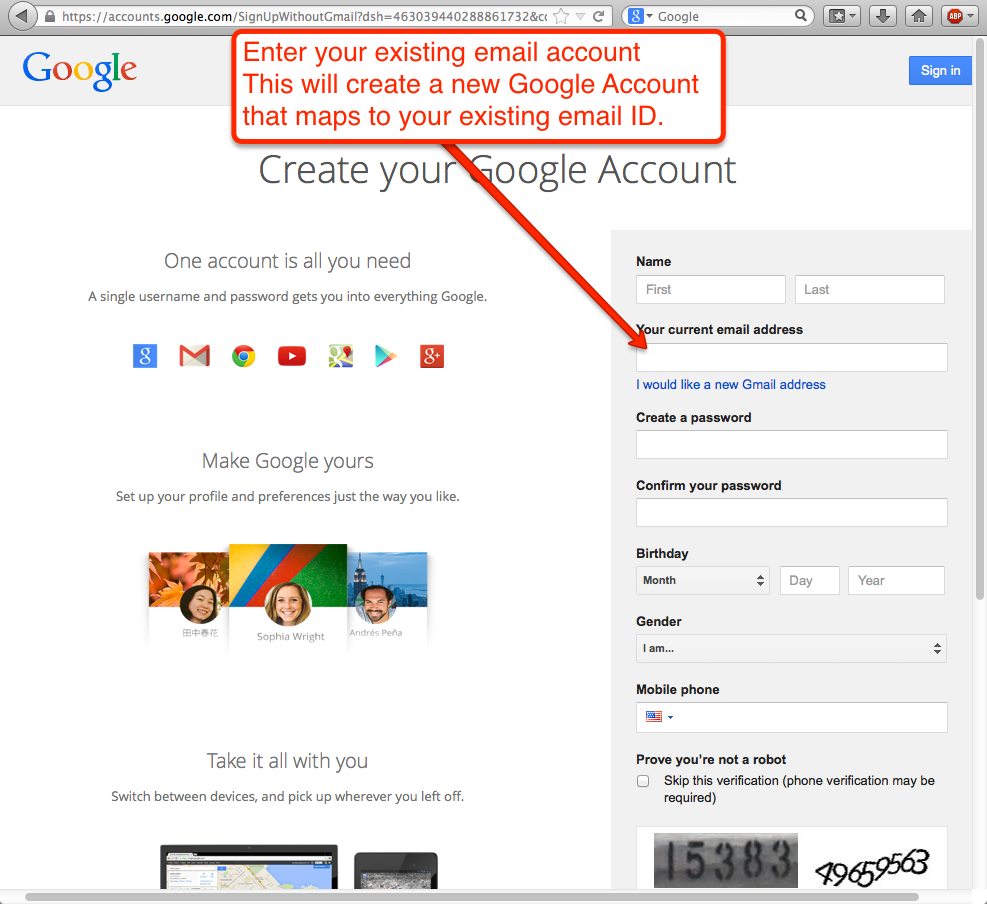
Final step
Final step

Creating a new Google ID in this way doesn’t mean you are switching to Gmail!

Post navigation

← What a CPU spike looks like How to get rid of an old Kerika account →

Archives

  • April 2026
  • March 2026
  • January 2026
  • December 2025
  • November 2025
  • September 2025
  • July 2025
  • June 2025
  • May 2025
  • April 2025
  • November 2024
  • October 2024
  • August 2024
  • June 2024
  • May 2024
  • April 2024
  • March 2024
  • February 2024
  • January 2024
  • December 2023
  • November 2023
  • October 2023
  • September 2023
  • August 2023
  • July 2023
  • June 2023
  • May 2023
  • April 2023
  • March 2023
  • February 2023
  • January 2023
  • December 2022
  • November 2022
  • July 2022
  • April 2022
  • March 2022
  • February 2022
  • January 2022
  • December 2021
  • October 2021
  • August 2021
  • May 2021
  • March 2021
  • February 2021
  • December 2020
  • November 2020
  • October 2020
  • September 2020
  • July 2020
  • May 2020
  • April 2020
  • March 2020
  • February 2020
  • January 2020
  • December 2019
  • November 2019
  • October 2019
  • September 2019
  • August 2019
  • July 2019
  • June 2019
  • May 2019
  • April 2019
  • February 2019
  • January 2019
  • December 2018
  • November 2018
  • October 2018
  • September 2018
  • August 2018
  • July 2018
  • June 2018
  • May 2018
  • March 2018
  • February 2018
  • January 2018
  • December 2017
  • November 2017
  • October 2017
  • September 2017
  • August 2017
  • July 2017
  • June 2017
  • May 2017
  • January 2017
  • November 2016
  • October 2016
  • September 2016
  • August 2016
  • April 2016
  • March 2016
  • February 2016
  • January 2016
  • December 2015
  • November 2015
  • October 2015
  • September 2015
  • August 2015
  • July 2015
  • June 2015
  • May 2015
  • April 2015
  • March 2015
  • February 2015
  • January 2015
  • December 2014
  • November 2014
  • October 2014
  • September 2014
  • August 2014
  • July 2014
  • June 2014
  • May 2014
  • April 2014
  • March 2014
  • February 2014
  • January 2014
  • December 2013
  • November 2013
  • October 2013
  • September 2013
  • August 2013
  • July 2013
  • June 2013
  • May 2013
  • April 2013
  • March 2013
  • February 2013
  • January 2013
  • December 2012
  • November 2012
  • September 2012
  • June 2012
  • May 2012
  • March 2012
  • February 2012
  • January 2012
  • December 2011
  • October 2011
  • September 2011
  • June 2011
  • May 2011
  • April 2011
  • March 2011

Categories

  • Academic & Nonprofit
  • Account
  • Agile & Scrum
  • Agile & Scrum
  • AI
  • Best Practices
  • Billing
  • Bug Fixes
  • Ephemera
  • Global
  • Government
  • Intellectual Property
  • Kanban & Lean
  • Kanban & Lean
  • Kerika
  • Team Collaboration
  • Technology
  • Teknologi
  • Teknologi
  • Teknolohiya
  • Tidak Dikategorikan
  • Tutorials
  • Uncategorized
  • Uncategorized
  • Usability
  • Whiteboards

Recent Posts

  • What a customer from Uruguay said today…
  • You can now import your Board
  • We are blocking disposable email domains
  • Our AI Helper just got better
  • New AI Helper for starting Boards and making Templates

Recent Comments

No comments to show.
Privacy Policy Proudly powered by WordPress