Monthly Archives: July 2026

Launch your North Dakota business with ease using this structured, visual template

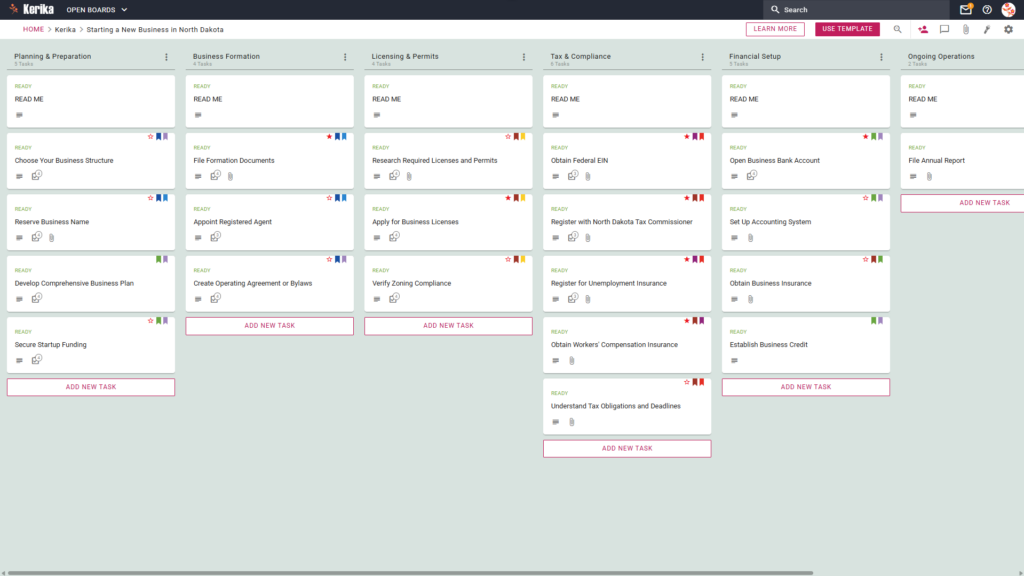
Banner titled "Starting a New Business in North Dakota" featuring a screenshot of a Kerika Kanban board with task columns for Planning & Preparation, Business Formation, Licensing & Permits, Tax & Compliance, Financial Setup, and Ongoing Operations.

Click the image above to open the live template in a new tab

Navigating state regulations and paperwork in North Dakota can feel like a massive logistical hurdle. Between state-specific tax filings and the intricate requirements of the North Dakota Secretary of State, the administrative overhead often creates friction that slows down your momentum. But don’t worry, this guide is here to help!

The solution is the Kerika North Dakota Business Launch template. We designed this template to provide a visual, structured workspace that simplifies the complex journey of business formation. Instead of getting lost in scattered spreadsheets or confusing government portals, you get a clear, professional roadmap for your entire team.

Ready to build your dream in the Peace Garden State? Let’s get started!

1. Who Can Use This

This workspace is built to support the diverse group of professionals and founders responsible for a successful launch:

  • Aspiring Entrepreneurs: Individuals taking their first steps toward ownership who need a repeatable, reliable process to ensure every legal requirement is met.
  • Business Partners: Co-founders who need to collaborate in real-time. In Kerika, you can add partners as Team Members with full read/write access to keep the project moving.
  • Professional Consultants and Legal Aides: Experts managing logistics for clients. These users can be added as Visitors, allowing them to review documents and provide guidance without accidentally altering your core workflow.

For distributed teams, Kerika acts as a “single source of truth,” allowing team members across different time zones to stay perfectly in sync without the need for constant status meetings.

2. What it Includes

The Starting a New Business in North Dakota template provides a comprehensive starting point with a pre-configured, visual layout

  • A Six-Column Workflow: Your launch progress is tracked through the Planning & Preparation, Business Formation, Licensing & Permits, Tax & Compliance, Financial Setup, and Ongoing Operations columns
  • Foundational Tasks: Pre-configured cards include the Choose Your Business Structure, Reserve Business Name, and Develop Comprehensive Business Plan
  • Legal and Financial Milestones: Dedicated cards are ready for the File Formation Documents, Obtain Federal EIN, Register with North Dakota Tax Commissioner, and Open Business Bank Account

3. When You Should Use This

This workspace provides the most value in high-stakes environments where organization and security are critical.

  • During the Initial Launch Phase: Use this template from day one to ensure no legal or tax step is missed. North Dakota’s regulatory environment is business-friendly, but it requires precision to avoid processing delays with the Secretary of State.
  • When Collaborating Remotely: If your partners or consultants are spread across the state or the country, Kerika handles time zone adjustments automatically so the entire team remains synchronized.
  • When Security is Paramount: Business formation involves sensitive legal documents. Kerika is the only task management tool that leaves file ownership entirely with you; all your documents are stored in your own Google Drive, OneDrive, or Box account.

4. How To Use It

Managing your North Dakota launch is straightforward with these expert workflow tools:

  1. The READ ME Cards: You will find a “READ ME” card at the top of every column. Check these first! They often contain direct links to essential North Dakota state portals, such as the FirstStop portal, ensuring you aren’t hunting for the right website.
  2. Advancing the Workflow: As you complete tasks, move cards from left to right. As a strategist, I recommend moving the File Formation Documents card to the Licensing & Permits column only once the Secretary of State has confirmed your filing, as local permits often require your official formation papers as a prerequisite.
  3. The CHECKLIST Tab: Open any card and navigate to the CHECKLIST tab to manage granular sub-tasks. Check these off one-by-one to ensure no detail, such as a specific filing fee or notary signature, is missed.
  4. The ATTACHMENTS Tab: Use the ATTACHMENTS tab to upload your Articles of Organization, Operating Agreement, or EIN confirmation letters directly to the relevant card. Because these files stay in your own secure cloud storage, you never lose control of your most sensitive legal assets.

Conclusion

By moving your launch to a visual board, you eliminate messy email chains and ensure your new venture maintains the highest professional standards from the very beginning. Because Kerika integrates seamlessly with Google Workspace and Microsoft 365, managing access is a breeze.

You can maintain a “clean” workspace by adding co-founders as Team Members for active collaboration, while keeping outside consultants as Visitors for high-level oversight. This ensures everyone has the information they need while you maintain total security over your business data.

Need Something Different?

If this template isn’t exactly what you need, let us know at support@kerika.com ,  and we will create a custom version for you, free!
Launching Your Business in North Carolina: A Step-by-Step Guide Using Kerika

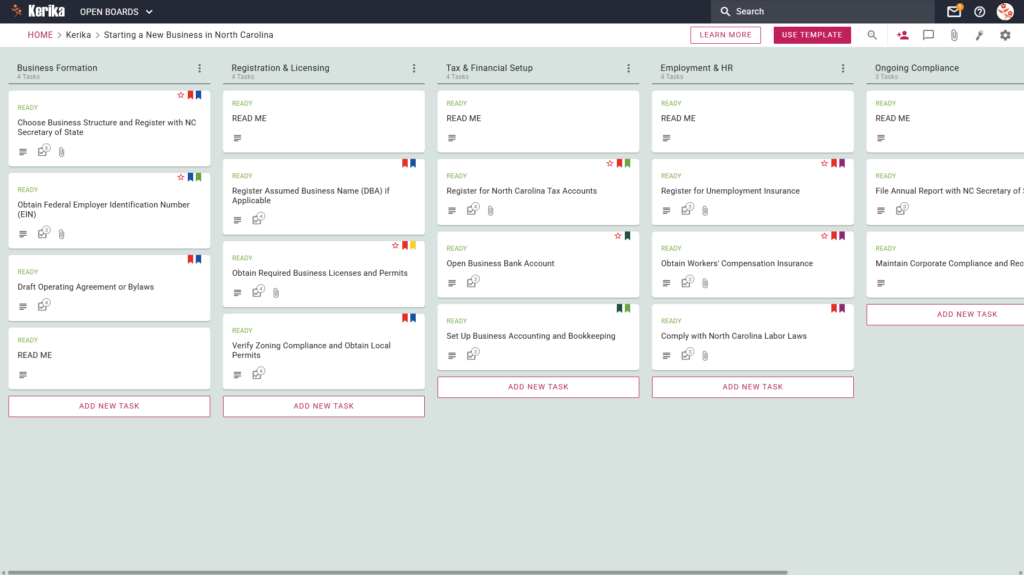
Banner titled "Starting a New Business in North Carolina" featuring a screenshot of a Kerika Kanban board with task columns for Business Formation, Registration & Licensing, Tax & Financial Setup, Employment & HR, and Ongoing Compliance.

Click the image above to open the live template in a new tab

Starting a business in North Carolina involves navigating a maze of state-specific regulations, legal filings, and administrative hurdles. From registering with the Secretary of State to ensuring local zoning compliance, the logistical requirements can quickly become overwhelming for any new founder.

But don’t worry, this guide is here to help! We have designed a dedicated Kerika template to simplify your launch process by providing a visual, structured workspace for every milestone. Ready to get your North Carolina business off the ground? Let’s get started!

1. Who Can Use This

This template is built to support different types of founders as they navigate the complexities of state law:

  • Solo Entrepreneurs: If you are transitioning a side hustle into a formal legal entity in North Carolina, this template helps you track every individual requirement without missing a beat. It provides the structure you need to move from an idea to a legitimate business.
  • Partnership Founders: For small teams, this workspace allows you to clearly define roles and shared responsibilities. It ensures everyone is aligned on the path to launch and avoids the confusion of overlapping tasks.
  • Startup Teams: Growing companies can use this as a centralised workspace to coordinate legal, tax, and HR milestones across a larger team. It provides a “single source of truth” for all founding members, keeping everyone informed of progress.

2. What it includes

The template is organised into a Five-Column Workflow designed to take you from initial formation to long-term operations:

  • Business Formation: This stage focuses on the bedrock of your company. It includes tasks to Choose Business Structure and Register with NC Secretary of State, Obtain Federal Employer Identification Number (EIN), and Draft Operating Agreement or Bylaws.
  • Registration & Licensing: Move here to handle identity and location requirements. This includes tasks to Register Assumed Business Name (DBA) if Applicable, Obtain Required Business Licenses and Permits, and Verify Zoning Compliance and Obtain Local Permits.
  • Tax & Financial Setup: This critical phase ensures your finances are in order. You must Register for North Carolina Tax Accounts, Open Business Bank Account, and Set Up Business Accounting and Bookkeeping.
  • Employment & HR: If you are building a team, use this column to Register for Unemployment Insurance, Obtain Workers’ Compensation Insurance, and Comply with North Carolina Labor Laws.
  • Ongoing Compliance: Once you are up and running, use this section to stay in good standing. This involves tasks such as File Annual Report with NC Secretary of State and Maintain Corporate Compliance and Records.

3. When You Should Use This

This workspace provides the most value when organisation and security are your top priorities:

  • Beginning Your Entrepreneurial Journey: Use this during your initial ‘business registration’ phase to ensure no foundational legal steps are overlooked.
  • Navigating State Compliance: Use this whenever you need to ensure your actions align specifically with North Carolina law, which has its own unique set of requirements.
  • High-Stakes Document Security: Use this if you need a secure method to store sensitive legal filings. Kerika keeps you in total control by storing all your files directly in your own Google Drive, OneDrive, or Box account.

4. How To Use It

Managing your business setup is straightforward with these Kerika features:

  1. The READ ME Card: You will find a READ ME card at the top of every column. Always check these first, as they contain specific rules for moving tasks to the next stage of the workflow.
  2. Advancing the Workflow: As you achieve your milestones, simply drag your task cards from left to right. This gives your entire team immediate visibility into what is done and what remains to be tackled.
  3. The CHECKLIST Tab: For granular sub-tasks, such as gathering specific documents for a local license, use the CHECKLIST tab within each card. Check these off one-by-one to ensure no detail is missed during the process.
  4. The ATTACHMENTS Tab: Use the ATTACHMENTS tab to upload state forms and permits directly to the relevant card. Kerika automatically manages access rights, ensuring team members have contributor access while stakeholders are kept as read-only Visitors.

Conclusion

Using the Kerika North Carolina business template ensures your launch is supported by organised, professional standards. By providing a clear roadmap, you can eliminate confusion and maintain full visibility over your progress.

With seamless integration into Google Workspace and Microsoft 365, managing document access and security is simple and instant. You are now equipped to manage your business launch efficiently and move towards your goals with confidence.

Need Something Different?

If this template isn’t exactly what you need, let us know at support@kerika.com, and we will create a custom version for you, free!
How to Launch Your New York Startup with Kerika’s Professional Template

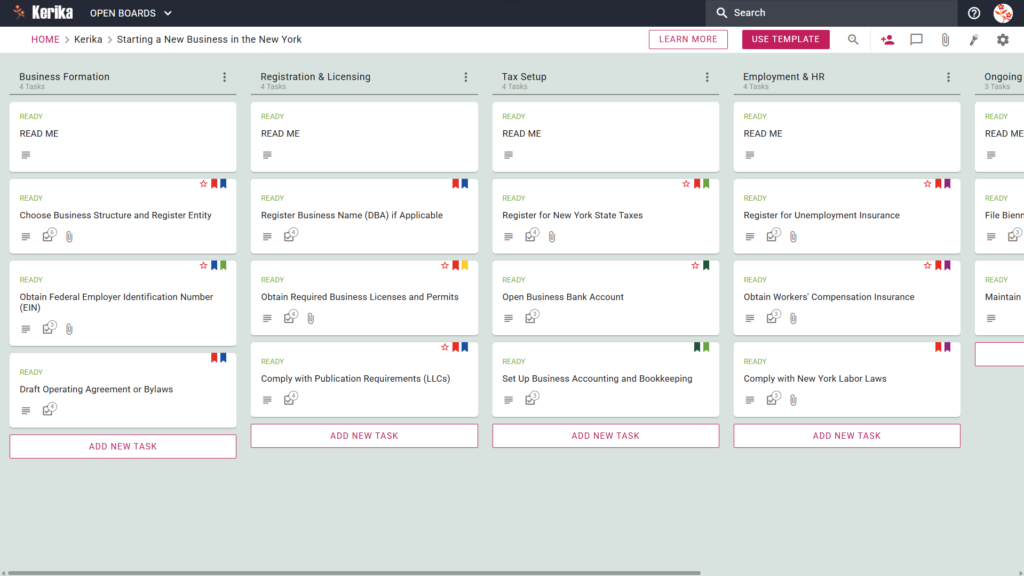
Banner titled "Starting a New Business in New York" featuring a screenshot of a Kerika Kanban board with task columns for Business Formation, Registration & Licensing, Tax Setup, Employment & HR, and Ongoing Compliance.

Click the image above to open the live template in a new tab

Starting a business in New York often feels like a massive logistical hurdle. Between state-specific regulations and the administrative friction of entity registration, the sheer volume of paperwork can be overwhelming for any founder. This isn’t just a hypothetical challenge; it’s the primary barrier that stalls many brilliant ideas before they even get off the ground.

But don’t worry, this guide is here to help! We designed the Kerika New York Startup template to transform this complex process into a visual, structured workspace. By breaking down daunting requirements into manageable, actionable steps, you can focus on building your brand while we help you navigate the logistics. Ready to reclaim your time and productivity? Let’s get started!

1. Who Can Use This

This template is designed to provide a clear roadmap for various types of founders navigating the unique New York business landscape:

  • Solo Entrepreneurs: If you are launching a single-member venture, you are likely responsible for every moving part yourself. This template acts as your personal project manager, ensuring you track every legal and administrative requirement without needing a dedicated back-office team. It keeps your focus sharp so no critical filing date slips through the cracks.
  • Partnership Founders: For those starting a business with partners, this board serves as a shared “single source of truth.” It allows your leadership team to coordinate on legal and financial setups, ensuring everyone is aligned on the status of entity formation and capital contributions. Having a centralized workspace prevents the confusion often caused by scattered messages and old document versions.
  • Startup Teams: Small teams or distributed professionals often need to coordinate across different time zones or locations. This workspace allows your team to collaborate in real-time, providing a transparent view of who is responsible for which regulatory milestone. By maintaining a unified project board, you ensure that document versions and filing deadlines are never lost in transit.

2. What it includes

The template provides a comprehensive, pre-configured layout specifically tailored to New York state requirements. It features A Five-Column Workflow:

  • Business Formation: This is where you handle the foundational steps, such as choosing your legal structure and drafting your Operating Agreement or Bylaws. It is also the designated space to manage the critical task to Obtain Federal Employer Identification Number (EIN).
  • Registration & Licensing: This column helps you manage your public identity and local legal standing. Within this stage, you will find the specific workflow to Comply with Publication Requirements (LLCs) and obtain necessary local permits.
  • Tax Setup: A dedicated space to manage your fiscal obligations, including New York state tax registration. This section ensures you have a repeatable process for setting up your internal accounting and bookkeeping systems.
  • Employment & HR: This section ensures you comply with New York Labor Laws and manage necessary insurance, such as Workers’ Compensation. It provides a structured way to handle the administrative overhead of hiring your first employees.
  • Ongoing Compliance: This column is for recurring tasks, such as filing biennial statements, to ensure your business remains in good standing. It serves as a permanent record to help you maintain your corporate history and state compliance year after year.

3. When You Should Use This

This workspace provides the most value in high-stakes environments where organization and security are critical:

  • Beginning Your Entrepreneurial Journey: Use this when you need a ‘start-business’ roadmap inspired directly by New York State government requirements to ensure you don’t miss a critical first step.
  • Navigating State Compliance: New York state law is complex and requires a repeatable process to avoid penalties. This template allows you to maintain professional consistency as you move from initial entity formation to active operations.
  • High-Stakes Document Security: When dealing with sensitive legal documents, you need strict access control. Kerika is unique because it stores your documents in your own Google Drive, OneDrive, or Box account, leaving file ownership entirely with you.

4. How To Use It

Managing your New York startup launch is straightforward when you follow these four steps:

  1. The READ ME Card: At the top of every column, you will find a “READ ME” card. You should check these first, as they contain specific rules and criteria that must be met before you move a task to the next stage of the workflow.
  2. Advancing the Workflow: Move your task cards through the five columns only when specific criteria are met. This structured approach ensures that no detail, from tax registration to licensing, is overlooked during the rush of a launch.
  3. The CHECKLIST Tab: Open individual cards to manage sub-tasks and fine details. For example, within the Business Formation column, you can use the checklist to ensure you successfully Obtain Federal Employer Identification Number (EIN) and other critical identifiers.
  4. The ATTACHMENTS Tab: Use this tab to upload your spreadsheets, draft agreements, or scanned licenses directly to the relevant cards. These files remain secure in your cloud storage while staying easily accessible to the partners and team members who need them.

Conclusion

By adopting a visual board for your New York startup, you can eliminate messy email chains and maintain the highest professional standards from day one. The Kerika template integrates seamlessly with Google Workspace and Microsoft 365, which means access rights are managed for you automatically.

When a team member’s role changes, their file access in your cloud storage is updated instantly, ensuring that sensitive formation documents are always protected. This professional, automated approach allows you to focus on your mission and growth while Kerika manages the administrative workflow.

Need Something Different?

If this template isn’t exactly what you need, let us know at support@kerika.com, and we will create a custom version for you, free!