Click the image above to open the live template in a new tab
Starting a business in North Carolina involves navigating a maze of state-specific regulations, legal filings, and administrative hurdles. From registering with the Secretary of State to ensuring local zoning compliance, the logistical requirements can quickly become overwhelming for any new founder.
But don’t worry, this guide is here to help! We have designed a dedicated Kerika template to simplify your launch process by providing a visual, structured workspace for every milestone. Ready to get your North Carolina business off the ground? Let’s get started!
1. Who Can Use This
This template is built to support different types of founders as they navigate the complexities of state law:
- Solo Entrepreneurs: If you are transitioning a side hustle into a formal legal entity in North Carolina, this template helps you track every individual requirement without missing a beat. It provides the structure you need to move from an idea to a legitimate business.
- Partnership Founders: For small teams, this workspace allows you to clearly define roles and shared responsibilities. It ensures everyone is aligned on the path to launch and avoids the confusion of overlapping tasks.
- Startup Teams: Growing companies can use this as a centralised workspace to coordinate legal, tax, and HR milestones across a larger team. It provides a “single source of truth” for all founding members, keeping everyone informed of progress.
2. What it includes
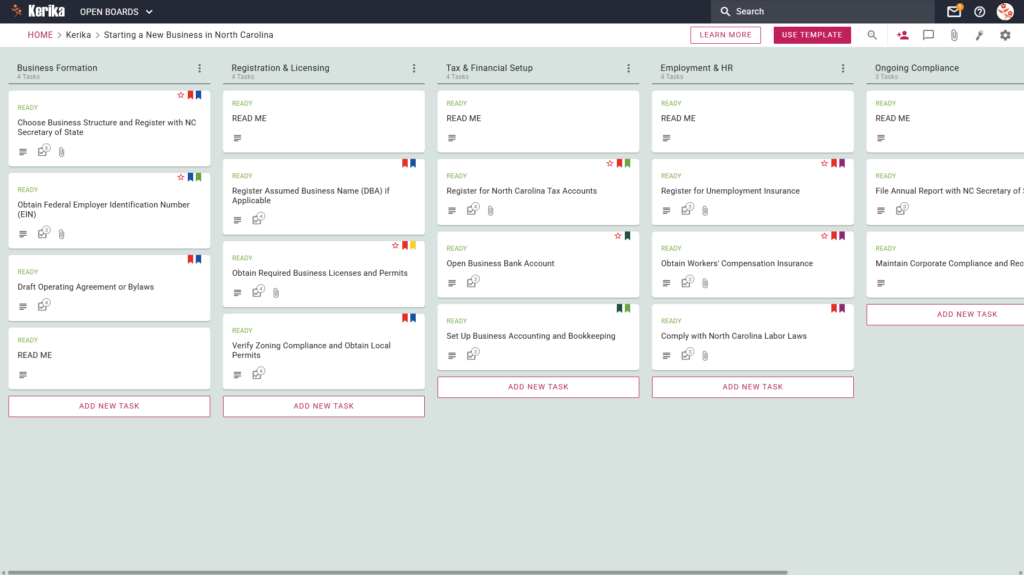
The template is organised into a Five-Column Workflow designed to take you from initial formation to long-term operations:
- Business Formation: This stage focuses on the bedrock of your company. It includes tasks to Choose Business Structure and Register with NC Secretary of State, Obtain Federal Employer Identification Number (EIN), and Draft Operating Agreement or Bylaws.
- Registration & Licensing: Move here to handle identity and location requirements. This includes tasks to Register Assumed Business Name (DBA) if Applicable, Obtain Required Business Licenses and Permits, and Verify Zoning Compliance and Obtain Local Permits.
- Tax & Financial Setup: This critical phase ensures your finances are in order. You must Register for North Carolina Tax Accounts, Open Business Bank Account, and Set Up Business Accounting and Bookkeeping.
- Employment & HR: If you are building a team, use this column to Register for Unemployment Insurance, Obtain Workers’ Compensation Insurance, and Comply with North Carolina Labor Laws.
- Ongoing Compliance: Once you are up and running, use this section to stay in good standing. This involves tasks such as File Annual Report with NC Secretary of State and Maintain Corporate Compliance and Records.
3. When You Should Use This
This workspace provides the most value when organisation and security are your top priorities:
- Beginning Your Entrepreneurial Journey: Use this during your initial ‘business registration’ phase to ensure no foundational legal steps are overlooked.
- Navigating State Compliance: Use this whenever you need to ensure your actions align specifically with North Carolina law, which has its own unique set of requirements.
- High-Stakes Document Security: Use this if you need a secure method to store sensitive legal filings. Kerika keeps you in total control by storing all your files directly in your own Google Drive, OneDrive, or Box account.
4. How To Use It
Managing your business setup is straightforward with these Kerika features:
- The READ ME Card: You will find a READ ME card at the top of every column. Always check these first, as they contain specific rules for moving tasks to the next stage of the workflow.
- Advancing the Workflow: As you achieve your milestones, simply drag your task cards from left to right. This gives your entire team immediate visibility into what is done and what remains to be tackled.
- The CHECKLIST Tab: For granular sub-tasks, such as gathering specific documents for a local license, use the CHECKLIST tab within each card. Check these off one-by-one to ensure no detail is missed during the process.
- The ATTACHMENTS Tab: Use the ATTACHMENTS tab to upload state forms and permits directly to the relevant card. Kerika automatically manages access rights, ensuring team members have contributor access while stakeholders are kept as read-only Visitors.
Conclusion
Using the Kerika North Carolina business template ensures your launch is supported by organised, professional standards. By providing a clear roadmap, you can eliminate confusion and maintain full visibility over your progress.
With seamless integration into Google Workspace and Microsoft 365, managing document access and security is simple and instant. You are now equipped to manage your business launch efficiently and move towards your goals with confidence.
Need Something Different?
If this template isn’t exactly what you need, let us know at support@kerika.com, and we will create a custom version for you, free!