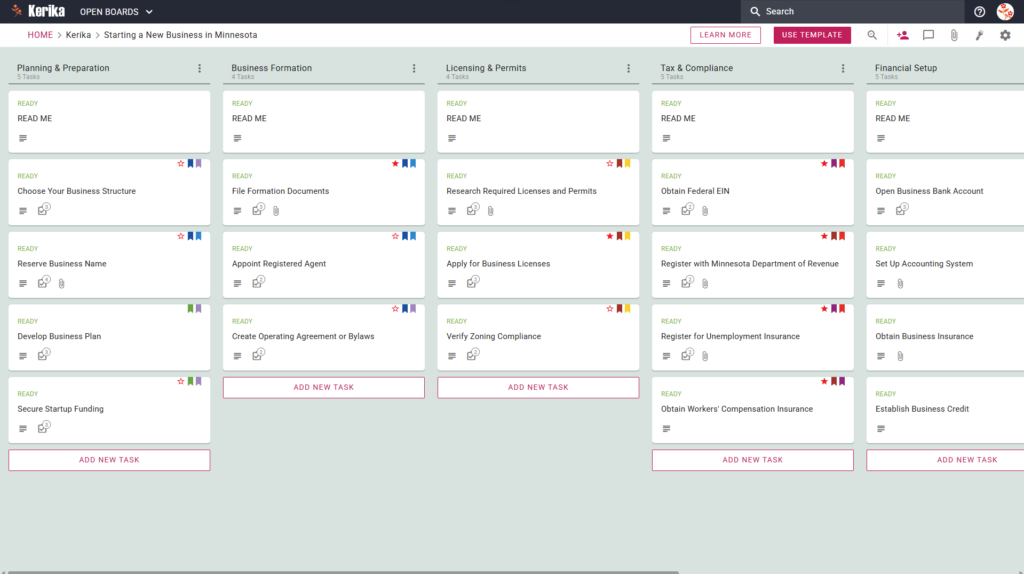
Click the image above to open the live template in a new tab
Starting a company in Minnesota involves a variety of logistical hurdles, from initial state filings to ensuring long-term compliance with local regulations. For many entrepreneurs, the friction lies in managing the administrative overhead while trying to build a brand. Navigating state-specific requirements can feel like juggling dozens of moving parts at once, and missing a single step can lead to costly delays.
But don’t worry, this guide is here to help! We designed this template to simplify the complex process of business formation in the North Star State. It provides a visual, structured roadmap that ensures you remain focused on your growth goals rather than getting lost in a mountain of paperwork. Ready to reclaim your time and productivity? Let’s get started!
1. Who Can Use This
This template is built to support the diverse needs of founders as they navigate the Minnesota business landscape:
- Solo Entrepreneurs If you are starting out alone, you can use this template to manage every detail of your launch. It acts as a digital personal assistant, ensuring you track every task from name reservation to tax registration without feeling overwhelmed by the sheer volume of “to-dos.”
- Partnership Founders When multiple owners are involved, clear communication is vital. Minnesota requires specific filings for LLPs or General Partnerships, and this board serves as your single source of truth. Partners can divide responsibilities one handling the legal filings while another manages the financial setup ensuring everyone knows exactly which steps are complete.
- Startup Teams As teams grow, collaboration across different workstreams becomes more complex. Growing teams can use this template to collaborate across areas like finance, licensing, and operations. It keeps all project-related discussions and documents in one accessible place, preventing the “knowledge silos” that often plague new ventures.
2. What it includes
The Starting a New Business in Minnesota template provides a comprehensive, visual workflow designed to track your progress from your initial idea to your first day of trade. The board is organised into seven key columns:
- Planning & Preparation: Lay the groundwork by choosing your business structure, using the Reserve Business Name task, and building out your formal business plan.
- Business Formation: Manage the essential legalities. This includes tasks to Appoint Registered Agent, File Formation Documents, and Create Operating Agreement or Bylaws.
- Licensing & Permits: Research and apply for the specific state and local licences required for your industry, including the crucial task to Verify Zoning Compliance.
- Tax & Compliance: This column is the heart of your state obligations. It includes mandatory tasks to: Obtain Federal EIN, Register with Minnesota Department of Revenue, Register for Unemployment Insurance, Obtain Workers’ Compensation Insurance
- Ongoing Operations: This ensures your business remains in good standing long after the launch, with tasks like File Annual Renewal.
- Completed: The final destination for every task on your board, providing a satisfying visual record of everything you have achieved.
3. When You Should Use This
This workspace provides the most value in environments where organisation and strict state compliance are non-negotiable:
- Beginning Your Entrepreneurial Journey: Use this template from day one to ensure no legal steps are missed. It provides a repeatable, reliable process that keeps your launch consistent and professional.
- Navigating State Compliance: This is essential when following the official requirements found at the Office of the State Of Minnesota Secretary of State website. The template helps you translate those complex state requirements into actionable, manageable tasks.
- High-Stakes Document Security: Business formation involves sensitive data your Articles of Incorporation and EIN Confirmation Letters should not live in a third-party database. Kerika stores your documents in your own Google Drive or OneDrive, ensuring you retain full ownership and control of your most sensitive filings.
- Long-Term Maintenance: Beyond the initial launch, the template helps you manage Annual Renewals, ensuring you never miss a deadline that could jeopardise your company’s legal status.
4. How To Use It
Managing your Minnesota business launch is straightforward with these steps:
- The READ ME Card: You will find a “READ ME” card at the top of columns. Always check these first; they contain specific rules and guidance on the criteria that must be met before you move a task to the next stage of the workflow.
- Advancing the Workflow: As your tasks progress, simply drag the cards from left to right. Your ultimate goal is to move every card into the Completed column.
- The CHECKLIST Tab: Open any card and navigate to the CHECKLIST tab to manage sub-tasks. You can check these off one-by-one to ensure specific details, such as filing dates or specific financial figures, are never overlooked.
- The ATTACHMENTS Tab: Use the ATTACHMENTS tab to upload formation documents, licences, or insurance certificates directly to the relevant card. Because these files stay in your secure cloud storage, they are instantly accessible to your entire team.
Conclusion
Using a visual workflow ensures your Minnesota business launch is supported by organised, professional preparation. Because Kerika integrates seamlessly with Google Workspace and Microsoft 365, access rights are managed automatically.
Internal team members get the full access they need to build the business, while external advisors such as your Accountant or Attorney can be added as Visitors. In Kerika, visitors are free, allowing you to collaborate with professionals without increasing your software costs. Moving to a visual board eliminates messy email chains and ensures your new Minnesota venture maintains the highest professional standards from day one.
Need Something Different?
If this template isn’t exactly what you need, let us know at support@kerika.com, and we will create a custom version for you, free!