Click the image above to open the live template in a new tab
Starting a business in the Commonwealth involves navigating a complex web of state-specific regulations and filings. Navigating the Commonwealth’s specific filing requirements shouldn’t keep you up at night, yet the administrative burden often feels like a barrier to your entrepreneurial dreams.
We have designed this template to transform that anxiety into a clear, manageable plan. By providing a visual workspace for organising every phase of your launch from selecting a structure to finalising your marketing we ensure you never miss a beat. But don’t worry, this guide is here to help!
Ready to turn your vision into a legal reality? Let’s get started!
1. Who Can Use This
This template is designed to support different types of founders as they navigate the complexities of state compliance:
- Solo Entrepreneurs: If you are managing every detail of your new venture alone, this template acts as your personal project manager. It provides a clear roadmap to ensure no administrative requirement is overlooked while you focus on growth.
- Partnership Founders: For co-founders who need a shared source of truth, this board coordinates legal agreements and responsibilities. It keeps all stakeholders aligned on the progress of critical formation documents.
- Startup Teams: This layout is perfect for groups needing to delegate specialised tasks like marketing and financial setup. It allows the team to collaborate efficiently across different operational areas without losing sight of the big picture.
2. What it includes
We have designed this template to provide a comprehensive, pre-configured layout to guide you through the business lifecycle:
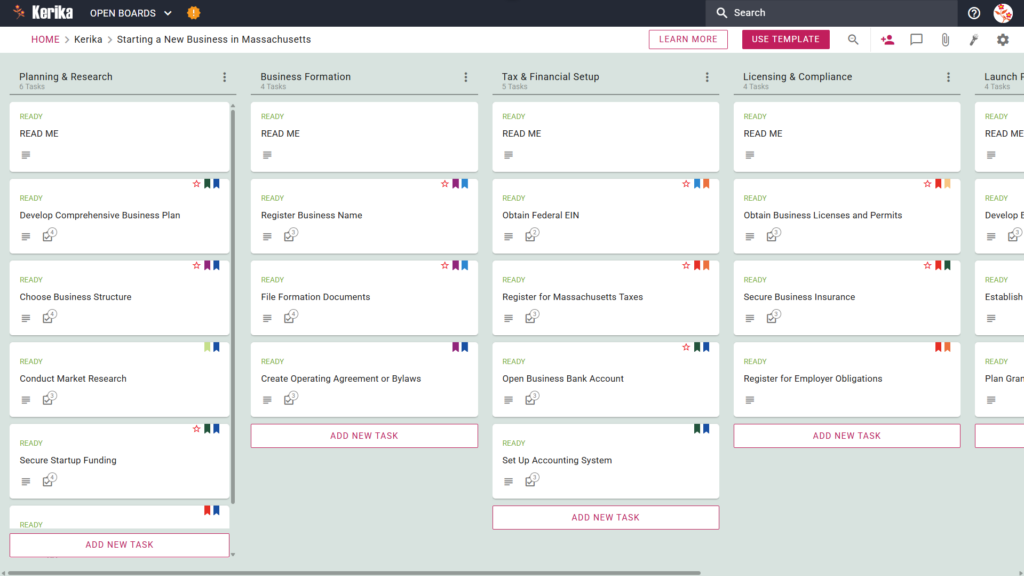
- Planning & Research: Focuses on initial strategy, including tasks like Conduct Market Research and Select Business Location.
- Business Formation: Covers legal registration, including Register Business Name and creating operating agreements.
- Tax & Financial Setup: Dedicated to obtaining an EIN, setting up accounting systems, and opening Open Business Bank Account.
- Licencing & Compliance: Manages the acquisition of Business Licences and Permits and ensures you Secure Business Insurance.
- Launch Preparation: Finalises brand identity and allows you to Plan Grand Opening and Launch Strategy.
3. When You Should Use This
This workspace provides the most value in high-stakes environments where organization and security are critical:
- Beginning Your Entrepreneurial Journey: Use this template when you need a repeatable, reliable process to navigate official requirements from guide-to-starting-a-business-in-massachusetts, the official resource site from the Massachusetts State government.
- Navigating State Compliance: This is the perfect solution when you need to ensure compliance with Massachusetts state law from day one. It helps you avoid the risk of missing critical obligations, like registering for Massachusetts Taxes.
- High-Stakes Document Security: Use this when your business launch requires strict access control. Kerika is the only task management tool that leaves file ownership entirely with you by storing sensitive legal and tax documents in your own Google Drive, OneDrive, or Box account.
4. How To Use It
Managing your board prep is straightforward with these steps:
- The READ ME Card: You will find “READ ME” cards at the top of every column. These are essential starting points that contain our specific rules for moving tasks between stages, ensuring you meet the necessary criteria before progressing.
- Advancing the Workflow: As you complete different phases of your setup, move the task cards from left to right. For example, once your Business Formation is complete, you can begin moving cards into the Tax & Financial Setup column to signal the next phase of the project.
- The CHECKLIST Tab: For detailed items like “File Formation Documents”, open the card and navigate to the CHECKLIST tab. This allows you to manage specific sub-tasks one-by-one, ensuring no small detail is missed during the registration process.
- The ATTACHMENTS Tab: Use the ATTACHMENTS tab to store your certificates of organisation or EIN confirmation letters. By attaching them directly to the relevant cards, you keep your documents organised within your own secure Google Drive or OneDrive account while keeping them accessible to the whole team.
Conclusion
Using a visual Kanban board for your business setup eliminates the chaos of scattered spreadsheets and emails. Kerika manages access rights and integrates directly with your cloud storage, keeping sensitive legal documents secure while providing your team with the transparency they need.
Because Kerika connects seamlessly with your files, when a user’s role is changed in Kerika, their file access in the connected Google Drive or OneDrive is updated instantly. By using this structured approach, you ensure your organisation maintains professional standards from day one.
Need Something Different?
If this template isn’t exactly what you need, let us know at support@kerika.com, and we will create a custom version for you, free!