Click the image above to open the live template in a new tab
Launching a new business in Kansas often feels like navigating a complex maze of state-specific regulations, tax requirements, and administrative hurdles. According to research on organizational health by firms like McKinsey, the absence of a clear, structured roadmap is a primary contributor to early-stage friction and project stall. From choosing the right legal structure to filing the correct formation documents, the weight of getting organized can quickly drain your momentum before you ever serve your first customer.
But don’t worry, this guide is here to help! Our Kansas Business Launch template is designed to eliminate that friction by providing a visual, structured workspace that tracks every critical milestone. It transforms a daunting list of chores into a clear, manageable roadmap. Ready to launch your Kansas venture? Let’s get started!
1. Who Can Use This
This template is specifically designed for entrepreneurs and small business owners based in Kansas who need to coordinate their launch with official state bodies. It is an ideal tool for:
- Solo Entrepreneurs: If you are launching a venture on your own, this template acts as your personal project manager. It helps a single founder keep track of every moving part without falling into the “founder’s trap” where you get so focused on your product that you ignore critical compliance steps.
- Partnership Founders:For those launching with a partner, the board serves as a “single source of truth.” It allows co-founders to divide responsibilities clearly, ensuring both parties remain aligned on the status of formation documents and operating agreements without needing constant status meetings.
- Startup Teams: Small teams can use this template to coordinate complex tasks like market research or brand identity across different owners. This isn’t just a list; it’s a collaborative environment where everyone knows exactly what they are responsible for and when tasks are due.
2. What it includes
The Starting a New Business in Kansas template provides a comprehensive starting point with a pre-configured, visual layout:
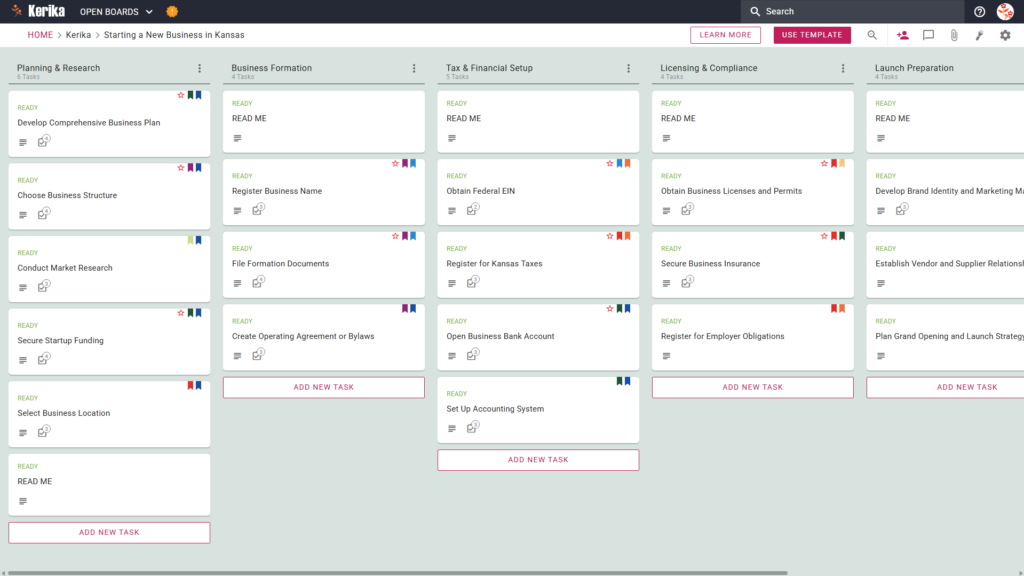
- A Six-Column Workflow: Your progress is tracked through the Planning & Research, Business Formation, Tax & Financial Setup, Licensing & Compliance, Launch Preparation, and Completed columns.
- Planning & Business Formation: Pre-configured cards include Complete your Comprehensive Business Plan, Choose a Business Structure, Select a Business Location, Register your Business Name, File Formation Documents, and Finalize Operating Agreements or Bylaws.
- Tax & Financial Setup: Dedicated cards are ready for Obtain your Federal EIN, Open Business Bank Accounts, and the critical step to Register for Kansas Taxes.
- Licensing & Launch Preparation: To ensure you are legally protected and ready for opening, the template includes cards to Secure Business Insurance, Register for Employer Obligations, Develop Brand Identity, Establish Vendor Relationships, and Plan your Grand Opening Strategy.
3. When You Should Use This
The ideal time to deploy this template is the moment you decide to move from a general “idea” to an official entity. This isn’t just another item to check off your list; it’s a core part of your launch success. It is essential when:
- Transitioning to Formal Registration: You are ready to transition from casual planning to formal state registration.
- Navigating State Requirements: You are navigating the official requirements found on the official ‘business’ portal, the Kansas State government’s primary resource, and need a way to track those mandates.
- Ensuring Compliance: You need a reliable, repeatable process to ensure no legal or financial steps are skipped during the high-pressure setup phase
4. How To Use It
- The READ ME Card At the top of each column, you will find “READ ME” cards. Always check these first, as they contain the specific rules and criteria that must be met before you move a task to the next stage of the workflow.
- Advancing the Workflow Logic dictates the flow: move cards from Planning & Research through to Launch Preparation. To ensure your business foundation is solid, only advance a card once it features the green “READY” tag, signaling that all prerequisites for that task are complete.
- The CHECKLIST Tab Every card contains a CHECKLIST tab. Use this to manage specific sub-tasks, such as the individual steps required to Register for Kansas Taxes or the specific filings for Employer Obligations. These checklists ensure that even the smallest detail—which can often become a bottleneck is captured and resolved.
- The ATTACHMENTS Tab Use the ATTACHMENTS tab to store your formation documents, EIN confirmations, and permits directly on the relevant cards. Unlike other tools, Kerika is the only platform that ensures you maintain 100% file ownership by integrating directly with your own Google Drive, OneDrive, or Box account.
Conclusion
By adopting this visual management approach, you eliminate messy email chains and ensure your new venture meets professional standards from day one. You can focus on growth while Kerika handles access rights automatically, ensuring the right people have the right information at the right time. Your launch is too important to leave to chance—stay organized, stay compliant, and stay focused on your vision.
Need Something Different?
If this template isn’t exactly what you need, let us know at support@kerika.com and we will create a custom version for you, free!