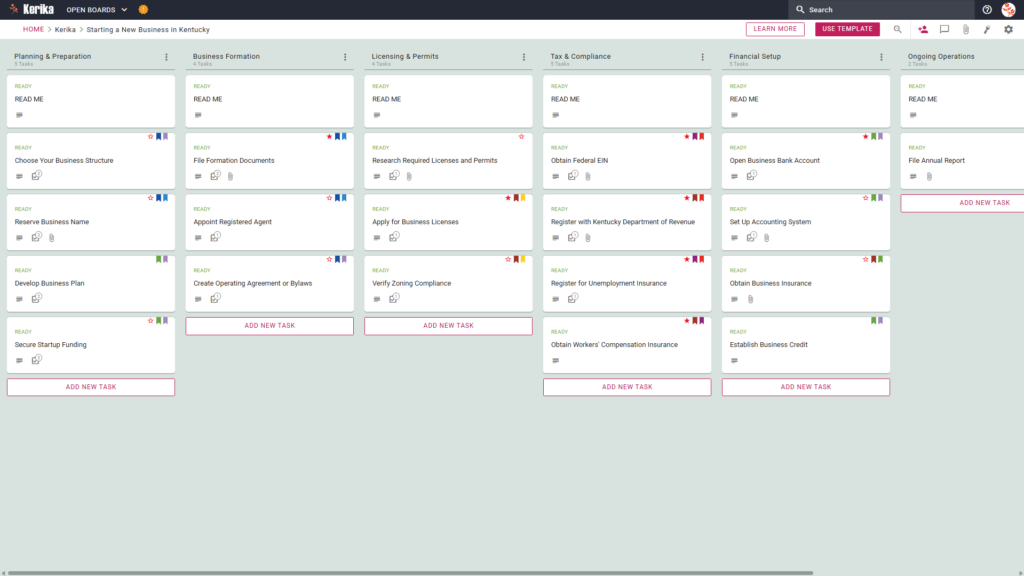
Click the image above to open the live template in a new tab
Organising a new venture in Kentucky can feel like a massive logistical hurdle, especially when you are faced with the administrative overhead of state-specific legal requirements. The friction usually lies in the complexity of managing various filings, permits, and tax registrations simultaneously. For many founders, this operational bottleneck leads to missed deadlines or overlooked paperwork, creating significant risk before the business even opens its doors.
But don’t worry, this guide is here to help you get started with confidence. This template does you a massive favour by centralising your requirements into a professional compliance roadmap. We designed the Kerika Kentucky Business Template to simplify this complexity by providing a visual, structured workspace for your entire team. By breaking down the process into manageable stages, we help you stay focused on building your business rather than just drowning in the paperwork.
Ready to launch? Let’s get started!
1. Who Can Use This
This template is built to support the diverse needs of entrepreneurs as they navigate the path to business ownership:
- Solo Entrepreneurs: If you are building a business on your own, this template acts as your virtual Chief Operating Officer. It ensures you manage all “to-do” items alone without missing critical legal deadlines, which is essential for mitigating personal liability risks.
- Partnership Founders: For those starting a venture with others, the board acts as a “single source of truth.” It allows for the clear delegation of formation tasks between co-founders, effectively preventing the “I thought you were doing that” syndrome that often plagues new partnerships.
- Startup Teams: Larger teams benefit from enhanced governance and transparency. You can track progress in real-time across different departments, such as finance and legal, ensuring that every stakeholder is aligned with the launch timeline.
2. What it includes
The Starting a New Business in Kentucky template provides a comprehensive starting point with a pre-configured, visual layout:
- A Six-Column Workflow: Your progress is tracked through the Planning & Preparation, Business Formation, Licensing & Permits, Tax & Compliance, Financial Setup, and Ongoing Operations columns.
- Planning & Formation: Pre-configured cards include Choose Your Business Structure, Develop Business Plan, and File Formation Documents.
- Licensing, Tax & Compliance: Dedicated cards are ready for Apply for Business Licenses, Register with Kentucky Department of Revenue, and Obtain Workers’ Compensation Insurance.
- Financial Setup & Operations: To ensure a successful opening, the template includes cards for Open Business Bank Account, Set Up Accounting System, and File Annual Report.
3. When You Should Use This
Timing is critical when navigating official state requirements. You should utilise this workspace during the following phases:
- Pre-launch Phase: Use the template the moment you decide to start a business to ensure your initial planning like choosing an entity structure is handled correctly.
- Initial Setup: While the ‘Start My Business – Kentucky Business One Stop’ portal is where you physically file your documents, this Kerika board is where you manage the people and work leading up to those filings.
- Regulatory Alignment: Use this tool to ensure no regulatory step in Kentucky, from zoning compliance to insurance, is overlooked before you begin operations.
4. How To Use It
Managing your Kentucky business launch is straightforward with this technical workflow:
- The READ ME Card: You will find a “READ ME” card at the top of every column. Always check these first; they contain specific criteria and rules that must be finalised before you move tasks to the next stage of the workflow.
- Advancing the Workflow: As tasks progress, move cards from left to right. For example, only move cards from Planning & Preparation to Business Formation once your entity type is confirmed. This ensures you aren’t filing paperwork for a structure you haven’t fully vetted.
- The CHECKLIST Tab: Open any card and navigate to the CHECKLIST tab to manage granular sub-tasks. Use this for detailed requirements like “Verify Zoning Compliance” to ensure even the smallest local ordinance is never missed.
- The ATTACHMENTS Tab: Store vital documents, such as your Articles of Organisation, directly on the cards. Kerika is the only tool that leaves file ownership entirely with you; your documents stay in your own secure Google Drive or OneDrive account.
Conclusion
Replacing messy email chains and fragmented spreadsheets with a visual Kanban board provides the operational efficiency your new venture deserves. Kerika manages access rights automatically: team members get the Read+Write access they need to build the business, while external advisors can be added as Visitors with read-only access. This ensures that while you build your Kentucky business, your sensitive documents remain secure and correctly shared. With this roadmap in place, you can move forward with the confidence of a seasoned professional.
Need Something Different?
If this template isn’t the perfect fit for your specific industry, we are here to help. Simply email support@kerika.com and we will create a custom-built version for you, free of charge.