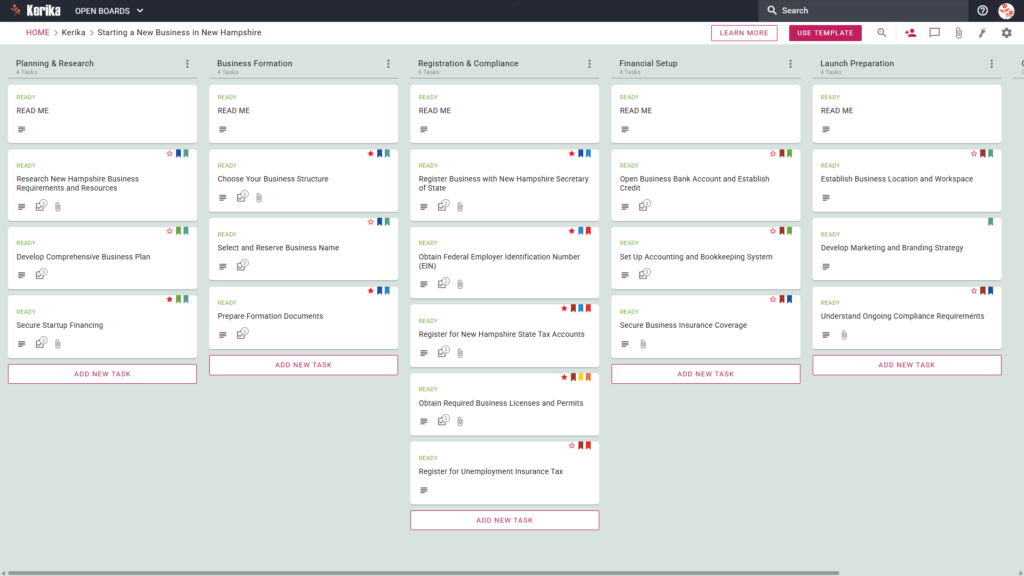
Click the image above to open the live template in a new tab
Launching a new venture in New Hampshire is an ambitious and exciting journey, but the initial administrative hurdles can often feel overwhelming. From navigating state-specific registrations to organising complex financial structures, the sheer volume of paperwork and procedural steps can easily derail even the most determined entrepreneur.
But don’t worry, this guide is here to help you navigate those early days with confidence. We designed this template to simplify the complex process of business formation by breaking it down into a clear, manageable roadmap. Instead of getting lost in spreadsheets and sticky notes, you can manage your entire launch from a single, intuitive workspace.
This template provides a visual, structured environment that ensures you stay on top of every legal and operational requirement. By centralising your tasks and documents, you can focus on building your brand while we help you manage the logistics. Ready to turn your vision into a New Hampshire reality? Let’s get started!
1. Who Can Use This
- Solo Entrepreneurs:This workspace is ideal for individuals who need to manage every moving part of a new business alone without becoming overwhelmed by the administrative overhead.
- Partnership Founders: For those launching with a partner, the template provides essential shared visibility and a platform for a clear, documented division of responsibilities.
- Startup Teams: Growing teams can use this board to scale their operations quickly while ensuring they remain fully compliant with all New Hampshire state regulations.
2. What it includes
The New Hampshire Business Template is pre-configured with a comprehensive workflow based on the specific requirements for starting a company in the state:
- The Five-Column Workflow: Your progress is tracked through five distinct stages: Planning & Research, Business Formation, Registration & Compliance, Financial Setup, and Launch Preparation.
- State-Specific Tasks: The template includes critical tasks required by the state, such as Register Business with New Hampshire Secretary of State, Register for New Hampshire State Tax Accounts, and Register for Unemployment Insurance Tax.
- Key Deliverables: This workspace acts as a hub to help you organise the documentation for your business plan, startup funding, and Employer Identification Number (EIN). You can also track the acquisition of necessary business licences and permits, accounting systems, business bank accounts, and a comprehensive launch strategy.
3. When You Should Use This
This workspace provides the most value in high-stakes environments where organization and security are critical:
- Beginning Your Entrepreneurial Journey: Use this template when you need a repeatable, reliable process to navigate official requirements from business, the official resource site from the New Hampshire State government.
- Navigating State Compliance: This is the perfect solution when you need to ensure compliance with New Hampshire state law from day one. It helps you avoid the risk of missing critical obligations, like registering for New Hampshire State Tax Accounts or Unemployment Insurance Tax.
- High-Stakes Document Security: Use this when your business launch requires strict access control. Kerika is the only task management tool that leaves file ownership entirely with you by storing sensitive legal and tax documents in your own Google Drive, OneDrive, or Box account
4. How To Use It
Managing your New Hampshire business launch is straightforward when you follow these four steps:
- The READ ME Card: You will find “READ ME” cards at the top of the columns. Always check these first as they provide expert guidance and specific New Hampshire statutory links that must be reviewed before moving a task to the next stage of the workflow.
- Advancing the Workflow: Progress happens by moving task cards across columns. Only move tasks from ‘Planning & Research’ to ‘Business Formation’ once your business structure has been officially chosen, ensuring your legal groundwork is solid before committing to filings.
- The CHECKLIST Tab: Open any card and navigate to the CHECKLIST tab to manage more granular details. This is the perfect place to track specific dates, filing fees, or figures to ensure that no small detail is overlooked during the registration process.
- The ATTACHMENTS Tab: Use the ATTACHMENTS tab to upload your formation documents, articles of incorporation, or financial spreadsheets directly to the relevant cards. This ensures all your essential paperwork is kept in a secure, centralised location for easy retrieval.
Conclusion
Using this visual board eliminates the chaos of scattered notes, lost documents, and messy email chains. It provides a “single source of truth” for your startup, allowing you to move through the New Hampshire registration process with professional precision.
What makes Kerika unique for your business security is that we leave file ownership entirely with you. Because Kerika integrates seamlessly with Google Workspace and Microsoft 365, your documents are stored in your own Google Drive or OneDrive account. You maintain full control over your data and access rights while benefiting from a streamlined management interface.
Need Something Different?
If your specific business model requires a different approach or additional steps, we are here to help. Simply email support@kerika.com, and we will build a custom version of this template tailored to your unique business needs, free of charge.