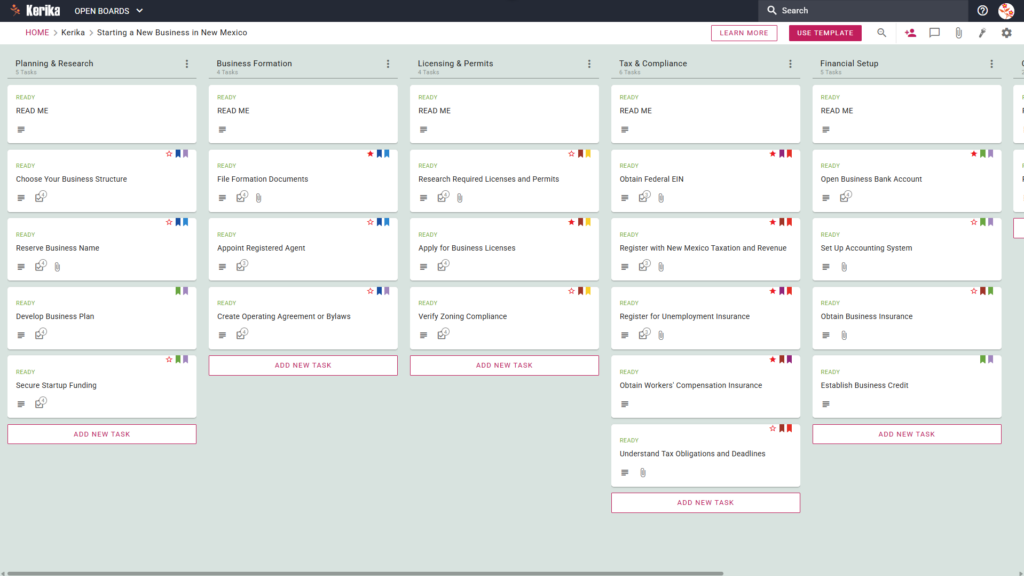
Click the image above to open the live template in a new tab
Starting a new venture in the Land of Enchantment involves navigating a complex web of state regulations and administrative hurdles. Whether you are organising your first startup or expanding an existing enterprise, the friction of managing various filings and compliance dates can feel like a massive logistical hurdle.
But don’t worry, this guide is here to help! We designed this template to simplify the complex process of launching your company by providing a visual, structured workspace. This ensures you can focus on your vision while we help you manage the administrative overhead of governance.
Ready to launch your New Mexico venture with confidence? Let’s get started!
Who Can Use This
This template is built to support different types of founders as they navigate the path to business ownership:
- Solo Entrepreneurs: You can manage every moving part of your New Mexico launch without feeling overwhelmed by the sheer volume of tasks. This template serves as your personal roadmap, ensuring you never miss a critical filing or deadline.
- Partnership Founders: You and your co-founders can share the workload effectively and maintain a “single source of truth.” By using a shared board, everyone stays in sync regarding who is handling specific tasks like legal filings or financial setup.
- Startup Teams: Small teams can collaborate on different stages of the workflow simultaneously. Your team members can update their progress in real-time, allowing for seamless coordination even if you are working from different locations.
What it includes
The New Mexico Business template provides a comprehensive starting point with a Five-Column Workflow: Planning & Research, Business Formation, Licensing & Permits, Tax & Compliance, and Financial Setup. This structured environment allows you to track your progress visually from the initial concept through to full operational status.
- Planning & Research: Includes critical early steps such as Choose Your Business Structure, Reserve Business Name, and Develop Business Plan.
- Business Formation: Helps you manage the legal side, including how to Appoint Registered Agent, File Formation Documents, and Create Operating Agreement or Bylaws.
- Licensing & Permits: Focuses on regulatory hurdles like Research Required Licenses and Permits, Verify Zoning Compliance, and applying for your specific Business Licences.
- Tax & Compliance: Covers mandatory state and federal registrations, specifically requiring you to Obtain Federal EIN, Register with New Mexico Taxation and Revenue, Register for Unemployment Insurance, and Obtain Workers’ Compensation Insurance.
- Financial Setup: Guides you through the final hurdles of your launch, such as Open Business Bank Account, Set Up Accounting System, and Obtain Business Insurance.
When You Should Use This
This workspace provides the most value when organisation and security are critical to your success:
- Beginning Your Entrepreneurial Journey: Use this template when you are first exploring Business Services in New Mexico. It provides a repeatable, reliable process to ensure your launch is consistent with professional standards.
- Navigating State Compliance: This is the perfect solution when you need to focus on the importance of adhering to New Mexico law and specific state-level filings. It ensures that complex requirements are broken down into manageable steps.
- High-Stakes Document Security: Use Kerika when your venture requires strict control over sensitive formation documents. Kerika is the only task management tool that leaves file ownership entirely with you, storing your files in your own secure Google Drive, OneDrive, or Box account.
How To Use It
Managing your New Mexico business launch is straightforward with these tactical steps:
- The READ ME Card: You will find a “READ ME” card at the top of every column on your board. Always check these first, as they contain specific rules and the criteria that must be met before you begin adding or moving tasks within that specific category.
- Advancing the Workflow: As you complete your tasks, you can move cards from left to right to represent your transition from the planning phase to active legal standing. For example, once you Verify Zoning Compliance or Appoint Registered Agent, moving these cards ensures your dashboard reflects your company’s growing maturity.
- The CHECKLIST Tab: Open every task card and navigate to the CHECKLIST tab to manage sub-tasks. You can check these off one-by-one to ensure no detail, such as a specific date on a permit or a figure in a tax filing, is ever missed.
- The ATTACHMENTS Tab: Use the ATTACHMENTS tab to upload your formation documents or state-issued licences directly to the relevant card. These files stay in your own secure cloud storage, and Kerika ensures they are automatically accessible to the right team members.
Conclusion
Using a visual Kanban board eliminates messy email chains and ensures your new company maintains the highest professional standards from day one. Because Kerika integrates seamlessly with Google Workspace and Microsoft 365, your access rights are managed automatically.
When you change a user’s role within your Kerika board, their file access in your cloud storage is updated instantly. This ensures that you maintain total ownership and control of your business data while providing your team with the tools they need to succeed.
Need Something Different?
If this template isn’t exactly what you need, let us know at support@kerika.com, and we will create a custom version for you, free!