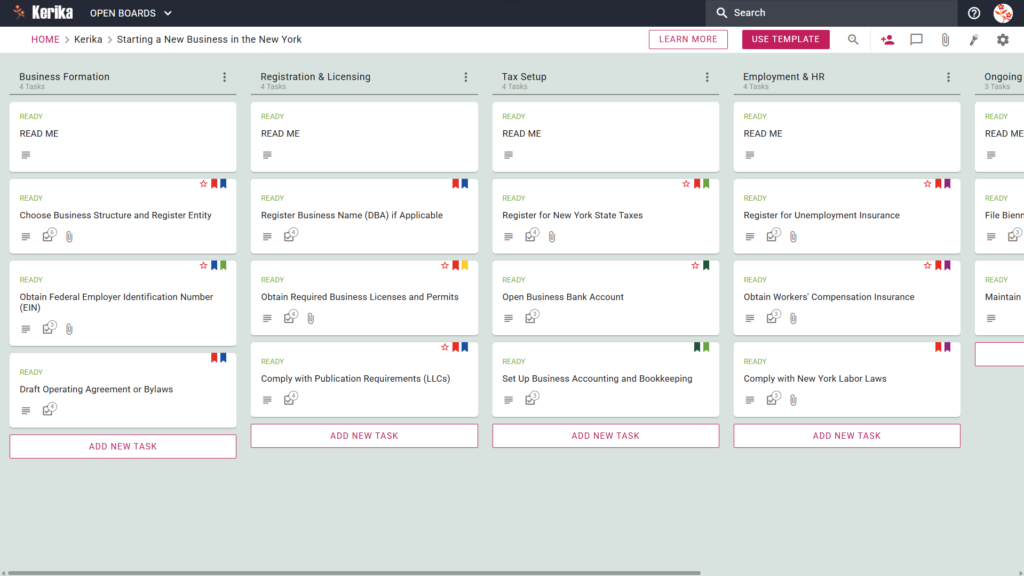
Click the image above to open the live template in a new tab
Starting a business in New York often feels like a massive logistical hurdle. Between state-specific regulations and the administrative friction of entity registration, the sheer volume of paperwork can be overwhelming for any founder. This isn’t just a hypothetical challenge; it’s the primary barrier that stalls many brilliant ideas before they even get off the ground.
But don’t worry, this guide is here to help! We designed the Kerika New York Startup template to transform this complex process into a visual, structured workspace. By breaking down daunting requirements into manageable, actionable steps, you can focus on building your brand while we help you navigate the logistics. Ready to reclaim your time and productivity? Let’s get started!
1. Who Can Use This
This template is designed to provide a clear roadmap for various types of founders navigating the unique New York business landscape:
- Solo Entrepreneurs: If you are launching a single-member venture, you are likely responsible for every moving part yourself. This template acts as your personal project manager, ensuring you track every legal and administrative requirement without needing a dedicated back-office team. It keeps your focus sharp so no critical filing date slips through the cracks.
- Partnership Founders: For those starting a business with partners, this board serves as a shared “single source of truth.” It allows your leadership team to coordinate on legal and financial setups, ensuring everyone is aligned on the status of entity formation and capital contributions. Having a centralized workspace prevents the confusion often caused by scattered messages and old document versions.
- Startup Teams: Small teams or distributed professionals often need to coordinate across different time zones or locations. This workspace allows your team to collaborate in real-time, providing a transparent view of who is responsible for which regulatory milestone. By maintaining a unified project board, you ensure that document versions and filing deadlines are never lost in transit.
2. What it includes
The template provides a comprehensive, pre-configured layout specifically tailored to New York state requirements. It features A Five-Column Workflow:
- Business Formation: This is where you handle the foundational steps, such as choosing your legal structure and drafting your Operating Agreement or Bylaws. It is also the designated space to manage the critical task to Obtain Federal Employer Identification Number (EIN).
- Registration & Licensing: This column helps you manage your public identity and local legal standing. Within this stage, you will find the specific workflow to Comply with Publication Requirements (LLCs) and obtain necessary local permits.
- Tax Setup: A dedicated space to manage your fiscal obligations, including New York state tax registration. This section ensures you have a repeatable process for setting up your internal accounting and bookkeeping systems.
- Employment & HR: This section ensures you comply with New York Labor Laws and manage necessary insurance, such as Workers’ Compensation. It provides a structured way to handle the administrative overhead of hiring your first employees.
- Ongoing Compliance: This column is for recurring tasks, such as filing biennial statements, to ensure your business remains in good standing. It serves as a permanent record to help you maintain your corporate history and state compliance year after year.
3. When You Should Use This
This workspace provides the most value in high-stakes environments where organization and security are critical:
- Beginning Your Entrepreneurial Journey: Use this when you need a ‘start-business’ roadmap inspired directly by New York State government requirements to ensure you don’t miss a critical first step.
- Navigating State Compliance: New York state law is complex and requires a repeatable process to avoid penalties. This template allows you to maintain professional consistency as you move from initial entity formation to active operations.
- High-Stakes Document Security: When dealing with sensitive legal documents, you need strict access control. Kerika is unique because it stores your documents in your own Google Drive, OneDrive, or Box account, leaving file ownership entirely with you.
4. How To Use It
Managing your New York startup launch is straightforward when you follow these four steps:
- The READ ME Card: At the top of every column, you will find a “READ ME” card. You should check these first, as they contain specific rules and criteria that must be met before you move a task to the next stage of the workflow.
- Advancing the Workflow: Move your task cards through the five columns only when specific criteria are met. This structured approach ensures that no detail, from tax registration to licensing, is overlooked during the rush of a launch.
- The CHECKLIST Tab: Open individual cards to manage sub-tasks and fine details. For example, within the Business Formation column, you can use the checklist to ensure you successfully Obtain Federal Employer Identification Number (EIN) and other critical identifiers.
- The ATTACHMENTS Tab: Use this tab to upload your spreadsheets, draft agreements, or scanned licenses directly to the relevant cards. These files remain secure in your cloud storage while staying easily accessible to the partners and team members who need them.
Conclusion
By adopting a visual board for your New York startup, you can eliminate messy email chains and maintain the highest professional standards from day one. The Kerika template integrates seamlessly with Google Workspace and Microsoft 365, which means access rights are managed for you automatically.
When a team member’s role changes, their file access in your cloud storage is updated instantly, ensuring that sensitive formation documents are always protected. This professional, automated approach allows you to focus on your mission and growth while Kerika manages the administrative workflow.
Need Something Different?
If this template isn’t exactly what you need, let us know at support@kerika.com, and we will create a custom version for you, free!