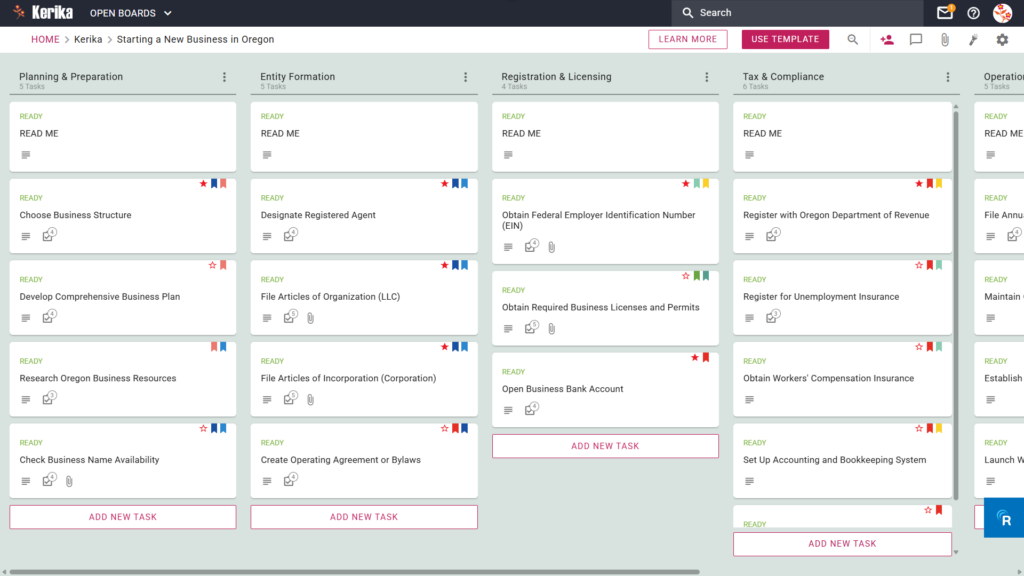
Click the image above to open the live template in a new tab
Starting a new business in Oregon creates significant friction due to complex legal steps, tax filings, and mandatory documentation. You must navigate unique state requirements while maintaining your focus on the actual work. But don’t worry, this guide is here to help!
We designed this specialized template to provide a visual, structured path from your initial idea to a fully operational company. It streamlines the administrative overhead so you can focus on building your brand. Ready to reclaim your time and productivity? Let’s get started!
1. Who Can Use This
This template supports everyone from solo founders to growing leadership teams who need to remain organized during the formation process.
- Solo Entrepreneurs: This tool serves individuals launching a venture alone who need a clear roadmap to ensure no state requirements are missed. You can track every detail without feeling overwhelmed by the paperwork.
- Partnership Founders: We built this for small teams needing to coordinate roles and share legal documentation during the formation phase. It allows you to delegate tasks while keeping everyone on the same page.
- Startup Teams: Larger groups utilize this as a “single source of truth” for complex registration and licensing workflows. It ensures that every department head knows exactly which stage the business has reached.
2. What it includes
The template provides a comprehensive Five-Column Workflow that guides you through the entire lifecycle of starting your business.
- Planning & Preparation: Research Oregon Business Resources and Check Business Name Availability in this column to build a strong foundation. You must finalize your business structure and plan before moving forward.
- Entity Formation: Execute your legal filings and Designate Registered Agent to represent your business in the state. This column helps you track your Articles of Organization or Articles of Incorporation with the Secretary of State.
- Registration & Licensing: Secure your Federal Employer Identification Number (EIN) and Open Business Bank Account to separate your personal and professional finances. This stage ensures you obtain all necessary local permits to operate legally.
- Tax & Compliance: Register with Oregon Department of Revenue and Register for Unemployment Insurance to avoid costly state penalties. This critical section helps you set up workers’ compensation and your primary bookkeeping systems.
- Operations & Growth: File Annual Report with Oregon and establish long-term systems for recordkeeping and marketing. Use this final column to launch your website and maintain a professional compliance calendar.
3. When You Should Use This
This workspace provides the most value when you need to maintain high standards of organization and security.
- Beginning Your Entrepreneurial Journey: Use this when first navigating the “State of Oregon: Business – Business” requirements to keep your initial research organized. It prevents you from losing track of vital resources early in the process.
- Navigating State Compliance: Deploy this template when you need to ensure every step follows Oregon law to avoid penalties or delays. It tracks the Oregon-specific timeline to ensure you never miss the deadline for your Annual Report.
- High-Stakes Document Security: Use Kerika when you need to store sensitive articles of incorporation or tax IDs securely in your own Google Drive, OneDrive, or Box account. This ensures you maintain full ownership of your most sensitive files.
4. How To Use It
Managing your Oregon business launch is straightforward when you use these core features:
- The READ ME Card: Locate these cards at the top of your columns to find the specific rules for advancing tasks. Always review these instructions to understand the criteria you must meet before moving a card to the next stage.
- Advancing the Workflow: Move cards only when you have completed every requirement of the current stage. This disciplined approach ensures that your business foundation remains solid before you attempt to scale.
- The CHECKLIST Tab: Open the CHECKLIST tab within each card to manage granular details like specific filing dates or fee amounts. These sub-tasks help you manage the “micro-steps” of complex tasks like drafting an Operating Agreement.
- The ATTACHMENTS Tab: Upload your Business Plan or Articles of Organization directly to the relevant cards using the ATTACHMENTS tab. This keeps your vital documents linked to their specific tasks so you never have to search through external folders.
Conclusion
Using a visual Kanban board transforms the chaotic process of business formation into a manageable, professional workflow. Kerika manages access rights automatically when you add users as Team Members or Visitors, ensuring your sensitive data remains protected. By moving your registration process to this template, you eliminate messy email chains and maintain the highest professional standards for your new Oregon venture.
Need Something Different?
If this template isn’t exactly what you need for your specific industry, we are happy to help. Email support@kerika.com, and our team will provide a free custom version tailored to your unique business requirements.