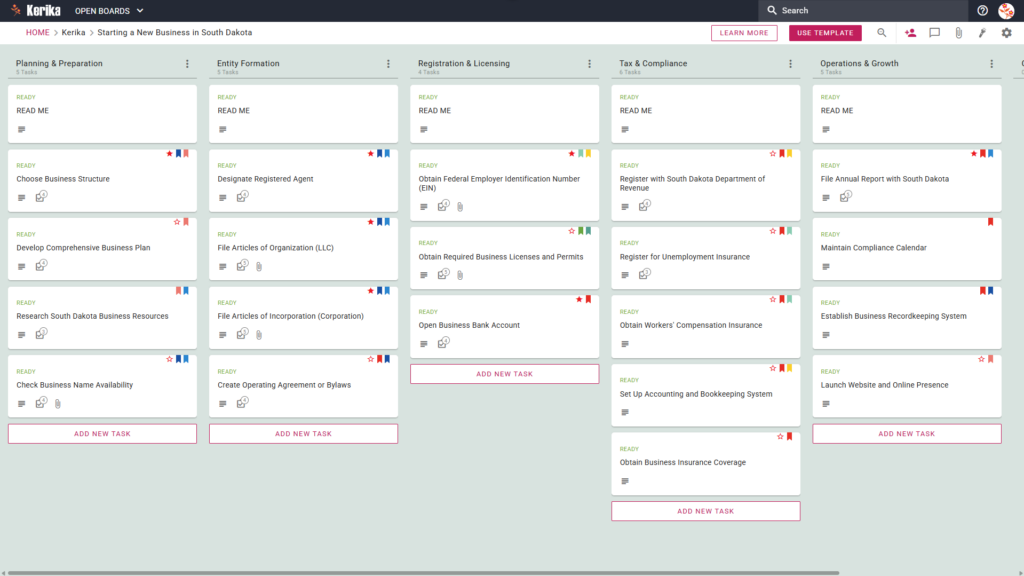
Click the image above to open the live template in a new tab
Launching a new venture in the Mount Rushmore State is an exhilarating milestone, yet the administrative friction of state-specific filings can quickly dampen that initial momentum. For many founders, the challenge lies in navigating the Secretary of State’s online filing system while tracking a mountain of varying deadlines. Whether it is ensuring your South Dakota Annual Report is submitted by the first day of your anniversary month or managing local permits, the risk of a compliance oversight is real.
But don’t worry, this guide is here to help! This workspace serves as the operational backbone for your launch, providing a clear path through the legal and tax requirements of South Dakota. By using a visual, structured workspace, you can eliminate the chaos of scattered notes and ensure every filing is executed with precision. Ready to turn your vision into a compliant legal entity? Let’s get started!
1. Who Can Use This
This template is expertly designed to support the diverse range of founders entering the South Dakota market:
- Solo Entrepreneurs: For those managing every detail alone, this template acts as a personal roadmap. It provides a clear, logical sequence of tasks, helping you stay on track with everything from researching South Dakota Business Resources to organising your initial marketing efforts without feeling overwhelmed.
- Partnership Founders: When starting a business with others, staying aligned on legal obligations is vital. This workspace ensures all co-founders remain in lockstep regarding the Operating Agreement or Bylaws, ensuring that these critical governance documents are finalised and signed before you move to the filing stage.
- Startup Teams: Distributed teams require a ‘single source of truth’ to track state-level compliance across different locations. The template allows team members to collaborate on the business launch in real-time, ensuring no one loses track of document versions or misses a required licence application deadline.
2. What it includes
The South Dakota Business Template provides a comprehensive, pre-configured workflow based on the five-column system seen in our live board. This structure is designed to take you from a nascent idea to a fully operational company:
- Planning & Preparation: This column handles initial research, including checking business name availability and developing a comprehensive business plan.
- Entity Formation: This is the legal core of your launch. Here, you will Designate a Registered Agent, File Articles of Organization (LLC), or File Articles of Incorporation (Corporation).
- Registration & Licensing: Manage practical steps for obtaining your Federal Employer Identification Number (EIN) and securing required local permits and bank accounts.
- Tax & Compliance: Handle critical filings like the requirement to Register with South Dakota Department of Revenue and setting up unemployment and workers’ compensation insurance.
- Operations & Growth: Focus on long-term sustainability by establishing a recordkeeping system and tracking the requirement to File Annual Report with South Dakota.
3. When You Should Use This
This workspace provides the most professional value during high-stakes phases of your business development:
- Beginning Your Entrepreneurial Journey: The best time to adopt this template is the moment you move from general ideation to researching South Dakota Business Resources. Establishing a structured workflow from day one prevents administrative debt from accumulating later.
- Navigating State Compliance: This tool becomes essential when you reach the stage of formal legal filings. Whether you are submitting Articles of Incorporation (Corporation) or Articles of Organisation (LLC), the template ensures you adhere strictly to South Dakota law and timing.
- High-Stakes Document Security: Legal filings and sensitive financial plans require elite security. Kerika is the only task management tool that leaves file ownership entirely with the user. All your documents are stored in your own Google Drive, OneDrive, or Box account, ensuring you retain total control over your intellectual property.
4. How To Use It
Managing your South Dakota business launch is straightforward with these four functional components:
- The READ ME Card: At the top of every column, you will find a “READ ME” card. You should check these first; they contain specific workflow rules and the criteria that must be met before you are permitted to move tasks into that specific stage of the launch.
- Advancing the Workflow: To maintain a clean and professional board, only move cards across columns once a stage is completely finished. For example, advance a card from ‘Planning’ to ‘Entity Formation’ only after your business structure and name are officially finalised.
- The CHECKLIST Tab: Every task card contains a CHECKLIST tab. Open this to manage granular sub-tasks, such as double-checking the figures on your tax registration. Checking these off one-by-one ensures that even the smallest details of state compliance are addressed.
- The ATTACHMENTS Tab: Use the ATTACHMENTS tab to upload state forms or business plans directly to the relevant card. Kerika automatically manages access rights based on user roles: Team Members get the read+write access needed to build the business, while stakeholders like investors or mentors can be added as Visitors with read-only access. When you change a user’s role in Kerika, their file access in your cloud storage is updated instantly.
Conclusion
The Kerika South Dakota Business Template eliminates the mess of disjointed email chains and provides a professional standard for your company’s launch. Because Kerika integrates seamlessly with Google Workspace and Microsoft 365, your team can collaborate effectively while your sensitive documents remain secure in your own cloud storage. By moving to a visual board, you gain a clear overview of your progress and the confidence that your new South Dakota business is built on a solid, compliant foundation. Take the next step today and start building your future.
Need Something Different?
If this template isn’t exactly what you need, let us know at support@kerika.com, and we will create a custom version for you, free!