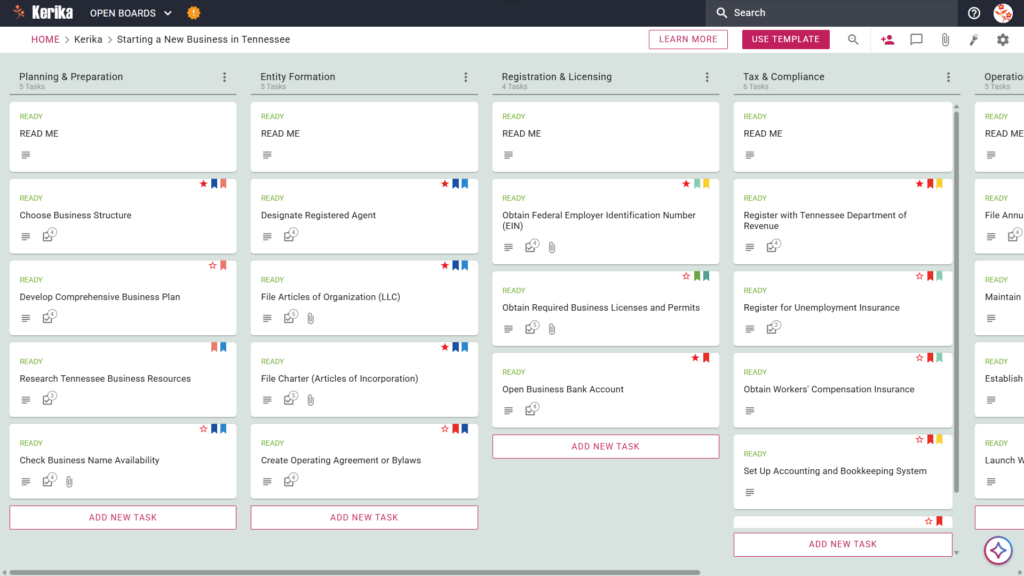
Click the image below to open the live template in a new tab
Establishing a new company in the Volunteer State can feel like a daunting administrative climb, particularly when you are organising the specific sequence of Secretary of State and Department of Revenue filings. The real friction usually lies in the administrative overhead of managing legal requirements and state registrations in the correct order. But don’t worry, our guide and template are here to help you move from initial confusion to a clear, actionable roadmap. Ready to build your Tennessee business? Let’s get started!
1. Who Can Use This?
This template is built to support the diverse group of entrepreneurs and professionals ready to launch their business in Tennessee.
- Solo Entrepreneurs: You can easily manage your personal “to-do” list without feeling overwhelmed by the transition from planning to execution. This template helps you stay focused on one milestone at a time, ensuring your individual launch remains perfectly organised and on track.
- Partnership Founders: If you are launching with a co-founder, you need a “single source of truth” for your shared responsibilities. This workspace allows you to collaborate seamlessly and ensures both partners are aligned on legal obligations and financial setup.
- Startup Teams: As your team grows, you can use the board to assign specific roles and track progress across various departments in real-time. It provides a highly structured environment where everyone knows exactly what needs to be done to maintain the highest professional standards.
2. What it includes?
The Starting a New Business in Tennessee template provides a comprehensive starting point with a pre-configured, visual layout:
- A Five-Column Workflow: Your progress is tracked through the Planning & Preparation, Entity Formation, Registration & Licensing, Tax & Compliance, and Operations & Growth columns.
- Planning & Formation: Pre-configured cards include Develop Comprehensive Business Plan, Designate Registered Agent, and File Articles of Organization (LLC).
- Registration & Tax Setup: Dedicated cards are ready for Obtain Required Business Licenses and Permits, Register with Tennessee Department of Revenue, and Register for Unemployment Insurance.
- Compliance & Operations: To ensure a successful opening, the template includes cards for Obtain Workers’ Compensation Insurance, File Annual Report with Tennessee, and Establish Business Recordkeeping System
3. When You Should Use This?
- Beginning Your Entrepreneurial Journey: Use this when you are first researching requirements via “Businesses | Tennessee Secretary of State.” It acts as your primary tool to ensure every foundational step discovered during your research is captured and organised from day one.
- Navigating State Compliance: This workspace is essential when you are moving through legal requirements mandated by Tennessee law. By tracking complex filings on the board, you ensure your business never misses a critical state deadline or licence renewal.
- High-Stakes Document Security: Use this when you need a secure environment for sensitive documents like your Articles of Organisation or Operating Agreement. Kerika is the only tool that keeps file ownership entirely with you by storing your data in your own Google Drive, OneDrive, or Box account.
4. How To Use It?
Managing your business launch is straightforward with these steps:
- The READ ME Card: Start by opening the READ ME card at the top of every column on your board. You must check these first as they contain the specific rules and state-specific criteria that must be met before you move a task to the next stage of the workflow.
- Advancing the Workflow: Manage your progress by dragging task cards from left to right as milestones are completed. For example, once you have finished your Entity Formation tasks, you can drag and drop them into the Registration & Licensing column to show your business is moving toward active status.
- The CHECKLIST Tab: To manage the finer details, open any card and navigate to the CHECKLIST tab. This is where you track sub-tasks, such as the specific individual steps required for Registering for Unemployment Insurance (found in the Tax & Compliance column), ensuring no detail is overlooked.
- The ATTACHMENTS Tab: Use the ATTACHMENTS tab to upload your state forms, certificates, or business plans directly to the relevant card. This keeps all your vital documents organised in one secure place and eliminates the need to search through email chains for filing confirmations.
Conclusion
Using a visual board to launch your venture helps you eliminate messy email chains and ensures you stay compliant with all Tennessee state requirements. Because Kerika integrates seamlessly with Google Workspace and Microsoft 365, you can grant your legal counsel read-only Visitor access while your co-founders maintain full read+write rights. This structured approach allows you to focus on growth while maintaining the highest professional standards for your new business.
Need Something Different?
If this template isn’t exactly what you need for your specific industry, simply email support@kerika.com. Our team will be happy to create a free custom version tailored to your unique business requirements.