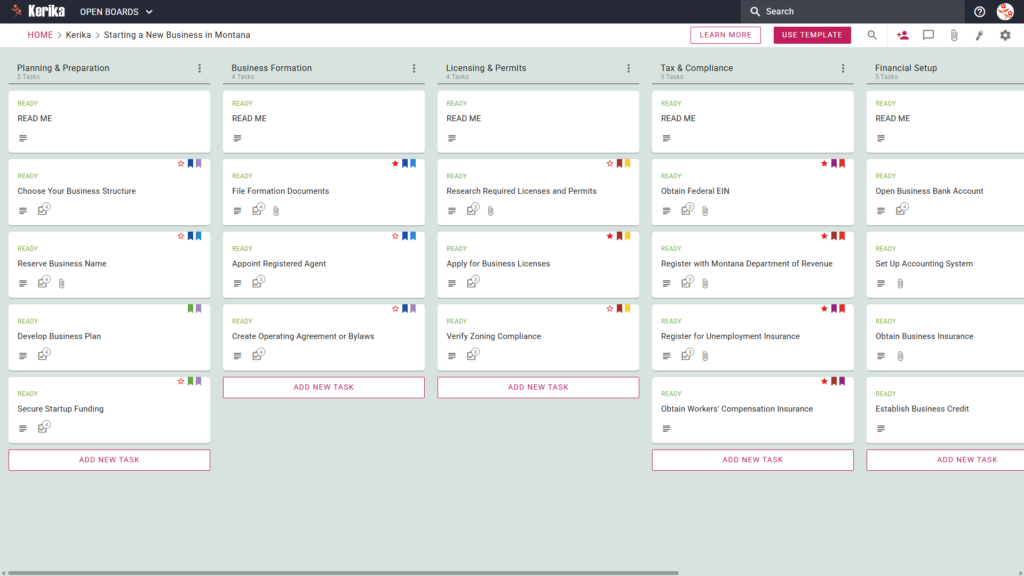
Click the image above to open the live template in a new tab
Launching a new venture in the Treasure State is an inspiring move, but the logistical hurdles and administrative complexity of getting off the ground can often feel overwhelming. From selecting the right legal structure to navigating state-specific filings, there are many moving parts to manage while organising your vision.
But don’t worry, this guide is your buffer against the administrative friction that often stalls great ideas. We designed this Kerika template to act as your central command centre, ensuring you never miss a critical step in the formation process. By using a visual, structured workspace, you can focus on building your brand while we help you manage the paperwork.
Ready to launch your Montana business with confidence? Let’s get started!
1. Who Can Use This
This template is built to support various types of founders as they navigate the path to business ownership:
- Solo Entrepreneurs: This acts as your personal roadmap. If you are managing the launch alone, this board ensures you stay on track. In Montana, solo founders often act as their own Registered Agent, a critical role you can track within the formation column.
- Partnership Founders: Coordination is vital when launching with others. This template facilitates seamless collaboration, making it clear who is responsible for which task so roles remain distinct and transparent from day one.
- Startup Teams: For small teams, this provides a single source of truth. It allows everyone to stay updated on complex state requirements and ensures the entire team is aligned on the launch timeline.
2. What it includes
The Montana Business Workflow template provides a comprehensive, six-column layout that follows the chronological lifecycle of a business, from initial concept to long-term maintenance:
- Planning & Preparation: Begin your journey by defining your foundation. This column includes cards such as Choose Your Business Structure, Reserve Business Name, Develop Business Plan, and Secure Startup Funding.
- Business Formation: This is where your entity becomes official. You will find tasks for File Formation Documents, Appoint Registered Agent, and Create Operating Agreement or Bylaws.
- Licencing & Permits: Use this section to research the specific legal requirements for your industry. It includes cards to Research Required Licences and Permits, Apply for Business Licences, and Verify Zoning Compliance.
- Tax & Compliance: Stay on the right side of the law by completing essential registrations. This column tracks your progress with Obtain Federal EIN, Register with Montana Department of Revenue, and Register for Unemployment Insurance. It also includes the specific task to Obtain Workers’ Compensation Insurance.
- Financial Setup: Build your professional infrastructure using cards like Open Business Bank Account and Establish Business Credit. This section also includes Obtain Business Insurance, a vital step to protect your assets that is distinct from state-mandated Workers’ Comp.
- Ongoing Operations: Business management extends far beyond the launch. This column features the File Annual Report task, which is a critical compliance milestone for maintaining your “Good Standing” status with the Secretary of State.
3. When You Should Use This
This workspace provides the most value during high-stakes phases of your business development:
- Beginning Your Entrepreneurial Journey: Use this at the “blank page” stage. It provides a structured path when you are first deciding how to transform an idea into a legal entity.
- Navigating State Compliance: This is essential when navigating requirements from the Business Services – Official Montana Secretary of State Website – Christi Jacobsen. Having your tasks organised in Kerika makes using official government resources much more efficient.
- High-Stakes Document Security: Use this when you need a secure place for your sensitive files. You can keep your Articles of Organisation and other formation documents in your own Google Drive, OneDrive, or Box account while managing the workflow within Kerika.
4. How To Use It
Managing your Montana business launch is straightforward if you follow these four steps:
- The READ ME Card: At the top of every column, you will find a “READ ME” card. Always check these first; they contain specific rules and criteria that should be met before moving tasks to the next stage of the lifecycle.
- Advancing the Workflow: As you reach milestones, move your task cards from left to right. This visual progress helps you recognise how much you have achieved as you move from planning to active operations.
- The CHECKLIST Tab: Open any card and navigate to the CHECKLIST tab to manage sub-tasks. This is perfect for breaking down complex state filings into small, manageable steps that ensure nothing is missed.
- The ATTACHMENTS Tab: Use the ATTACHMENTS tab to link digital versions of your permits or proof of registration directly to the relevant card. Because Montana is a “remote-first” friendly state, having these documents secure in the cloud via Kerika is specifically beneficial for founders who aren’t based near a physical state office.
Conclusion
By adopting a visual Kanban board, you can transform the daunting task of starting a business into a clear, manageable process. Kerika integrates directly with Google Workspace and Microsoft 365, ensuring that your document access rights are managed seamlessly within your existing ecosystem.
Whether you are a solo founder or building a team, having a structured workspace allows you to launch your Montana business with the highest professional standards. Your dream is achievable, and with the right tools, you can stay focused on the work that truly matters.
Need Something Different?
If this template isn’t exactly what you need, let us know at support@kerika.com, and we will create a custom version for you, free!