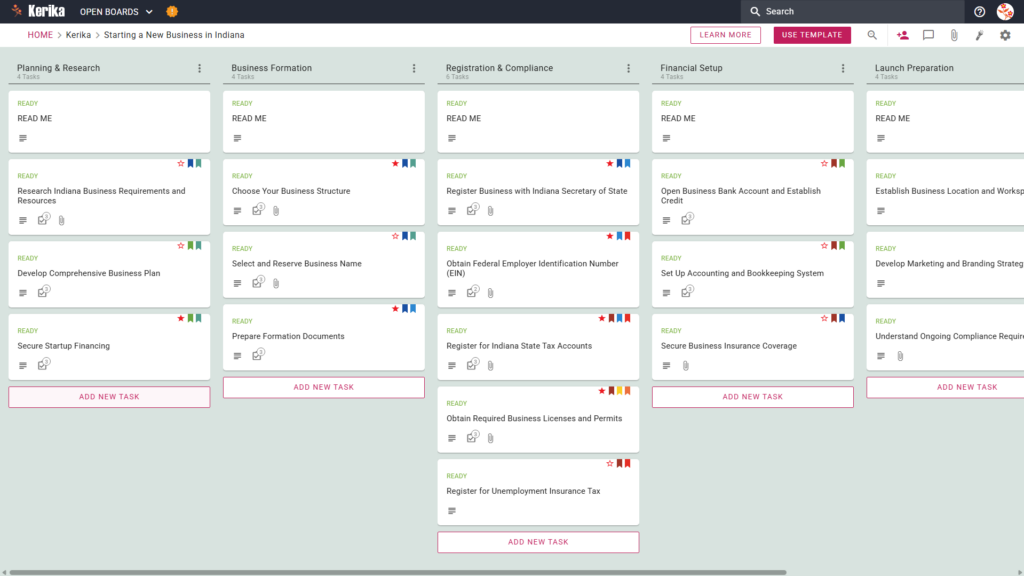
Click the image above to open the live template in a new tab
Launching a company is an exciting milestone, but navigating state-specific regulations in Indiana can quickly become a complex logistical hurdle. From legal registrations to tax compliance, the administrative overhead often feels overwhelming for new founders.
But don’t worry, this guide is here to help you navigate the process with confidence. We have designed this template to serve as a visual, structured solution that replaces administrative confusion with a clear, actionable roadmap. By using this workspace, you can transform a daunting list of requirements into a manageable sequence of tasks. Ready to build your Indiana business? Let’s get started!
1. Who Can Use This
This template is built to support the diverse group of professionals and entrepreneurs responsible for getting a new venture off the ground in the Hoosier State.
- Solo Entrepreneurs: Launching alone? You need a single source of truth for every detail. This template ensures you don’t miss a single filing or deadline while handling the entire workload yourself.
- Partnership Founders: For co-founders, coordination is everything. This workspace allows you to coordinate roles, assign specific tasks, and share vital documentation in real-time to keep all partners aligned and accountable.
- Startup Teams: Small teams needing a collaborative space to scale can use this board to track diverse workstreams. It allows every team member to see exactly what is finished and what requires immediate attention.
2. What it includes
The template provides a comprehensive workflow designed to mirror the chronological journey of setting up a business in Indiana. By moving from left to right, you ensure that foundational research is completed before you commit to legal or financial obligations.
- A Six-Column Workflow: Your progress is tracked through the Planning & Research, Business Formation, Registration & Compliance, Financial Setup, Launch Preparation, and Completed columns.
- Planning & Formation Tasks: Pre-configured cards include Research Indiana Business Requirements and Resources, Develop Comprehensive Business Plan, and Prepare Formation Documents.
- Registration & Compliance: Dedicated cards are ready for Register Business with Indiana Secretary of State, Obtain Federal Employer Identification Number (EIN), Register for Indiana State Tax Accounts, and Obtain Required Business Licenses and Permits.
- Financial Setup & Launch Preparation: To ensure a successful opening, the template includes cards for Open Business Bank Account and Establish Credit, Set Up Accounting and Bookkeeping System, and Establish Business Location and Workspace
3. When You Should Use This
This workspace provides the most value when you are ready to transition from a simple idea to a formal legal and financial entity.
- Navigating Official Requirements: Use this template to manage the specific requirements found in the ‘IN.gov | Business Owner’s Guide’. It translates government checklists into functional tasks, such as “Obtain Federal Employer Identification Number (EIN)” or “Register for Unemployment Insurance Tax.”
- Moving from Ideation to Setup: This is the ideal tool when you are ready to select a business structure and reserve your business name within the state of Indiana.
- High-Stakes Document Security: Organisation and security are critical during formation. Kerika ensures your files stay under your control by storing documents in your own Google Drive, OneDrive, or Box account, rather than on a third-party server.
4. How To Use It
Managing your Indiana business launch is straightforward when you follow these four steps:
- The READ ME Card: At the top of every column, you will find a “READ ME” card. Always check these first. They contain specific rules and criteria that must be met before you move a task to the next stage of the workflow.
- Advancing the Workflow: As you move from the research phase to the active launch, simply drag and drop task cards through the columns. This provides an instant visual update on your startup’s status for the entire team.
- The CHECKLIST Tab: Open any card and navigate to the CHECKLIST tab to manage sub-tasks. Use this to track granular details, such as specific licence renewal dates or individual application steps for state accounts.
- The ATTACHMENTS Tab: Use the ATTACHMENTS tab to upload your formation documents or tax filings directly to the relevant cards. This ensures your most important legal papers are always easy to find and securely stored.
Conclusion
Using a visual board for your business launch offers a significant advantage over managing tasks through messy email chains. By centralising your roadmap, you ensure that nothing falls through the cracks during the critical formation period.
Because Kerika integrates seamlessly with Google Workspace and Microsoft 365, managing stakeholder access is simple. You can add investors or advisors from the Indiana Small Business Development Centre (ISBDC) as ‘Visitors’ for read-only access. This allows them to monitor your progress and provide guidance without altering your data. This professional approach ensures your venture starts on a solid, organised foundation.
Need Something Different?
If this template isn’t exactly what you need, let us know at support@kerika.com and we will create a custom version for you, free!