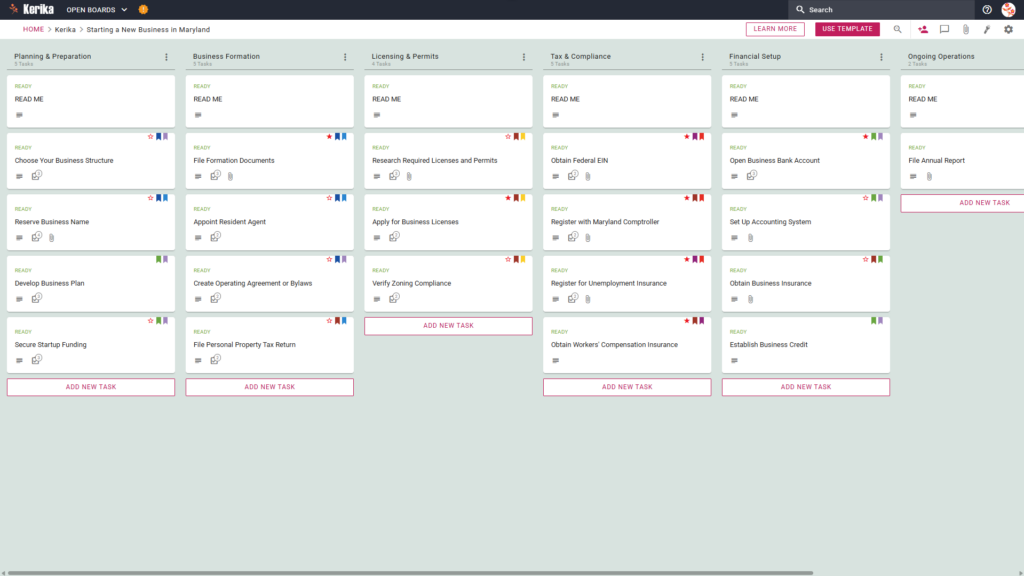
Click the image above to open the live template in a new tab
Starting a venture in Maryland is an ambitious milestone, but the administrative overhead can often feel like a massive logistical hurdle. Navigating the specific requirements of the Maryland Comptroller and the legalities of choosing a business structure creates significant friction for many founders.
This complexity can lead to delays or critical gaps in your governance framework. But don’t worry, this guide is here to help! We have designed this template to simplify your regulatory roadmap and provide a structured workspace for your entire team.
Ready to turn your business idea into a reality? Let’s get started!
1. Who Can Use This
This template is built to support different types of founders as they navigate the Maryland regulatory landscape:
- Solo Entrepreneurs: This workspace allows individuals to stay organised and manage every regulatory detail without needing a large administrative support team.
- Partnership Founders: For those launching with a partner, the board acts as a single source of truth to track shared responsibilities and prevent overlapping efforts.
- Startup Teams: Visual collaboration allows growing teams to move through the formation process efficiently, ensuring everyone is aligned as the organisation grows.
2. What it Includes:
The Starting a New Business in Maryland template provides a comprehensive starting point with a pre-configured, visual layout:
- A Six-Column Workflow: Your progress is tracked through the Planning & Preparation, Business Formation, Licensing & Permits, Tax & Compliance, Financial Setup, and Ongoing Operations columns.
- Planning & Formation: Pre-configured cards include Choose Your Business Structure, Develop Business Plan, and File Formation Documents.
- Licensing, Tax & Compliance: Dedicated cards are ready for Apply for Business Licenses, Register with Maryland Comptroller, and Obtain Workers’ Compensation Insurance.
- Financial Setup & Operations: To ensure a successful opening, the template includes cards for Open Business Bank Account, Set Up Accounting System, and File Annual Report.
3. When You Should Use This:
This workspace provides the most value in high-stakes environments where organization and security are critical:
- Beginning Your Entrepreneurial Journey: Use this template when you need a repeatable, reliable process to navigate official requirements from Start Your Business – Maryland Business Express, the official resource site from the Maryland State government.
- Navigating State Compliance: This is the perfect solution when you need to ensure compliance with Maryland state law from day one. It helps you avoid the risk of missing critical obligations, like registering with the Maryland Comptroller or obtaining Workers’ Compensation Insurance.
- High-Stakes Document Security: Use this when your business launch requires strict access control. Kerika is the only task management tool that leaves file ownership entirely with you by storing sensitive legal and tax documents in your own Google Drive, OneDrive, or Box account.
4. How To Use It
Managing your business launch is straightforward when you follow these steps within the Kerika platform:
- The READ ME Card: You will find a READ ME card at the top of every column. Think of these as process gates or quality control checkpoints; always check these first for the specific criteria that must be met before moving tasks.
- Advancing the Workflow: Move your task cards from left to right as milestones are met. This ensures your team only focuses on “ready” materials and avoids the chaos of jumping ahead before your legal foundation is laid.
- The CHECKLIST Tab: Open every card and navigate to the CHECKLIST tab to manage sub-tasks. You can check these off one-by-one to ensure that no small detail, such as a specific Maryland filing fee or figure, is ever overlooked.
- The ATTACHMENTS Tab: Use the ATTACHMENTS tab to store sensitive documents like your Articles of Organisation. Kerika is the only task management tool that leaves file ownership entirely with you by storing documents in your own Google Drive or OneDrive account.
Conclusion
Using a visual board for your business launch allows you to eliminate messy email chains and maintain high-level business credibility. Because Kerika integrates seamlessly with Google Workspace and Microsoft 365, your document access and security are managed automatically.
When you change a user’s role in Kerika, their file access in your cloud storage is updated instantly. Internal team members get the read+write access they need to build the business, while legal counsel or external partners can be added as Visitors with read-only access.
By following this structured workflow, you ensure your new venture maintains the highest professional standards from day one. It transforms a complex bureaucratic process into a manageable, transparent series of successful steps.
Need Something Different?
If this template isn’t exactly what you need, let us know at support@kerika.com and we will create a custom version for you, free!