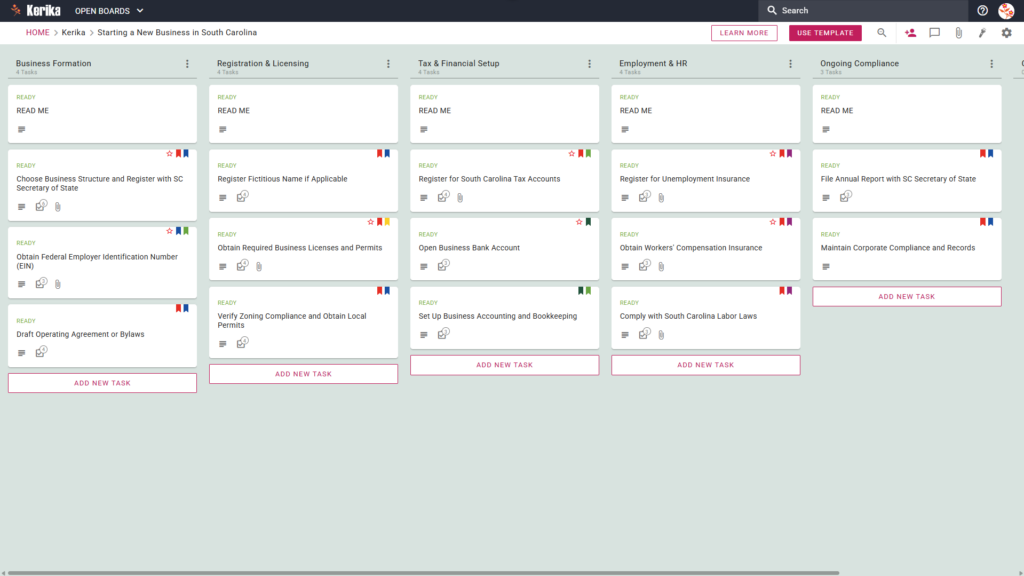
Click the image above to open the live template in a new tab
Starting a new business in South Carolina can feel like navigating a maze of bureaucratic red tape and jurisdictional confusion. The administrative overhead of state-specific compliance often creates a massive logistical hurdle that can stall even the most inspired founders. But don’t worry, this guide is here to help! We have designed this template to eliminate the friction of launching your venture by providing a visual, structured workspace for your entire team.
Ready to launch your South Carolina venture with confidence? Let’s get started!
1. Who Can Use This
This template is built to support a variety of users responsible for getting a new venture off the ground:
- Solo Entrepreneurs: This roadmap provides a structured path for individuals who need to manage every administrative detail alone. It ensures that no step in the South Carolina registration process is overlooked while organising the workload.
- Partnership Founders: Co-founders can use the board as a shared “single source of truth” to divide responsibilities clearly. It allows partners to co-ordinate their efforts in real-time without losing track of document versions or task ownership.
- Startup Teams: Small teams can use this workspace to manage registration, tax setup, and HR tasks simultaneously. The visual layout helps everyone stay aligned as the business moves through different stages of formation.
2. What it includes
The Starting a New Business in South Carolina template provides a comprehensive starting point with a pre-configured, visual layout:
- A Five-Column Workflow: Your progress is tracked through the Business Formation, Registration & Licensing, Tax & Financial Setup, Employment & HR, and Ongoing Compliance columns.
- Business Formation & Licensing: Pre-configured cards include Choose Business Structure and Register with SC Secretary of State, Draft Operating Agreement or Bylaws, and Obtain Required Business Licenses and Permits.
- Tax, Financial & HR: Dedicated cards are ready for Register for South Carolina Tax Accounts, Open Business Bank Account, and Register for Unemployment Insurance.
- Compliance & Operations: To ensure a successful opening, the template includes cards for Obtain Workers’ Compensation Insurance, File Annual Report with SC Secretary of State, and Maintain Corporate Compliance and Records.
3. When You Should Use This
This workspace provides the most value in high-stakes environments where organisation and security are critical:
- Beginning Your Entrepreneurial Journey: Use this when starting-a-business in the Palmetto State to ensure you have a repeatable, reliable process to follow from day one.
- Navigating State Compliance: This is the ideal tool for managing the specific legal requirements of South Carolina law, ensuring all filings are completed in the correct order.
- High-Stakes Document Security: This is the perfect solution for those who require strict access control. Kerika is the only task management tool that ensures your sensitive legal and financial files stay in your own secure cloud storage, such as Google Drive, OneDrive, or Box.
4. How To Use It
Managing your business setup is straightforward with these features:
- The READ ME Card: You will find a “READ ME” card at the top of every column. Always check these first, as they contain specific rules on the criteria that must be met before moving tasks to the next stage.
- Advancing the Workflow: Only move task cards from one column to the next, such as moving from Business Formation to Registration & Licensing, once the criteria for that stage have been fully met. This ensures the workflow remains accurate and prevents skipped steps.
- The CHECKLIST Tab: Open every card and navigate to the CHECKLIST tab to manage sub-tasks. Check these off one-by-one to ensure no detail, such as a specific filing fee or date, is ever missed.
- The ATTACHMENTS Tab: Use the ATTACHMENTS tab to upload documents, such as articles of incorporation or tax forms, directly to the relevant card. These files stay in your secure cloud storage, and Kerika ensures they are shared automatically with the right team members.
Conclusion
Using the Kerika template ensures your business setup is supported by a professional, organised approach. Because Kerika integrates seamlessly with Google Workspace and Microsoft 365, your access rights and file ownership are managed automatically. By moving to a visual board, you can eliminate messy email chains and maintain the high professional standards required for a successful launch.
Need Something Different?
If this template isn’t exactly what you need, let us know at support@kerika.com, and we will create a custom version for you, free!