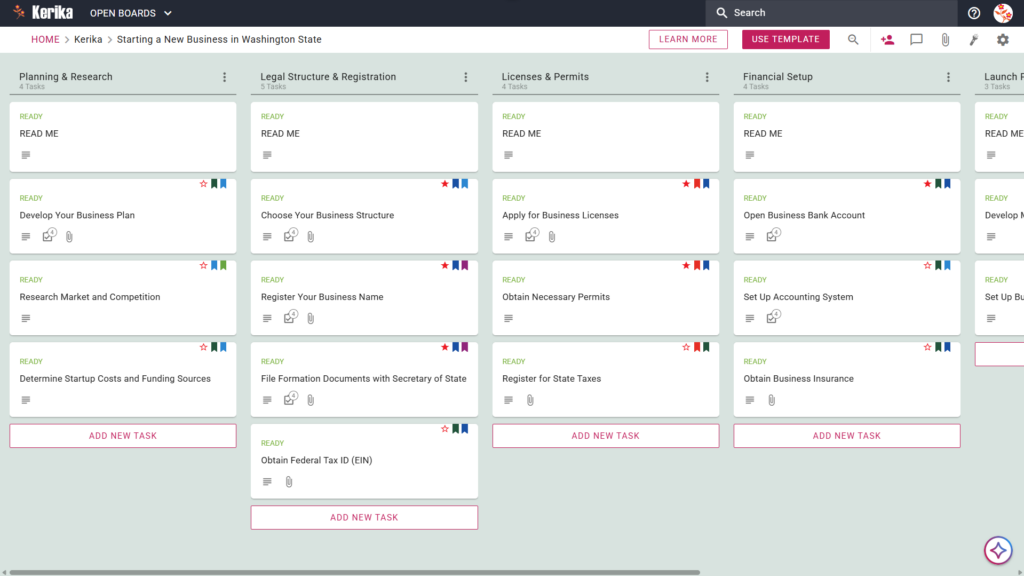
Click the image above to open the live template in a new tab
Launching a business in the Evergreen State is an exciting milestone, but the logistical hurdles can often feel like a massive hurdle. Navigating Washington State’s specific requirements such as those detailed in the official WA Small Business Guide frequently creates friction for new owners trying to manage legal filings, tax registrations, and licensing all at once.
But don’t worry, this guide is here to help you! We have designed this template to remove the guesswork and simplify the transition from a great idea to a fully operational legal entity. By translating static documentation into a dynamic workspace, we help you focus on your vision while we handle the roadmap. Ready to launch your dream in the Evergreen State? Let’s get started!
1. Who Can Use This?
This template is built to support a variety of professionals and founders navigating the Washington business landscape:
- Aspiring Entrepreneurs: Individuals planning their first venture who need a clear, step-by-step path through state-specific regulations.
- Business Partners: Co-founders who require a shared, collaborative workspace to divide responsibilities and track progress in real-time.
- Consultants and Advisors: Professionals such as lawyers, accountants, or business coaches who are guiding clients through the complexities of WA-specific compliance.
2. What it includes?
The Starting a New Business in Washington State template provides a comprehensive starting point with a pre-configured, visual layout:
- A Six-Column Workflow: Your launch progress is tracked through the Planning & Research, Legal Structure & Registration, Licenses & Permits, Financial Setup, Launch Preparation, and Completed columns.
- Foundational Tasks: Pre-configured cards include the Develop Your Business Plan, Research Market and Competition, and Determine Startup Costs and Funding Sources.
- Legal and Registration Milestones: Dedicated cards are ready for the Choose Your Business Structure, Register Your Business Name, File Formation Documents with Secretary of State, and Obtain Federal Tax ID (EIN)
3. When You Should Use This?
This workspace provides the most value when you encounter the specific “pain points” of business formation:
- When you need a step-by-step roadmap: Use this to ensure no critical legal requirement, such as your Washington Secretary of State filing, is missed during the rush of starting up.
- When transitioning from an idea to a formal entity: If you feel overwhelmed by the “Small Business Guide: Start” documentation, this template translates those static instructions into actionable tasks.
- When you need to centralize documents: Use Kerika to keep your EIN confirmation, state licenses, and formation papers in one secure, shared location rather than buried in messy email attachments.
4. How To Use It?
As a technical strategist, I recommend following these six steps to manage your business launch with professional precision:
- Initiate Your Board: Start by checking the READ ME cards at the top of every column. These contain the “ground rules” and criteria that must be met before you move tasks to the next stage.
- Assemble Your Team: Invite partners or legal advisors to the board. This ensures everyone has a single source of truth and eliminates the administrative overhead of constant status updates.
- Include Stakeholders: You can add specialized roles, such as your accountant, to specific cards within the “Financial Setup” column to handle banking and insurance tasks.
- Methodically Progress: Use the internal checklists on each card to manage sub-tasks. Move cards from left to right only after requirements are met. Successfully moving a card to the “Completed” column is your final signal that a phase of your launch is officially secured.
- Facilitate Communication: Use the card comments to discuss specific WA state requirements. This keeps your strategy organized and ensures that all historical context stays attached to the relevant task.
- Monitor Advancements: Use the visual layout to see at a glance how close you are to the “Launch Preparation” phase and identify any bottlenecks before they delay your opening day.
Conclusion
Using a visual, structured workspace transforms the complex process of business formation into a series of manageable, professional steps. By moving your launch to a Kerika board, you gain an environment that keeps your team aligned and your documents secure. Because Kerika integrates directly with Google Drive, OneDrive, or Box, you maintain full ownership and control of your sensitive EIN and formation documents at all times. You have the vision for your business; now you have the professional roadmap to make it a reality.
Need Something Different?
If this template isn’t exactly what you need, let us know at support@kerika.com, and we will create a custom version for you, free!