Google+ with a custom URL is useless for businesses

Google is making a huge push to get everyone to create a Google+ account, but it’s hard to see how this is going to succeed when Google+ is missing a very basic feature that every single business needs: the ability to create a custom URL, e.g. plus.google.com/kerika.

We have been updating our website and social media channels recently, and as part of that process we created a Google+ page for Kerika and ended up with the utterly useless URL of https://plus.google.com/110330426240622128664/posts

This isn’t a URL that even we can ever remember, and it certainly offers no incentive for us to publicize it. “Kerika” is a registered trademark and a registered service mark, so obviously it is important for us to use our name in all of our marketing. All other social media offer custom URLs: we have facebook.com/kerika, twitter.com/kerika, linkedin.com/kerika — even youtube.com/kerika! — but not plus.google.com/kerika!

It’s difficult to fathom Google’s foot-dragging in this matter: custom URLs don’t need to be offered to every single user — and its very difficult to manage a namespace if you tried to offer up custom URLs to hundreds of millions of people — but it is an absolute “must-have” feature for every business. All businesses care deeply about their product names: these are valuable intellectual property assets, and we cannot think of any business that would want to publicize a random 24-digit number instead of their own name.

Until Google gets this very basic feature implemented, there is no rational argument to be made for a business to take Google+ seriously…

Improved integration with Google Drive, faster performance, and full iPad support

Along with our best wishes for this holiday season, we have a small present to put under the tree as well: a new version of Kerika will be available on Christmas Day! This new version will come with:

  • Improved integration with Google Drive: now, you will be able share any kind of files, including music, videos, Flash, and other binary data, simply by adding them to your project cards or canvases. (When you log into Kerika again, you will be asked to reauthorize Kerika’s access to your Google Apps,)
  • Improved performance: projects should load at least twice as fast as they did before, making it a lot easier to use Kerika in coffee shops and other places with unreliable WiFi.
  • Full, fun iPad support: you will be able to access your Kerika projects using the Safari or Chrome browser on your tablet (no need to download any apps).
  • Better support for visitors: you can give project stakeholders (like your clients, for example) read-only access to your projects. They will be able to view everything in your projects except for your chat, which will remain private to the team members.

There are also usability tweaks:

  • Attachments can now be opened with a single click.
  • The “Move” action can now be found in the menu at the top of the columns.

What we are working on next:

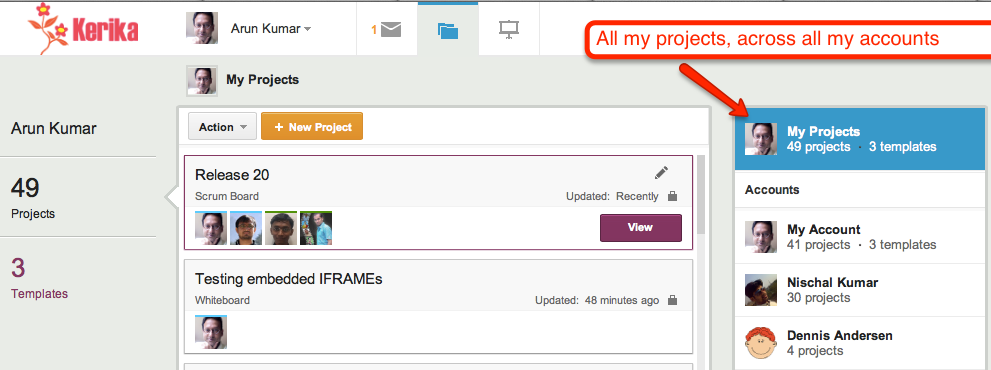
  • A consolidated view of all your projects, similar in concept to the “unified inbox” you find on your smartphone.
  • Easier ways to manage your account, and integration with the Google Apps Marketplace and the Chrome Web Store.
  • Work estimation, work logging, and exporting of project data.

Thanks again for all your support: the very encouraging feedback we have been getting from our users continues to fuel our efforts!

60 usability improvements (and we are not done yet!)

Kerika got updated today, with around 60 usability improvements based upon feedback from our early adopters. Many of the changes are quite small, but you should notice that now it is even easier to:

  • Add people to projects.
  • See who is part of each project.
  • Chat about cards.
  • Work with templates.
  • Catch up on updates from coworkers.
  • Use Kerika’s unique canvas feature.

There’s also a simpler and easier welcome experience for new users, and improved performance with faster downloads.

And speaking of performance, that’s our next focus: we want to kick that up quite a bit, so it’s even easier to use Kerika with public WiFi networks like coffee shops.

Giving real thanks, this Thanksgiving

This Thanksgiving holiday, we have good cause to be grateful to all the folks who gave us detailed feedback on our new task management software, and helped us identify about 25 different improvements that we plan to make over the next week covering areas such as:

  • Eliminating any confusion that might exist regarding project privacy;
  • Making it easier to edit card titles;
  • Making it easier to chat on individual cards;
  • Improving the emails that are sent when people are added or removed from projects;
  • Improving the overall performance, by at least by 50%;
  • Simplifying the experience for new users;
  • Simplifying the use of canvases and whiteboards;
  • Adding helpful hints throughout the product; and
  • Eliminating references to “Kanban” which some people find confusing (without eliminating any functionality).

We will be updating Kerika next week, and will continue to release new versions every two weeks, and over the next month we plan to market and publicize the software more.

Task management comes to Kerika

At long last, task management comes to Kerika!

We are launching a brand-new version of Kerika this weekend: the fruits of over 8 months of intense research and design of the only taskboard that’s designed specially for distributed teams. There’s a short video that we urge you to watch: it provides a good overview of Kerika’s new capabilities:

  • You can organize your work using cards on a virtual task board: the interface is easy to understand and delightful to use.
  • Each card can contain details of the work, and, of course, you can add content from your laptop or the Web to each card.
  • Each card can be assigned to one or more people from your project team: Kerika lets you see at a glance who is working on what.
  • Chat is integrated directly with your work: you can send messages that are attached to your cards, or the entire taskboard.
  • You can get started with one of our standard project templates, or create your own process templates to reflect your organization’s best practices and proprietary methodologies.
  • Kerika’s unique whiteboard capabilities are integrated with the new task management: you can add a canvas to each card for sharing ideas, and everything updates in real-time as usual.
  • And our special focus continues to be the challenges faced by teams that are distributed over different locations — it could be that you are working with people offshore, or simply working from home: Kerika makes it easy for you to see, at a glance, exactly what’s changed on each work item in each project.

As usual, we look forward to your feedback! (Contact us by email.)

A new user interface, with much improved usability

We are launching a brand-new version of Kerika, with a completely reworked user interface and a ton of new features including support for iPads and other full-sized tablets.

The new UI is different enough that we have put together a 2-minute video that we recommend you watch before you sign in next; it will really help you get the most out of the new software. The interface is new, but all your old projects and data are all intact!

The new interface is part of a larger transformation we are undertaking that will add project management capabilities to our existing collaboration features: we want to provide support for Kanban-style projects, Agile/Scrum projects, and customized workflows. We have finished designing the new features and if you would be willing to take a look at our mockups and give us your opinion, it would be greatly appreciated!

Meanwhile, please enjoy the new version, particularly if you have an iPad or other full-sized tablet. To access Kerika on your tablet, just log into the kerika.com site using your tablet’s browser: there is no need to download any app because we have rebuilt the user interface to work just fine inside your tablet’s browser.

How to tell if a file has been updated

The first version of Kerika was written as a peer-to-peer (p2p) application, so one challenge we faced was detecting when files that are being shared as part of a project were changed by a user, so that we could send the latest version to everyone else on the team.

Our first attempt at a solution was to simply examine the Last Modified time for files. However, this proved to be very unreliable for a rather odd reason: whenever you open a spreadsheet using Microsoft Excel, it automatically updates the Last Modified time to be the current time – even before you had made any changes.

And when you close Excel, without having made any changes, it resets the Last Modified time back to its original value. So, whenever you opened a Excel files for viewing, we would erroneously identify it as an updated file.

We then tried looking at the size of files, to see if these had changed since we last examined them. We knew, of course, that this would be error prone in its own way: if you change some text within a file such that it contains the same number of characters as before, the overall size of that file would not change.

But this approach failed for another reason altogether: Microsoft Word allocates disk space in chunks at a time, rather than as exact amounts. This means that any edits to Word files that do not require Word to grab another chunk, or give up a chunk, would never be reflected in the reported size of the file.

Eventually, we decided to take the MD5 hash of files, which is a more reliable way of detecting if a file has been modified. We were concerned about how much CPU overhead this would take, but it proved to not be a problem after all.

Kerika isn’t written in Indonesian. (And Google Docs isn’t in Vietnamese either…)

An odd problem that we cannot quite figure out: every once in a while Google’s Chrome browser will tell the user that the application is written in Indonesian, and then offer to do a translation.

We cannot figure out what’s going on with this: all of the code is written in Javascript and Scalable Vector Graphics (SVG), so why would Chrome consider it to be an Indonesian page?

The problem must lie with Google Chrome itself: now, we are noticing that it will sometimes report that Google Docs is written in Vietnamese, as this screenshot shows!

When techies turn libertarian, neither Democrats nor Republicans will win

The Wall Street Journal’s editorial page contains a bemusing article called Keeping the Spirit of Steve Jobs Alive that concludes that

Thanks to Washington, the liberal politics of Silicon Valley may now be tilting toward the libertarian right.

The WSJ is, of course, a Republican mouthpiece, which probably explains the writer’s smug assumption that when techies turn libertarian, they will all start voting Republican, which is absurd on two counts:

  • It is based upon what is essentially “non-news” in the first place: many techies have long tilted libertarian in their political views because of the very nature of their profession: information technology itself is based upon the free flow of information, so respect for the First Amendment runs deep within the tech world, and the business itself is relentlessly meritocratic and brutally disruptive, which supports neither the collective approach of the left, nor the deference to authority of the right.
  • Libertarianism may be to the “right” of liberalism, but in its emphasis on personal liberty, it could just as easily be described as being to the “left” of conservatism. In any case, libertarianism forms a 3-D point with respect to classic liberalism and conservatism, so any mapping of a 3-D topography of political views to a 2-D spectrum will necessarily be misleading.

And because libertarianism confounds the simple soundbites and clear definition of the “enemy” that both Democrats and Republicans find convenient, neither party would really welcome libertarians in their midst.

If the WSJ had understood the difference between Republicans and libertarians (with a small “l”) in the first place, they would have noticed a long time ago that a lot of techies are social liberals and economic conservatives…

Our latest version: better integration with Google, and more UI coolness

You will have a new version of Kerika tomorrow, with a bunch of great new features. One big improvement is in Kerika’s integration with Google: we are upgrading to Google’s newer, better authentication system, so you will be asked to sign-in through Google again as if you were a brand new user — but don’t worry, none of your old projects or data are affected in any way by this change! The new sign-in process consolidates in one place all the permissions that Kerika requests with respect to your Google account; they include:

  • Access to your basic information: name, email address and photograph, which we use to make sure your Kerika account is set up properly. Now, the photo you use on Google will be used automatically for your Kerika projects as well.
  • Access to your Google Docs account, which, as before, we use to store the files you upload to your Kerika projects. Now, when you upload files to a Kerika project, they will be stored in the Google Docs account of the Account Owner. This makes it easier for Account Owners to manage all the content assets related to their projects.
  • Access to your contacts: this will be used in our next release (look for it in a couple of weeks) which will have auto-completion of names and email addresses when you invite people to join your projects.

There’s a long list of benefits that come with the new version of Kerika:

  1. When you add a URL to a Kerika page, that web site will show up as an embedded page within your Kerika page (i.e. as an IFRAME): you can customize the size and the display, so that only the content you are interested in is shown. Which means that Kerika lets you literally cut-and-paste the Internet.
  2. When you add Web content to Kerika pages, the system automatically gets the title of the Web content, so you don’t have to enter that by hand. And, of course, you can always rename it if you like.
  3. When you upload files to Kerika projects, they will now be stored in sub-folders within your Google Docs that are named for the Kerika projects. This means your Google Docs account doesn’t get cluttered with files in the same way as it did before.
  4. If you use Google Drive, you will find that your Kerika documents are available across all your computers. Kerika is well integrated with Google Drive.
  5. When someone joins a project that already has a bunch of Google Docs, they won’t get a bunch of emails any more from Google letting them know that they have access to each of these files. (These emails were kind of annoying ;-)
  6. If someone is removed from a project team, they will no longer have access to the Google Docs that were part of that project.
  7. On Firefox, Chrome and Safari (but not IE9), you will see thumbnails of the documents on your Kerika projects, which makes it easier for you to quickly distinguish between several files.
  8. When you make a project open to the public, its documents are available only to people who know the URL of the documents. We feel this is a better approach to privacy when you considering making a project open to the public.
  9. When you are uploading a large file to your Kerika project, you don’t have to wait for the uploading to finish in order to do other work inside Kerika.
  10. When you copy a project, or use someone’s public project as a template, you will get your own copies of all the documents in that project.
  11. Switching between different Kerika pages is now much faster since images are now retrieved from your browser cache instead of from the server.
  12. A long-awaited bug fix: when you have images (pictures) on your Kerika pages, they will be shown properly on Internet Explorer 9 and Safari. (We had to fix a problem with the way these browsers dealt with Google Docs.)
  13. Text blocks can now have a border color as well.
  14. The emails sent when you invite people have been improved.
  15. And, finally, the thumbnails of Kerika pages — which you can post to Facebook, LinkedIn, Google+, etc. — are much improved.

Thanks for your continued support of Kerika, and for providing feedback on how we can improve the product. There’s more good stuff coming your way, so keep collaborating…