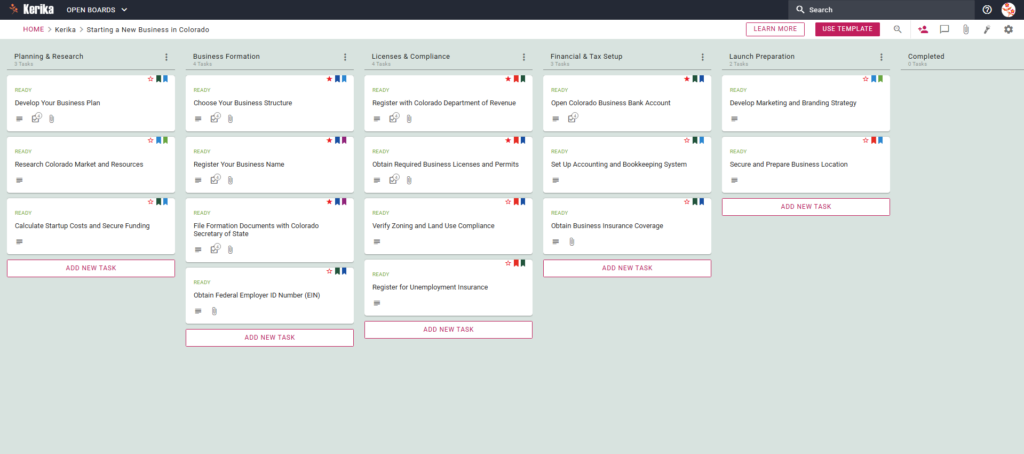
Click the image above to open the live template in a new tab
Starting a business in the Centennial State is an incredibly exciting journey, but we know it often comes with a daunting list of administrative hurdles. From navigating state filings to structural planning, the complexity can feel overwhelming for even the most seasoned entrepreneur. This Kerika template is designed specifically as your professional roadmap to help you reclaim your time by reducing the administrative overhead of your legal and financial setup. Instead of getting lost in disjointed spreadsheets or messy email chains, you can focus on building a foundation for scalability and success. Ready to launch with confidence? Let’s dive in!
1. Who Can Use This
This template is a dedicated resource for entrepreneurs and small business owners in Colorado. It is designed for:
- Founders who need to organize Colorado-specific paperwork and administrative filings.
- Local founders looking for a “single source of truth” to manage every moving part of their launch.
- Distributed teams and co-founders who need to collaborate seamlessly while maintaining clear accountability.
2. What it includes
The Colorado Business Launch template provides a pre-configured workflow across five essential columns, including critical tasks pre-loaded from the Colorado Secretary of State and Department of Revenue requirements:
- Planning & Research: Conduct market research and calculate startup costs to develop your comprehensive business plan.
- Business Formation: Choose your legal business structure, register your name, and file formation documents with the Colorado Secretary of State.
- Licenses & Compliance: Identify your specific state and local licenses, register with the Colorado Department of Revenue, and handle local tasks like Verify Zoning and Land Use Compliance.
- Financial & Tax Setup: Set up your accounting system, secure insurance, open a business bank account, and complete the critical Register for Unemployment Insurance task.
- Launch Preparation: Finalize your launch strategy, secure your business location, and prepare your branding for the grand opening.
3. When You Should Use This
- You should adopt this workflow from day one of your journey to ensure your files remain secure and organized in your own Google Drive, OneDrive, or Box account.
- This template serves as your primary navigation tool when visiting business.colorado.gov (the official state resource); as you gather information, you can attach relevant URLs and PDFs directly from the state site to your task cards so they are never lost.
4. How To Use It
- Initiate Your Board
Select the Colorado Business Launch template to immediately populate your board with pre-configured columns and tasks. This instant setup provides a clear roadmap, transforming a complex government process into a manageable visual workflow.
- Assemble Your Team
Invite your co-founders or legal advisors to the board as Team Members with read+write access. This allows everyone to contribute to tasks and upload documents in real-time while Kerika automatically handles the backend file permissions.
- Include Stakeholders
Add mentors or investors as Visitors to provide them with real-time, read-only access to your progress. This is a high-value way to keep your inner circle in the loop without incurring additional licensing costs.
- Methodically Progress
Every column begins with a READ ME card that contains the “Definition of Ready” for that phase—be sure to check these to ensure compliance. Move task cards through the workflow as you finish them, knowing that all dates and assignments roll up to the task level for clear visibility.
- Facilitate Communication
Use the Chat feature on specific task cards to keep all discussions connected to the work itself rather than scattered in emails. These conversations stay forever connected to the task, making it easy to retrieve decisions or context months after your launch.
- Monitor Advancements
Leverage the Dashboard to get a high-level summary of your entire project across multiple boards. This view highlights exactly what needs your attention, effectively eliminating the need for manual status reports or time-consuming update meetings.
Conclusion
Launching a business is complex, but your project management shouldn’t be. By using a visual Kanban-style board, you replace the confusion of email threads with a streamlined, professional process. Kerika keeps your Colorado business data secure by automatically managing file permissions when user roles change, ensuring your documents remain entirely under your ownership and control.
Need Something Different?
If this template isn’t a perfect fit for your specific venture, we are here to help. Email support@kerika.com and our team will create a free custom version designed specifically for your unique business needs.