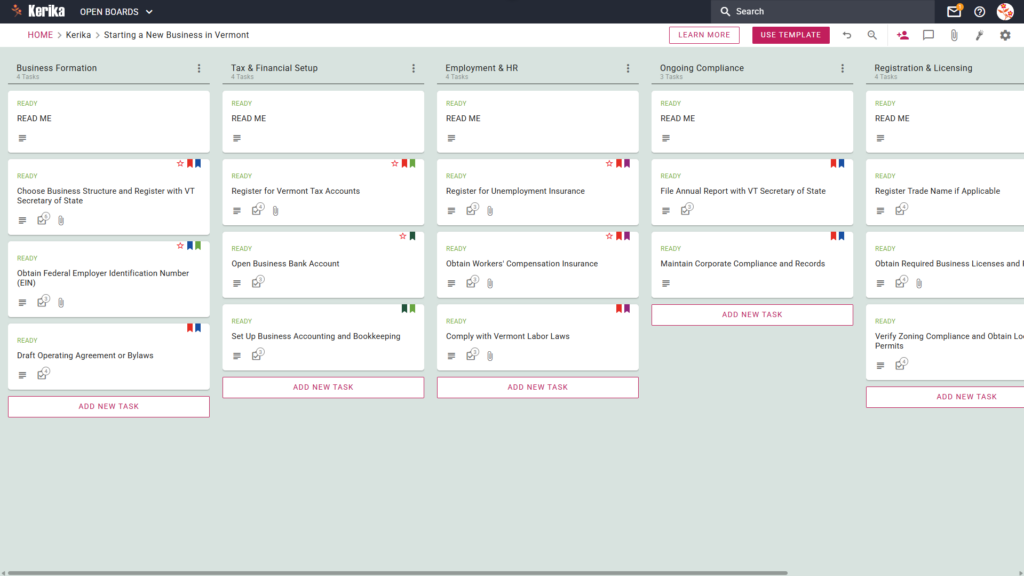
Click the image above to open the live template in a new tab
Establishing a new venture in the Green Mountain State is an ambitious goal, but the administrative landscape presents a significant regulatory hurdle that can derail a launch before it begins. Navigating Vermont-specific requirements, from local zoning permits to state tax registrations, requires impeccable timing and precise record-keeping.
Without a centralised workflow, critical documents often vanish into fragmented email chains and disconnected spreadsheets. We designed this template to eliminate that friction by providing a visual, structured workspace for your entire team to manage the state-specific business formation process from start to finish.
But don’t worry, this guide is here to help! By adopting a visual board, you can ensure every regulatory milestone is achieved with professional precision and zero guesswork. Ready to launch your Vermont business with confidence? Let’s get started!
1. Who Can Use This
This template is designed to support the diverse range of professionals and founders looking to establish a presence in Vermont:
- Solo Entrepreneurs: If you are launching a venture on your own, this template acts as your digital project manager to track every state-specific requirement. It ensures you never miss a deadline while managing multiple roles, providing a clear path from initial formation to ongoing compliance.
- Partnership Founders: For businesses with multiple owners, the template provides a “single source of truth” to keep the leadership team aligned. It allows partners to delegate responsibilities clearly, ensuring tasks like tax registration and legal filings are handled without any duplication of effort.
- Startup Teams: Small teams can use this structured workflow to collaborate in real-time, whether working locally or distributed across different locations. It ensures that as the team grows, the complete history of every state filing and legal document remains perfectly organised and accessible.
2. What it includes
The Vermont Business Startup template provides a comprehensive, pre-configured layout based on a Five-Column Workflow:
- Business Formation: This initial stage focuses on your legal foundation. It includes critical tasks such as “Choose Business Structure and Register with VT Secretary of State”, obtaining your “Federal Employer Identification Number (EIN)”, and drafting your operating agreement.
- Registration & Licensing: This column covers the permissions needed to operate legally. You will find cards for registering trade names and obtaining required business permits or local zoning clearances.
- Tax & Financial Setup: Manage your fiscal responsibilities by following tasks to Register for Vermont Tax Accounts, open business bank accounts, and establish your accounting infrastructure.
- Employment & HR: If you plan to hire, this section guides you through registering for unemployment insurance, workers’ compensation, and complying with Vermont labour laws.
- Ongoing Compliance: To ensure your business remains in good standing, use this column to track recurring requirements, such as the mandate to File Annual Report with VT Secretary of State.
3. When You Should Use This
This workspace provides the most value during high-stakes phases where organisation and security are critical:
- Beginning Your Entrepreneurial Journey: Use this template the moment you decide to launch to navigate “business-services” for new setups. It provides a repeatable, reliable process that ensures no foundational step is overlooked during the excitement of a new launch.
- Navigating State Compliance: This is essential when you need to ensure your setup adheres strictly to Vermont law. The structured columns prevent the accidental oversight of mandatory state filings and local permits.
- High-Stakes Document Security: Use Kerika when your security requirements demand strict access control over sensitive legal documents. Kerika is unique because file ownership remains entirely with you, storing all your filings in your own Google Drive, OneDrive, or Box account.
4. How To Use It
Managing your Vermont business launch is straightforward with these functional steps:
- The READ ME Card: You will find a “READ ME” card at the top of the columns. Always check these first, as they contain the Workflow Policies, the specific rules and criteria that must be met before adding or moving tasks to the next stage of the setup process.
- Advancing the Workflow: As you complete requirements, move task cards from left to right. Moving a card from Business Formation to Registration & Licensing provides the whole team with instant status updates, allowing everyone to see exactly how far the launch has progressed at a glance.
- The CHECKLIST Tab: Open every card and navigate to the CHECKLIST tab to manage sub-tasks. You can use this to track granular details, such as the steps for EIN verification. Kerika allows you to assign individual checklist items to different team members, ensuring clear accountability for every detail.
- The ATTACHMENTS Tab: Use the ATTACHMENTS tab to upload state filings, tax documents, or spreadsheets directly to the relevant card. Because Kerika uses your own cloud storage, there are no file size limits and no data silos; your files stay in your secure storage and are shared automatically with the authorised team.
Conclusion
Using the Kerika Vermont Business Startup Template ensures your new venture is supported by professional, organised preparation. By moving to a visual board, you eliminate the confusion of email threads and ensure your organisation maintains the highest professional standards from day one.
Because Kerika integrates seamlessly with Google Workspace and Microsoft 365, access rights are managed automatically. Team members get the read and write access they need to build the business, while external advisors can be added as “Visitors” with read-only access to review your progress.
Need Something Different?
If this template isn’t exactly what you need for your specific industry or state, let us know! Contact us at support@kerika.com, and we will create a custom version for you, free of charge.