Category Archives: Kerika

Posts about Kerika, the company and its people

Along the way to a better search, a deeper dive into Amazon Web Services

We have been busy building a great new Search function: the old search worked only with whiteboards, but the new search indexes absolutely everything inside Kerika: cards, chat, attachments – the whole lot.

We will talk about Search in a separate blog post; this article is about the detour we made into Amazon Web Services (AWS) along the way…

Now, we have always used AWS: the Kerika server runs on an EC2 machine (with Linux, MySQL and Jetty as part of our core infrastructure), and we also use Amazon’s Dynamo Database for storing card history – and our use of various databases, too, deserves its own blog post.

We also use Amazon’s S3 cloud storage, but in a limited way: today, only some static data, like account logos and user photos are stored there.

The new Search feature, like our old one, is built using the marvelous Solr platform, which is, in our view, one of the best enterprise search engines available. And, as is standard for all new features that we build, the first thing we did with our new Search function was use it extensively in-house as part of our final usability testing. We do this for absolutely every single thing we build: we use Kerika to build Kerika, and we function as a high-performing distributed, agile team!

Sometimes we build stuff that we don’t like, and we throw it away… That happens every so often: we hate it when it does, because it means a week or so of wasted effort, but we also really like the fact that we killed off a sub-standard feature instead of foisting crapware on our users. (Yes, that, too, deserves its own blog post…)

But our new Search is different: we absolutely loved it! And that got us worried about what might happen if others liked it as much: search can be a CPU and memory intensive operation, and we became worried that if our Search was so good that people started using it too much, it might kill the performance of the main server.

So, we decided to put our Solr engine on a separate server, still within AWS. To make this secure, however, we needed to create a Virtual Private Cloud (VPC) so that all the communications between our Jetty server and our Solr server takes place on a subnet, using local IP references like 10.0.0.1 which cannot be accessed by people outside the VPC. This makes it impossible for anyone outside the VPC to directly access the Solr server, adding an important layer of security.

To communicate between the Jetty server and the Solr server, we have started using Amazon’s Simple Queue Service (SQS).

OK, that means we add VPC to our suite of AWS services, but this started triggering a wider review of whether we should use more AWS services than we currently do. One sore point of late had been our monitoring of the main server: our homemade monitoring software had failed to detect a brief outage (15 minutes total, which apparently no one except our CEO noticed :0) and it was clear that we needed something more robust.

That got us looking at Amazon’s CloudWatch which can be used with Amazon’s Elastic Load Balancer (EBS) to get more reliable monitoring of CPU thresholds and other critical alerts. (And, along the way, we found and fixed the bug which caused the brief outage: our custom Jetty configuration files were buggy, so we dumped them in favor of a standard configuration which immediately brought CPU utilization down from a stratospheric level to something more normal.)

We didn’t stop there: we also decided to use Amazon’s Route 53 DNS service, which provides greater flexibility for managing subnets than our old DNS.

In summary, we have greatly expanded our Amazon footprint:

  • EC2 for our main Web servers, running Linux, Jetty, MySQL, with separate servers for Solr.
  • S3 for basic storage.
  • Dynamo for history storage.
  • VPC for creating a subnet.
  • SQS for monitoring.
  • CloudWatch for monitoring.
  • Elastic Load Balancer for connecting to servers.
  • Route 53 for DNS.

Something from Amazon that we did abandon: we had been using their version of Linux; we are switching in favor of Ubuntu since that matches our development environment. When we were trying to debug the outage caused by the high CPU utilization, one unknown factor was how Amazon’s Linux works, and we decided it was an unknown that we could live without:

  • First of all, why is there an Amazon Linux in the first place, as in: why did Amazon feel they need to make their own Linux distribution? Presumably, this dates back to the very early days of AWS. But is there any good reason to have a vendor-specific Linux distribution today? Not as far as we can tell…
  • It just adds unnecessary complexity: we are not Linux experts, and have no interest in examining the fine print to determine how exactly Amazon’s Linux might vary from Ubuntu.

Unless you have in-house Linux experts, you, too, would be better off going with a well-regarded, “industry-standard” (yes, we know there’s no such thing in absolute terms but Ubuntu comes pretty close) version of Linux than dealing with any quirks that might exist within Amazon’s variant. When you are trying to chase down mysterious problems like high CPU utilization, the last thing you want is to have to examine the operating system itself!

What we continue to use from Google:

  • Google login and restriction, based upon OAuth 2.0,
  • Google Drive for storing user’s local files.

All the pieces are coming in place now, and we should be able to release our new Search feature in a day or two!
Here be Dragons: the Terra Incognita of Distributed Agile

Traditional Scrum methods don’t help if you are dealing with distributed agile teams: in fact, the traditional answer to how you can manage distributed agile is “Pick distributed or agile; you can’t have both.”

Recently, Arun Kumar (founder and CEO of Kerika) gave a presentation to the Seattle Software Process Improvement Network (SeaSPIN), reviewing three generic strategies for managing distributed agile teams:

  • Divide by location
  • Divide by function
  • Divide by component

The talk was very well received, so here it is as a Slideshare presentation:

Agile for large and distributed teams: conversations with Al Shalloway, Mike DeAngelo and the Wikispeed team

Three great conversations about Agile and Scrum in recent days, with Al Shalloway of the Lean Software and Systems Consortium in Seattle; Mike DeAngelo, Deputy CIO of the State of Washington; and Clay Osterman and Joe Justice from Team WIKISPEED in Lynnwood. Common threads in these conversations:

  • Scaling up Scrum to large projects (e.g. the global WIKISPEED team numbers close to 300 people), and
  • Adapting Scrum for distributed teams (where people are located in multiple offices).

Agile purists might well recoil at the prospect of Scrum teams that can’t be fed with a single large pizza (the traditional rule-of-thumb for the optimal team size, still followed at companies like Amazon) or having to deal with people in multiple locations that can’t have face-to-face contact., but these are real-world problems for many organizations, and simply saying “No”, because the idea of very large or distributed teams offends one’s theology about Agile, isn’t a useful stance to take.

Increasingly, large organizations are distributed across cities, timezones, and even continents, and complex systems require large delivery teams. A pragmatic approach is necessary, not a purist one: we need to consider how we can adapt the basic principles of Scrum to meet the real-world needs of large organizations. Here are some lessons learned over the years in how to adapt Scrum for large or distributed teams:

  • Let multiple project teams push/pull items from a single Backlog, so that many small teams can work in parallel on a single system, rather than a single, large team take on the entire Backlog. This requires coordination among the various teams through a “Scrum of Scrums”: each individual team does it’s Daily Standup, and then the Scrum Masters of each team participate in a second meta-Standup where they report to each other on their particular teams’ progress and impediments.
    To succeed, you need project tools that make it very easy to have multiple teams push and pull items from a single Backlog. The project management system must make it easy for any any member of any team to have real-time visibility into the progress of every other team, so that the task of managing dependencies can be pushed down to individual team members rather than concentrated within the Scrum Masters. (Leaving it up to the Scrum Masters alone to manage all the inter-dependencies leaves you with the same single-point-of-failure that you have with traditional Waterfall approaches.)
  • Try stay within the “1 large pizza” size for individual teams. There’s a simple, practical reason why you should avoid having individual teams become much more than 8 in number: the Daily Standup takes too long, and people start to either under-report, or tune out much of the discussion.

    If a team has 20 people for example, and each person simply took 30 seconds to say what they had done, 30 seconds for what they plan to do next, and 30 seconds to describe impediments, that still adds up to a 30-minute long Standup!

    When faced with a Daily Standup that has become something of an ordeal, people tend to under-report, as a coping mechanism, and, frequently, what they under-report (under-discuss?) are the impediments.

    This can be fatal to the team’s overall success: problems and worries are not discussed very well, and eventually accumulate to the point where they become fatally large.

  • Split up the work, not the team. If your people are distributed across multiple locations, it is far better to split up the work rather than the teams: in other words, give each location a different set of deliverables, rather than try to get people working in several locations to work on the same deliverables.
    Too many organizations, particularly when they first built onshore-offshore teams, cling to the myth of “following the sun”: the idea that a team in India, for example, could work on a deliverable during Indian working hours, and then hand that work off at the end of the day to a California-based team that is conveniently 12-hours away.

    This is the myth of continuous work: the notion that the same deliverable can effectively be worked on 24 hours a day, by having two shifts of people work on it in non-overlapping timezones.This simply doesn’t work for most knowledge-intensive professions, like software development or product design.

    A huge effort is needed to hand over work at the end of each workday, and invariably there is a significant impact upon the work-life balance of the people involved: either the India team or the California team, in our example, would have to sacrifice their evenings in order to accommodate regular phone calls with the other team. Eventually (sooner rather than later), people get burned out by having their workdays extend into their evenings on a regular basis, and you are faced with high turnover.
    Splitting up the work means you can have loosely-coupled teams, where there isn’t the same burden of keeping every person aligned on a daily basis. A project tool that makes it easy for everyone to have a real-time view of everyone else’s work is essential, of course, but you no longer have to have Standups that would otherwise easily take up an hour each day.

What do you think? Let us know your best practices!

Another week, another update: this time, it’s mostly styling (and better user management)

We are trying to get back to a faster rhythm of releases. Our goal is to have releases within 3 weeks: we want to complete our development and QA within 2 weeks, and then use the third week for “dogfooding” the software.

(As you might expect, we are fervent users of Kerika! Everything related to our business is done using Kerika project boards, and to make sure we are putting out the best possible product, we use a daily build of the software on a test server. This keeps us firmly on the bleeding edge of our own software development: it means that we get to try out our software in a real-life scenario — one that is absolutely mission-critical for the company! — before we pass it on to our users.)

Our newest version, released today, contains a number of under-the-hood fixes that will help us manage our growing number of users. And, we are happy to report, our users are indeed growing: we are adding new users in March at twice the rate we did in February!

From your perspective, it’s mostly some styling and minor user interface changes that will be visible. We have a better way to expose the Cut, Copy, Paste and Delete functions for cards, having heard from too many users that they couldn’t easily figure out how to delete projects, we have more uniform use of colors, and there is a right-click menu for dealing with project cards as well as task cards.

The more uniform use of colors is a step towards a larger update/refresh of our look-and-feel. We have been hearing from users that our user interface is “too grey”, and we are working on that issue. We are also looking at improved notifications, both onscreen and through emails. Stay tuned!

A comprehensive template for implementing an Electronic Health Records system

With help from Paul Seville, MD, MBI, CSM, (who, by the way is a very impressive guy: experienced physician turned informatist!) Kerika is now offering a comprehensive process template for medical practices that need to implement an Electronic Health Records system: the template deals with all the stages of an EHR implementation, as recommended by the authoritative folks over at HealthIT.gov:

  • Stage 1: Assess Practice Readiness. This comes with 7 cards, representing the key work items needed to complete this stage.
  • Stage 2: Plan your Approach. 9 work items that include document templates for analyzing and mapping your practice’s current and future workflow.
  • Stage 3: Select or Upgrade to a EHR. 8 cards along with templates for evaluating vendors.
  • Stage 4: Conduct Training & Implement EHR. Checklists and templates for test plans for the implementation stage.
  • Stage 5: Achieve Meaningful Use. This is the most critical phase of implementing an EHR, of course, and we have cards for each of the 15 “Core Measures” and each of the 10 “Menu Measures” recommended by the government.
  • Stage 6: Continue Quality Improvement. This includes templates for conducting patient surveys.

This is the master process template for health informatics: over the coming days we will be providing more focused templates for each of the sub-projects involved in deploying an EHR: for example, templates for each of the Meaningful Use measures.

This project template includes a large number of document templates for the individual work items (e.g. a spreadsheet that you can use to evaluate EHR vendors). All document templates are available in Microsoft Office format as well through Google Docs.

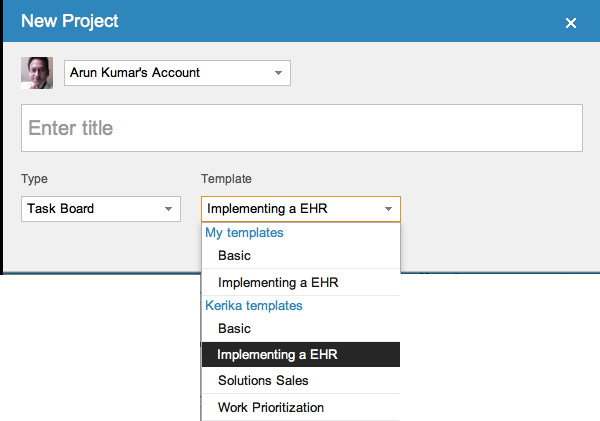
These templates are available to everyone, right now: when you start a new project, you will find “Implementing an EHR” among the choices for Task Board projects:

Selecting a process template

When you use a Kerika project template, you also get copies of all the document templates that are part of the project template. These are copied into your own Google Drive account, and can be shared with others on your project team.

Please let us know know what other templates you would like to see! (And our thanks to Dr. Seville for help with this particular template.)

Installing Kerika from the Google Apps Marketplace

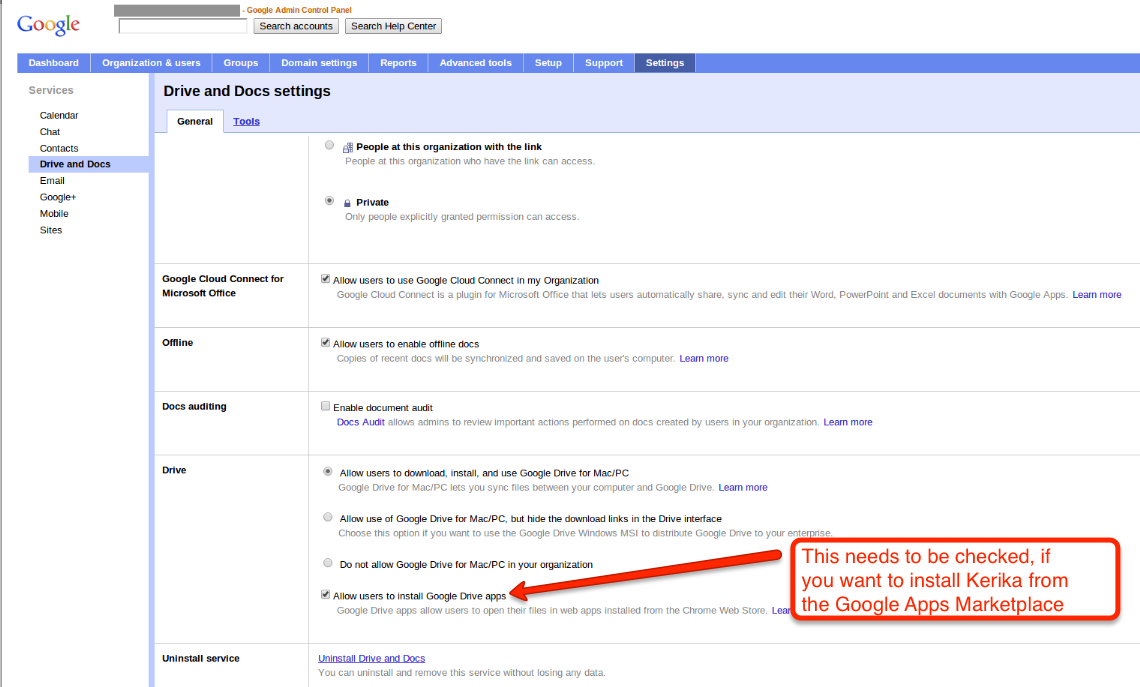
If your organization is using a premium edition of Google Apps (i.e., a paid version of Google Docs), then you can install Kerika from the Google Apps Marketplace. This can be done by any user within your Google Apps domain, provided this checkbox is checked (click on the image below to see a larger version):

Allowing users to install Kerika from the Google Apps Marketplace

This checkbox is usually checked — that’s the default setting, anyway — but some domain administrators may have turned off the ability of individual users to add Google Apps on their own initiative. If this is the situation with your organization, please contact your IT department and ask them to install Kerika for you. Or, you can always just sign in at Kerika.com or install it from the Chrome Web Store.