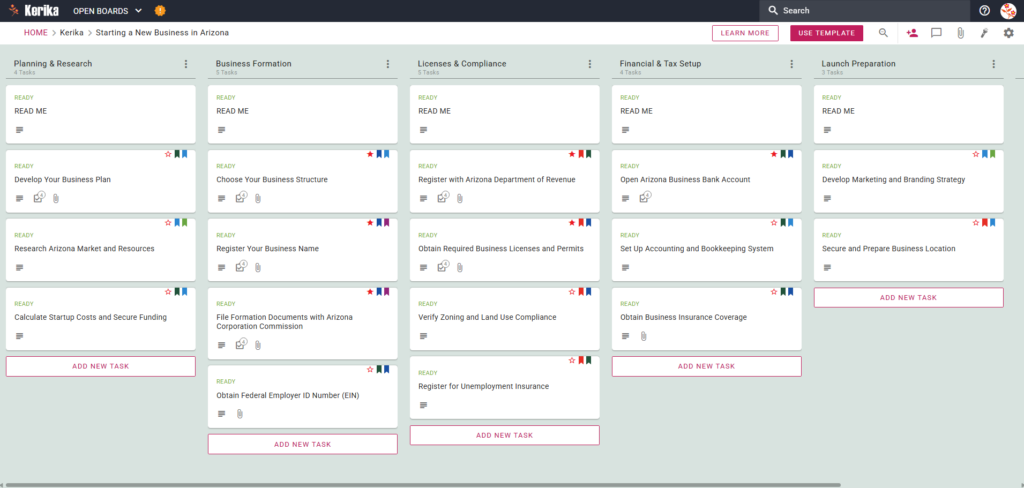
Click the image above to open the live template in a new tab
Starting a new business in Arizona involves navigating a complex web of state-specific requirements that can often feel like a logistical maze. Many entrepreneurs find themselves caught in the friction between different authorities, often confusing the roles of the Secretary of State and the Arizona Corporation Commission (ACC). While the Secretary of State handles trademarks and trade names, the ACC is the primary gatekeeper for LLCs and Corporations. Keeping track of these distinctions while managing legal filings and tax registrations is a significant hurdle for any founder.
But don’t worry, we’ve designed this template to help you navigate these moving parts with total clarity. The Kerika Arizona Business Template provides a structured, visual workspace that simplifies the path from your initial idea to your grand opening. By utilising a proven workflow, you can focus on building your brand while we help you manage the compliance. Ready to turn your vision into a reality? Let’s get started!
1. Who Can Use This
This template is built to support the diverse group of professionals and entrepreneurs ready to make their mark in the Grand Canyon State:
- Solo Founders: Individuals taking their first leap into business who need a step-by-step roadmap to ensure no regulatory requirement is overlooked.
- Partnerships and Small Teams: Collaborators who need to assign responsibilities clearly and maintain a “single source of truth” to avoid duplicating efforts.
- Professional Advisors: Consultants or legal assistants helping clients through the formation process who require a repeatable, professional framework for every launch.
2. What it includes
The template provides a comprehensive visual layout across five columns, representing the logical phases of a successful Arizona launch:
- Planning & Research: Focus on your foundational strategy, including market research and calculating startup costs.
- Business Formation: Manage the legalities, including choosing a structure and filing your Articles of Organization with the Arizona Corporation Commission. This phase also includes obtaining your Federal Employer ID Number (EIN).
- Licences & Compliance: This critical column covers high-priority tasks such as registering with the Arizona Department of Revenue, verifying Zoning and Land Use Compliance, and registering for Unemployment Insurance.
- Financial & Tax Setup: Organise your business banking, set up your bookkeeping system, and secure essential insurance coverage.
- Launch Preparation: Finalise your physical business location and execute your marketing and branding strategy.
By using this board, you will achieve three main deliverables: a finalised business plan, all required state and local licences, and a fully functional accounting system.
3. When You Should Use This
You should utilise this template as your “Offline Navigator” when interacting with the Arizona Business One Stop portal. While the official state portal handles the actual filing, it isn’t designed to manage the preparation, document gathering, or team assignments that happen behind the scenes. This Kerika workspace fills that gap, providing a secure place to organise your strategy before you hit “submit” on official forms. It is the perfect solution when you need to move beyond messy email threads and establish a professional, repeatable process for state compliance.
4. How To Use It
Managing your Arizona business launch is straightforward with these six steps:
- Initiate Your Board: Start by opening the template to create your dedicated workspace. You can immediately begin tailoring the pre-configured cards to suit your specific industry.
- Assemble Your Team: Add your internal collaborators to the board. Kerika makes it easy to see who is responsible for which task, whether it’s filing with the ACC or setting up the bank account.
- Include Stakeholders: Involve external partners, such as your accountant or legal advisor, by adding them to the board. This allows them to provide oversight and expert input directly where the work is happening.
- Methodically Progress: Move task cards across the five columns, from Planning to Launch as you complete them. Always check the READ ME card at the top of each column first; these contain the “definition of done” and specific guidance for each phase.
- Facilitate Communication: Use individual task cards to share updates and store vital information. Use the CHECKLIST tab to track sub-tasks and the ATTACHMENTS tab as a secure home for sensitive documents like your Articles of Organization or TPT Licences, ensuring they are never lost in your inbox.
- Monitor Advancements: Use the visual board to track your overall progress at a glance. The Kanban-style layout ensures that no regulatory step is missed and your timeline stays on track for your launch date.
Conclusion
The Kerika Arizona Business Template ensures your venture is built on a foundation of professional, organised preparation. By centralising your documents and tasks, you eliminate the chaos of scattered notes and ensure every state requirement is met with precision. Launch your new business with the confidence that every “i” is dotted and every “t” is crossed.
Need Something Different?
If this template isn’t exactly what you need, let us know at support@kerika.com, and we will create a custom version for you, free!