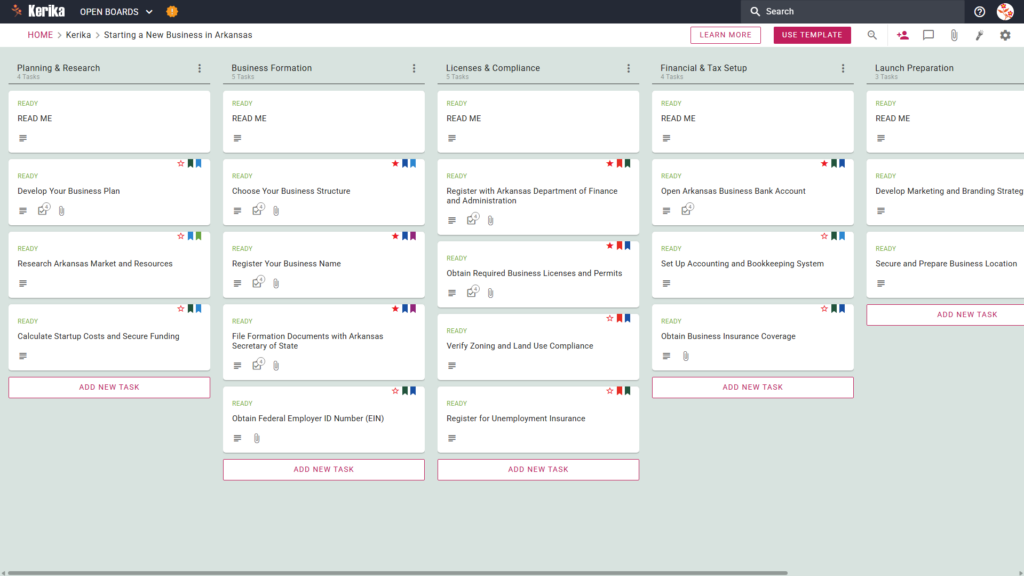
Click the image above to open the live template in a new tab
Starting a new venture in Arkansas is an ambitious journey, but the logistical hurdles of navigating state-specific administrative codes can feel like a massive barrier to entry. From securing local permits to filing the correct formation papers, the complexity often distracts from the excitement of your actual business idea. But don’t worry, this guide and our dedicated template are here to help you navigate these requirements with ease.
We have designed a visual roadmap to ensure your setup is compliant and efficient from day one. Ready to turn your business idea into a reality? Let’s get started!
- Who Can Use This
This template is expertly crafted for entrepreneurs and small business owners based in or relocating to Arkansas. By providing a structured framework, we help you avoid common pitfalls such as missed filing deadlines or non-compliance with local ordinances.
- Solo Founders who need a definitive checklist to ensure every legal requirement is met without the need for an expensive legal department.
- Small Teams who require a centralised workspace to assign responsibilities and coordinate launch tasks effectively across different locations.
- Business Consultants looking for a repeatable “system of record” to help clients navigate the Arkansas registration process smoothly and professionally.
- What it includes
The board mirrors the standard Arkansas business lifecycle through five strategic workflow columns:
- Planning & Research: Includes tasks for your business plan, market research, and calculating startup costs.
- Business Formation: Covers choosing a structure and filing formation documents with the Arkansas Secretary of State.
- Licences & Compliance: Handles registering with the Arkansas Department of Finance and Administration, verifying Zoning and Land Use Compliance, and registering for Unemployment Insurance.
- Financial & Tax Setup: Guides you through opening a bank account and establishing a robust accounting system.
- Launch Preparation: Focuses on securing a physical location and finalising your marketing and branding strategy.
The main deliverables from this board include a professional business plan, all required state/local licences, and a fully functional accounting system. Every card also contains a “READ ME” section with specific guidance to ensure you meet all criteria before moving to the next stage.
- When You Should Use This
- This workspace is most valuable when you are ready to engage with the official requirements of the Arkansas Secretary of State.
- Instead of managing your formation via ad-hoc spreadsheets or messy email chains, this template serves as a centralised system of record.
- It ensures that every specific Arkansas administrative requirement is visually tracked, reducing the risk of administrative errors that could delay your launch.
- How To Use It
- Initiate Your Board: Begin by loading the template to generate your visual workflow. This instantly populates your workspace with pre-configured cards for specific Arkansas requirements, like registering with the Department of Finance and Administration.
- Assemble Your Team: Invite co-founders or employees to the board to distribute the workload effectively. You can assign specific cards, such as “Verify Zoning Compliance”, to the team member best suited to handle local government interactions.
- Include Stakeholders: Add your legal advisors or accountants as “Visitors” or advisors to the board. This allows them to review your Business Formation documents or Financial Setup cards without needing to navigate complex external email threads.
- Methodically Progress: Move task cards through the workflow as you complete key steps, such as obtaining your EIN. Each card contains a CHECKLIST tab for sub-tasks and an ATTACHMENTS tab to store your filed state documents directly on the relevant card.
- Facilitate Communication: Use the built-in chat or comment sections on cards to discuss specific hurdles or updates. This keeps all conversations regarding your Arkansas state filings and local permits in one accessible, searchable location.
- Monitor Advancements: Use the board view to track your overall progress toward launch at a single glance. This allows you to quickly identify if bottlenecks are forming in the Licences & Compliance stage, helping you keep your timeline on track.
Conclusion
Using a visual Kanban-style board transforms the complex process of starting a business into a series of achievable, organised steps. By using this Kerika template, you gain the clarity and structure needed to navigate the Arkansas regulatory environment with professional confidence. Take the first step today and lay a solid foundation for your new enterprise.
Need Something Different?
If this template isn’t exactly what you need, let us know support@kerika.com, and we will create a custom version for you, free!