Arun Kumar, Kerika’s CEO, will present a special Breakout Session on One team, many places: creating collaboration networks for distributed workgroups
The vision of Lean Government is about collaborating across offices, across agencies, and even across sectors. In an era of flat or even declining budgets, it’s become essential to get Lean across the state, not just across the room.
The old technologies never really supported distributed Lean and Agile, but that’s all changed now: a new generation of browser-based work management tools makes it fast and easy to build Lean and Agile teams that connect professionals across agencies, and across sectors so that expertise from the private sector, academia, and nonprofits can be leveraged to deliver great results in Washington.
This breakout session will feature a look at some great cross-agency projects and cross-sector projects: initiatives that have succeeded in delivering in a way that was unimaginable only a couple of years ago.
The session will be presented at 12:15PM in Room 318 on October 21, and again at 10AM in Room 318 on October 22.
If you are working in state, county or local city government and are interested in Lean and Agile, be sure to join us: the cost for attending is just one can of food, which will be donated to a food bank :-)
We were at Boxworks14 last week, and had a great time!
We met a bunch of interesting folks, including Heidi Williams, Senior Director of Platform Engineering, who — along with Peter Rexer and others from her team — gave some really insightful deep-dives into Box’s technology stack.
(Among other things we learned that we could improve the Kerika user experience by changing the way we do OAuth 2.0 with Box.)
Keynote speeches were amazing: the hyper-kinetic Aaron Levie made for a rousing start, but the real star was Jared Leto who not only brought his Oscar onstage, but in a jaw-dropping move handed it over the audience for people to take selfies with while he blithely continued with his “Fireside Chat”.
Jared’s move even upstaged Aaron, which is pretty hard to do (as you will know, if you have ever encountered Aaron in the flesh…)
Other great speakers included Jim Collins, author of Built to Last, Vinod Khosla of Khosla Ventures (and, originally, Kleiner Perkins and Sun Microsystems), and Andrew McAfee from MIT.
Kerika’s Task Boards are so easy to set up and use that teams sometimes make the mistake of sticking everything on the same board, week after week and month after month, until the board becomes really too big to be useful.
The Kerika software itself doesn’t buckle under the weight of hundreds of cards on a single board (and, to be honest, we are also guilty of sometimes doing very large Scrum iterations that turned over a few hundred cards -.-), but just because the software works fine doesn’t mean the practice makes sense.
The most common way for a Kanban board to get overcrowded is for it to be used for too long: the Done column gets bigger and bigger, as more work gets completed each week, until you end up with a very lop-sided looking board with perhaps 20-50 items in “To Do”, and maybe 1,000 items in “Done”.
When presented with a board that contains hundreds or even thousands of items in Done, it’s hard for individual team members to get visual satisfaction from seeing cards move over to the Done column on a regular basis: as work gets done, it seems to vanish into this endless pile of other work that’s already been done.
Teams and, especially, Project Leaders should not underestimate the value of this visual satisfaction of seeing a well-balanced board, with about the same number of items in “To Do” (or Backlog, or Pending, or whatever you choose to call your parking lot) and in the “Done” column, with an even-looking distribution of items in the columns in the middle.
(The simplest Kanban board may just have three columns: To Do, Doing, and Done, but Kerika makes it easy to have far more complex workflows, and to capture your organizations’ best practices as a collection of process templates.)
If a Kanban board is going to be used for an extended period, say several months or more, then we recommend create a parallel History Board that can be used to track the historical achievements and progress of the team. Here’s how this scheme works:
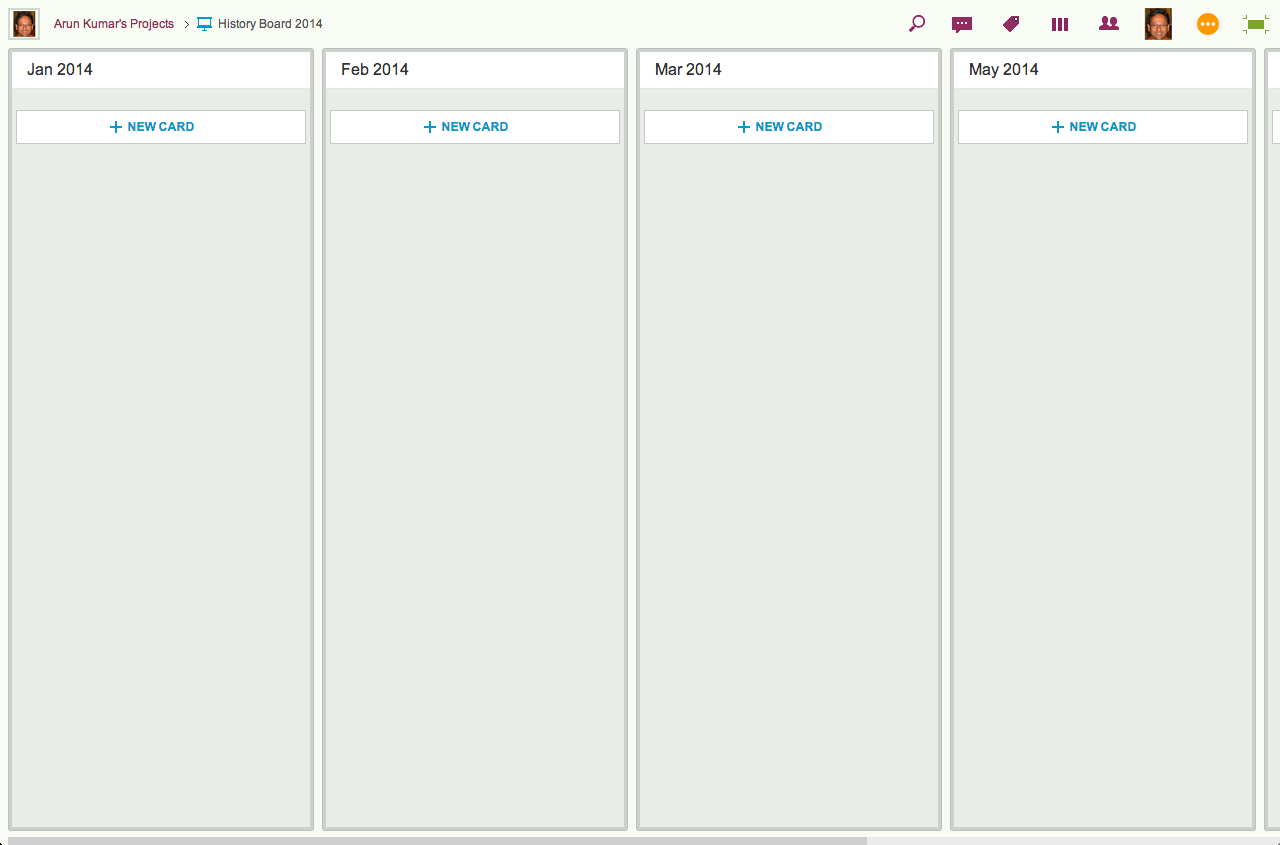
Create a board called “History Board 2014”. (The name isn’t particularly important.)
Organize this boards with columns that look like this: Jan 2014, Feb 2014, Mar 2014…
An example of a History Board
We will use these columns to hold all the cards that were completed in that particular month. So, for example, the Jan 2014 column would contain everything that was completed in January 2014.
At the end of every month, pause for a moment to celebrate your team’s accomplishments for that month. (Order in some beer and pizza and maybe pause for longer than a moment…)
Move all the items that in Done onto the History Board: use Kerika’s cut-and-paste feature, which will let you move a bunch of cards intact, along with their history, chat, attachments, etc., from the Done column of your main Kanban board to the appropriate column in your History Board.
Laptop users will find their right-mouse click menu handy for this: click on a card in the Done column, do “Select All” from the right-mouse menu, and then do a “Cut”. Once you have cut (or copied) anything into your Kerika Clipboard, a Paste button will automatically appear at the top of each column, on each board where you can make changes.
So, Cut from Done on your active board, go over to your History Board, and then do click on the Paste button at the top of the appropriate column, e.g. the August 2014 column.
This simple method lets you achieve two objectives at the same time:
It’s an easy way to trim the size of your active Kanban board: by taking out the “Done” stuff each month you can stop it from ballooning in size over time.
It’s an easy way to create a comprehensive historical view of everything your team has achieved over time: go over to the History Board and you can see how work got done over an entire year. (Might be useful at performance review time ;-)
A side-benefit: your active Kanban board will load a lot faster if it doesn’t get overloaded.
We are sometimes asked (usually by our more techie users) whether Kerika has a published API.
The short answer is “No”; the longer answer is “Not yet.”
We do have a server API, of course, that the Kerika front-end client application itself uses, but it is a very proprietary and non-standard API at present.
This is largely because of an early decision we made to use CometD for our real-time client-server communications.
CometD is a form of a long-poll architecture, but our implementation, unfortunately, is not very standard, in part because we built an “API generator” a long time ago that allows us to create new APIs fairly quickly using metadata descriptions of the desired features.
This was helpful when we were first getting started, but, quite honestly, it isn’t an approach that makes a lot of sense any more and we have migrated away from using that API generator.
But, because of our history/legacy code, we currently have a mix of auto-generated APIs and newer API, and this isn’t really something that we want to publish and support for external third-party development.
We plan to redo our API this year to make it more standard and easier for third-party developers to use, at which point we will publish it and start encouraging more platform development around Kerika.
We often get asked if Kerika has an integration with Git. The short answer is “No”, but the longer answer is more nuanced…
We use Git ourselves for managing our own source code and other software assets.
Git was designed from the git go (ha!) to be used by distributed teams, having originated with the Linux kernel team, perhaps the most important distributed team in the whole world, so it made perfect sense for us to use it: it works across operating systems, and a number of simple GUIs are now available for managing your various source-code branches.
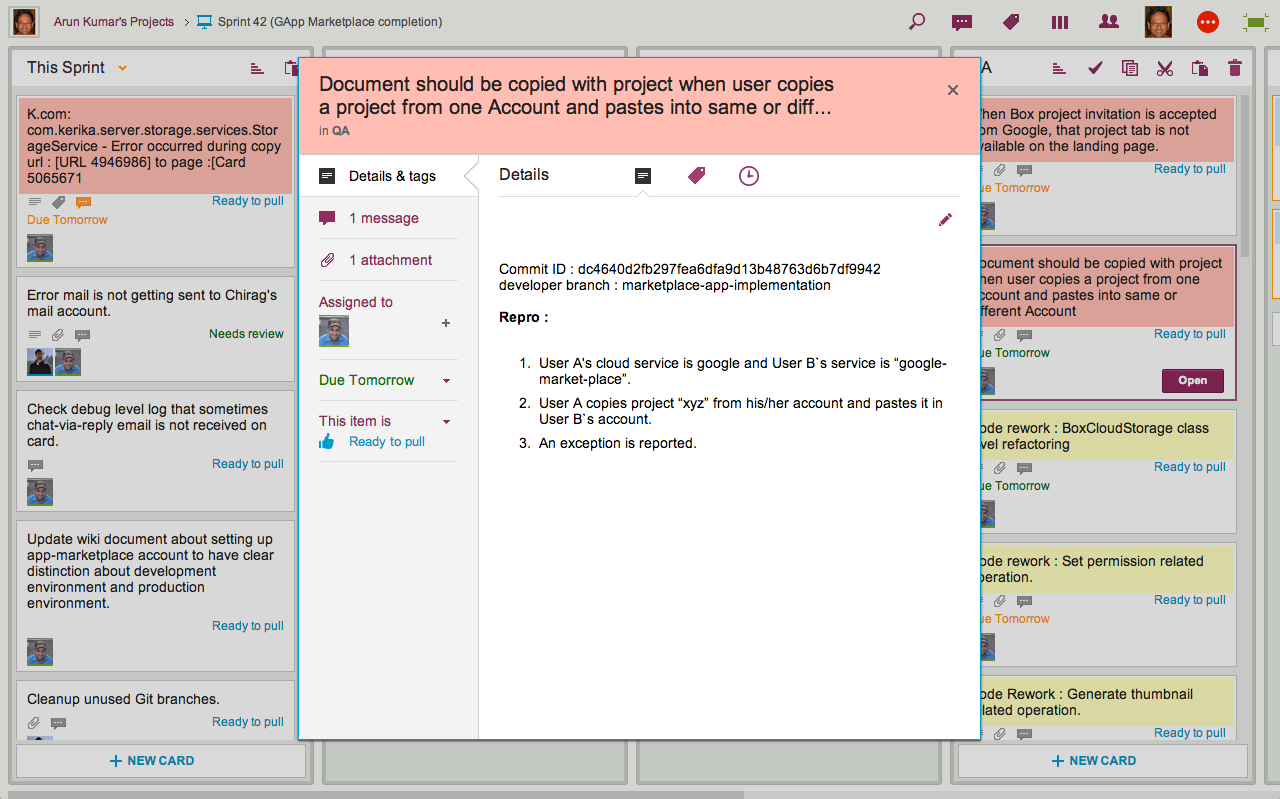
We simply embed the git references within cards on our project boards: sometimes in the chat conversation attached to a card, but more often within the card’s details.
Here’s an actual example of a bug that we fixed recently:
Example of Git integration
We use multiple Git branches at the same time, because we put every individual feature into a separate branch.
That’s not a fixed rule within Git itself; it’s just our own team’s practice, since it makes it easier for us to stick with a 2-week Sprint cycle: at the end of every 2 weeks we can see which features are complete, and pull these git branches together to build a new release.
So while Kerika doesn’t have a direct integration with Git, it’s pretty easy to use Kerika alongside Git, or other source management systems.
Another note from a user which we wanted to share with you…
Just this week we had a fundraising administrative group meeting where our people collected for a 4-day meeting.
One of my software developers attended the meeting and we were scheduled to do a 1.5 hour presentation in the last slot of the 3rd day at 3 PM.
At 11 AM that morning, while he was in the meeting, I created a Kerika project for our presentation. I added the cards and attached screen shots and links that I wanted to present.
I messaged him in the meeting to get him to add cards to the project for IT issues that had been discussed in the previous 2.5 days so that we could address them in our session.
While he added cards, I added more screen shots to his cards and we organized and combined the cards while being in separate rooms so that by the time 3 PM rolled around, I showed up for the meeting and we did our presentation together.
It was ‘very agile’ indeed.
It probably wasn’t as polished as a PowerPoint but it was a lot more relevant as we put it together so quickly.
While we presented the different topics, we swiped the cards through the ‘Active’ and into the ‘Done’ column.
As we neared the end of our time limit, we were then able to adjust on the fly the topics that we would present with the time we had left.
Of course, we didn’t finish but it allowed us to present the most meaningful information with the time we had.
One of our users wrote in last night with this great story, which we wanted to share with you…
I did a one hour webinar for the software company (Software AG) that we develop all of our software with as they were impressed with the way we were using their software development environment (NaturalOne).
I threw a little Kerika spice into my presentation as it has become such an important part of our development environment and I actually used it to prepare my presentation.
Instead of preparing the presentation by myself I used a Kerika project and had my software developers contribute cards and instructions in the areas that they specialized.
While I was doing a live presentation I was referring to the cards on my other monitor and swiping them to the ‘Done’ column as I completed them.
I know you like to hear stories about how people use your software and this worked very well for this presentation. It was recorded and I will send you a link to it once it is published. It might put you to sleep at night, except for the Kerika part.