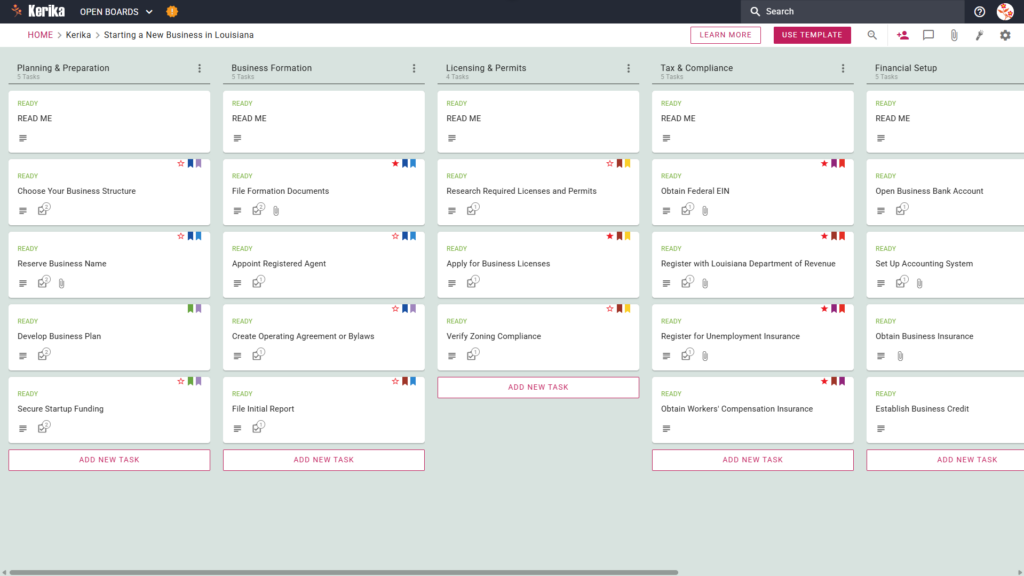
Click the image above to open the live template in a new tab
Organising a new business can feel like a massive logistical hurdle, especially when you are faced with the administrative overhead of state-specific regulations. In Louisiana, the real friction often lies in navigating the various legal filings, tax registrations, and licensing requirements. Managing these moving parts across messy email chains or static lists can lead to missed deadlines and unnecessary stress.
But don’t worry, this guide is here to help! This template serves as your operational backbone, simplifying the complex journey of business formation. It provides a visual, structured workspace for your entire team, allowing you to track every requirement from initial planning to ongoing operations. By using a visual board, you gain an immediate status update at a glance, eliminating the need for constant progress meetings. Ready to reclaim your time and productivity? Let’s get started!
1. Who Can Use This
This template is built to support the diverse range of entrepreneurs looking to establish a presence in the Pelican State:
- Solo Entrepreneurs You can use this as a clear roadmap to navigate state requirements alone, ensuring you follow a structured path without needing an expensive consultant.
- Partnership Founders Small teams needing a “single source of truth” to divide responsibilities, assign tasks, and collaborate without losing track of document versions.
- Startup Teams Growing organisations that need to coordinate complex licensing, tax setups, and financial requirements while maintaining high professional standards.
2. What it includes
The Starting a New Business in Louisiana template provides a comprehensive starting point with a pre-configured, visual layout:
- A Six-Column Workflow: Your progress is tracked through the Planning & Preparation, Business Formation, Licensing & Permits, Tax & Compliance, Financial Setup, and Ongoing Operations columns.
- Planning & Formation: Pre-configured cards include Choose Your Business Structure, Develop Business Plan, and File Formation Documents.
- Licensing, Tax & Compliance: Dedicated cards are ready for Apply for Business Licenses, Register with Louisiana Department of Revenue, and Obtain Workers’ Compensation Insurance.
- Financial Setup & Operations: To ensure a successful opening, the template includes cards for Open Business Bank Account, Set Up Accounting System, and File Annual Report.
3. When You Should Use This
This workspace provides the most value when organisation and compliance are non-negotiable:
- Transitioning to Formal Registration: Use this when you are ready to move from a casual idea to a formal legal entity and need a repeatable process to follow.
- Navigating State Requirements: This is the ideal tool when dealing with specific mandates from the Louisiana State government, helping you keep track of unique local filings.
- Ensuring Compliance: Use the template to ensure no critical tax, zoning, or insurance step, such as obtaining Workers’ Compensation Insurance (found within the Tax & Compliance column) is missed during the busy launch phase.
4. How To Use It
Managing your business launch is straightforward with these features:
- The READ ME Card You will find a “READ ME” card at the top of every column. Always check these first. They contain specific rules on the criteria that must be met before you consider a stage complete or move tasks to the next column.
- Advancing the Workflow As you complete your milestones, move task cards from left to right. This visual progression ensures the entire team knows exactly which stage the business is in whether you are still in Business Formation or have moved into Financial Setup.
- The CHECKLIST Tab Open every card and navigate to the CHECKLIST tab to manage specific sub-tasks. You can check these off one-by-one to ensure no detail, such as a specific filing date or fee amount, is ever overlooked.
- The ATTACHMENTS Tab Use the ATTACHMENTS tab to upload your formation documents, tax certificates, or bylaws directly to the relevant card. This keeps your most important legal documents in a secure, centralised location where they are easily accessible.
Conclusion
Using this template ensures your business launch is supported by professional, organised preparation. Kerika is the only task management tool that leaves file ownership entirely with you by storing documents in your own Google Drive, Microsoft 365, or Box account. This ensures your board acts as a digital mission control where you retain full control over your intellectual property.
Kerika manages access rights effectively: you can grant team members the read+write access they need to complete tasks, while keeping other stakeholders as Visitors with read-only access. By moving to a visual board, you eliminate messy email chains and ensure your new organisation maintains the highest professional standards from day one.
Need Something Different?
If this template isn’t exactly what you need, let us know at support@kerika.com and we will create a custom version for you, free!