A new template for tracking bugs and defects

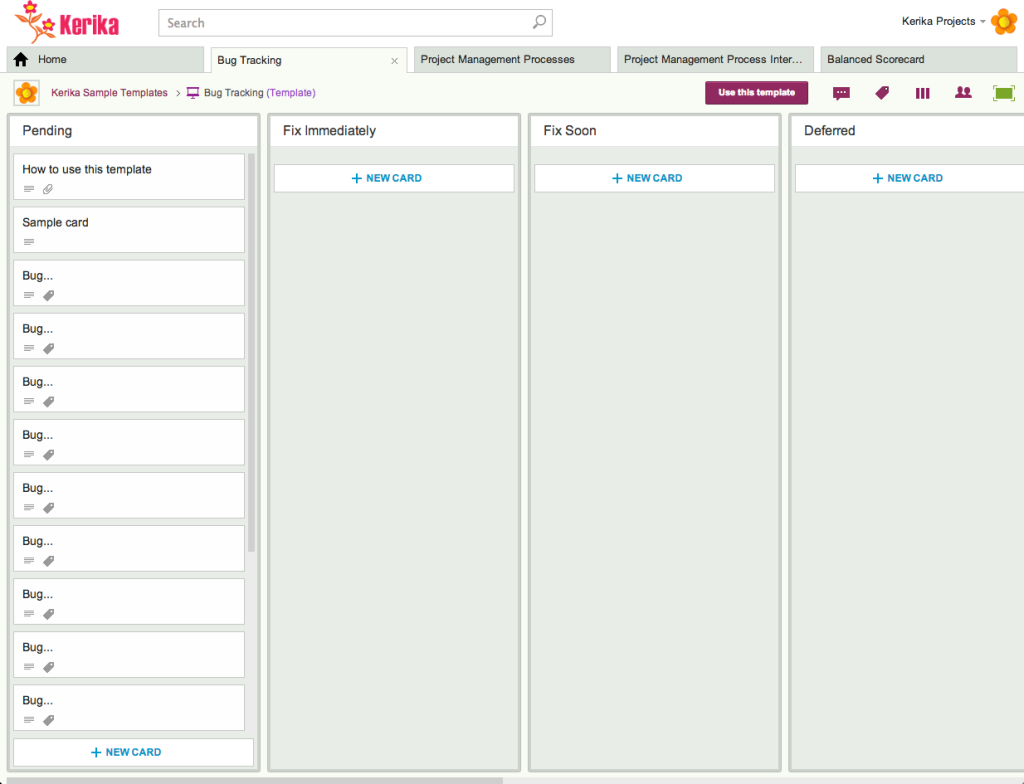
We just added another project template, for Kanban / Task Boards, that you can use to track and manage bugs/defects in a software or hardware product.

Bug Tracking Template
Click here to view this template

Here’s how it works:

  1. As new bugs/defects are found, add them to the Pending column. This is a holding area for new defects, before they get evaluated and prioritized.
  2. On a daily basis the Product Owner should evaluate items in the Pending column, considering both severity and priority.

    Severity is not the same as Priority: if a defect has a serious consequence, e.g. a software bug that causes data loss, then it would have a high Severity rating.

    But, some defects show up only rarely. So, you might have a defect with a serious consequence that happens very rarely, or affects very few users. In that case, you may want to reduce its priority.

    On the other hand, you may have a defect that is trivial, e.g. a confusing term on a website, but is a real annoyance for everyone. This bug could low severity, but high priority — because fixing it would immediately benefit a lot of your users.

  3. As the Product Owner evaluates each bug, it gets moved to the appropriate column: Fix Immediately, Fix Soon, or Deferred. Within each column, you can further prioritize bugs by moving the most important ones to the top of the column.

    Fix Immediately is for the most critical bugs; typically these need to be resolved with a day or two, and the software update may need to be delivered as a hotfix if the normal release cycle is too long.

    Fix Soon is for bugs that you definitely need to fix, but which are not super-critical.

    Deferred is for bugs that you are not likely to fix anytime soon. (If you don’t plan to fix a bug at all, move it to the Trash.)

  4. As each bug is picked up by a team member, move the card to In Progress, and assign the card to the team member: once someone’s face shows up on the card, it’s clear to everyone that the bug is being worked on, and by whom.
  5. As appropriate, use review processes to review and test the fix before moving it to Ready for Deployment.
  6. Use tags that make sense: we have set up some sample tags for this template; if they don’t make sense, use whatever tags will work best for your team! (There’s a short video on how tags work, attached to this card.)

Another round of bug bashing…

Our current release (Sprint No. 37 since we moved to a Scrum methodology!) is focused on bug bashing: mostly server-related bugs, and a few that users might have observed themselves.

This is fairly typical of our development cycles: while we fix major bugs in every release, every once in a while we spend an entire release on just general bug bashing and cleanup.  These offer opportunities to catch up on infrastructure improvements, getting our test cases in better shape and other administrative work.

Release 37 should be done, with testing, by the end of the week: it will have about 65 work items completed, with another 21 items that were trashed.

Trashed items are usually duplicates of bugs: different symptoms with the same underlying cause.

More fonts for Whiteboards

We have expanded the selection of fonts that are available for Whiteboards and canvases:

New fonts
New fonts

The list of available fonts now includes:

  • Arial
  • Armata
  • Audiowide
  • Calligraffiti Regular
  • Cinzel
  • Dancing Script
  • Indie Flower
  • Josefin Sans
  • Kaushan Script
  • Lato
  • Lobster
  • Montserrat
  • Nothing you could do
  • Oswald
  • Pacifico
  • Permanent Marker
  • Pinyon Script
  • Raleway
  • Rock Salt
  • Shadows into light
  • Times New Roman
  • Verdana


Kerika looks different: horizontal project tabs

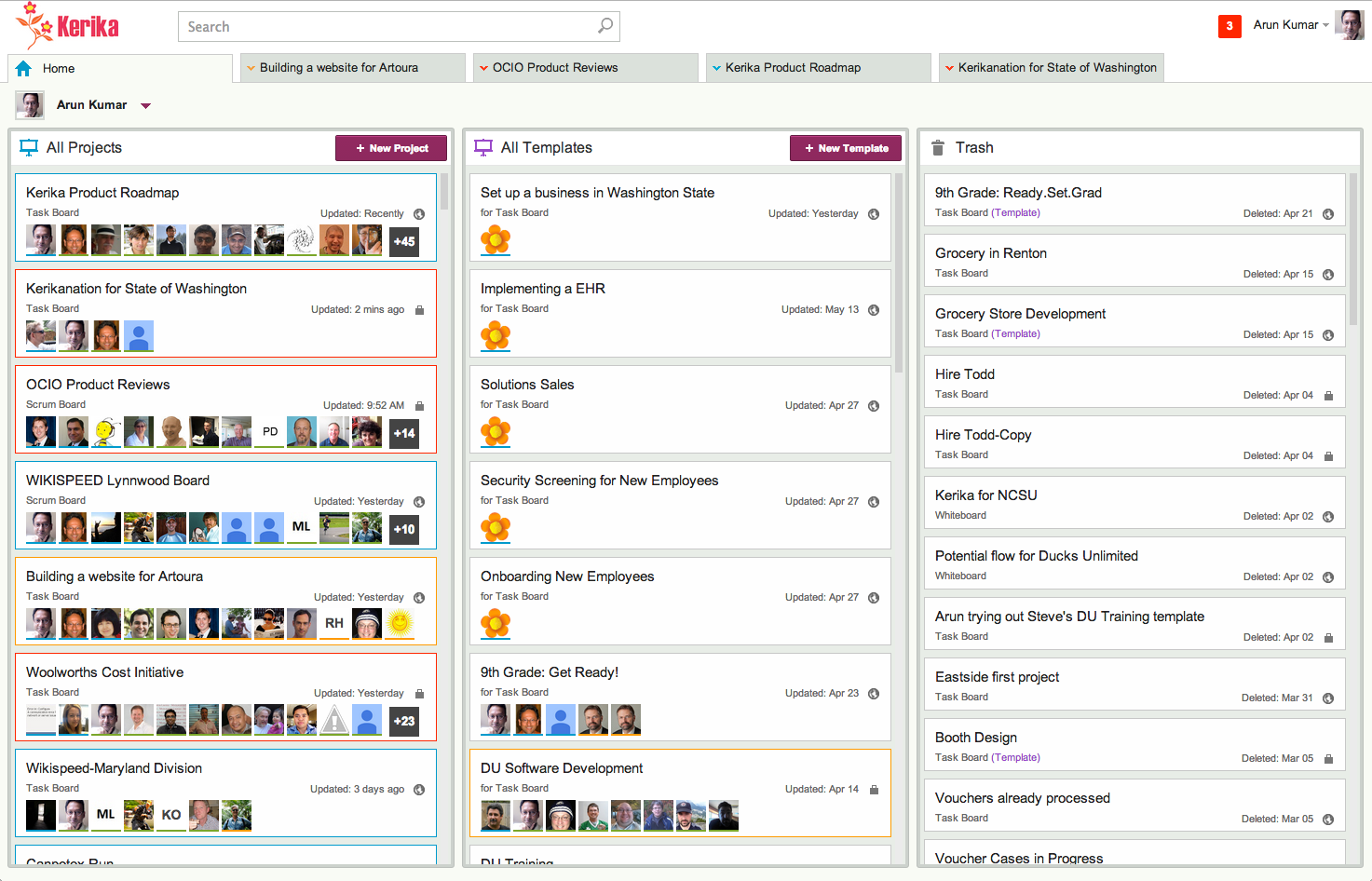
Our latest release makes Kerika’s user interface look even cleaner and easier to use: we have switched to horizontal tabs to hold all your open projects. (The old version had vertical tabs, running along the left side of the application.)

This makes for more efficient use of space, and provides a user experience that’s more familiar to browser users: the project tabs work like your browser tabs @ndash; you can close each one individually, and drag them across the screen to rearrange them.

It also makes it easier to use Kerika on a tablet: the new horizontal tabs provides a better use of screen real estate.

Task summary emails got a little smarter

One cool feature of Kerika is that you can get a 6AM email @ndash; local time, no matter where you are @ndash; that summarizes all the tasks that are overdue for you, due today, and due tomorrow.

And, if you are a Project Leader on any team, your task summary email can also include all the items that are overdue, due today and due tomorrow across the entire team @ndash; even if you are not assigned to those cards. (It’s an easy way for Project Leaders to plan their day.)

Now, these emails got a little smarter: if you move a project to Trash that still has outstanding due dates on cards, these are no longer included in your task summary email.

Heartbleed: no heartache, but it did prompt a complete security review

So, here’s how we dealt with the Heartbleed bug…

We learned about the bug just like you did: through news reports early on April 7th. Heartbleed was a “zero-day” bug, and the OpenSSL team put out an updated (patched) version of the OpenSSL protocol the same day, which meant that everyone, everywhere, had to scramble to get their systems patched as quickly as possible.

(And the bad guys, meanwhile, scrambled to grab sensitive information, with the Canadian tax authorities being among the first to report that they had been hacked. Of course, “first to report” isn’t the same as “first to actually get hacked”. Most people who got hacked either never found out, or never said anything…)

Kerika uses OpenSSL too, and our immediate concern was updating the Elastic Load Balancer that we use to manage access to our main Amazon Web Services (AWS) servers: the load balancers are where OpenSSL is installed; not on the Web servers that sit behind the load balancer.

Using Amazon Web Services turned out to be a really smart decision in this respect: Amazon just went ahead and patched all their load balancers one by one, without waiting for their customers to take any action. In fact, they patched our load balancer faster than we expected!

Patching the load balancer provided critical immediate protection, and gave us the time to do a more leisurely security review of all our operations. This was long overdue, it turned out, and so we went into “housecleaning mode” for over a week.

One part of this, of course, was updating all our Ubuntu Linux machines: Canonical Software was also very prompt in releasing a patched version of Ubuntu which we loaded onto all of our development, test, and production services. So, even though the OpenSSL vulnerability had been patched at the load balancer, we also applied patches on all our development, test and production servers even though these couldn’t be directly accessed from the Internet.

Next, we decided to clean up various online services that we weren’t actively using: like many other startups, we frequently try out various libraries and third-party services that look promising. We stick with some; others get abandoned. We had accumulated some API keys for services that we weren’t using any more (e.g. we had a YouTube API key that no one could even remember why we had gotten in the first place!), and we deactivated everything that wasn’t actively been used.

Closing unneeded online accounts helped reduce our “attack surface”, which adds to our overall security.

And, of course, we changed all our passwords, everywhere. All of our email passwords, all of our third-party passwords. All of our online passwords and all of our local desktop passwords. (On a personal level, our staff also took the opportunity to change all their banking and other online passwords, and to close unneeded online accounts, to reduce our personal attack surfaces as well.)

We got new SSL certificates: from Verisign for our production load balancer, and from GoDaddy for our test load balancer. Getting a new SSL certificate from Verisign took much longer than we would have liked; getting one from GoDaddy took just seconds, but on the other hand, Verisign does have a better reputation…

We reviewed our internal security policies and procedures, and found a few places where we could tighten things up. This mostly involved increased use of two-party authentication and — most importantly — further tightening up access to various services and servers within the Kerika team. Access to our production servers is highly restricted even within the Kerika team: we use AWS’s Identity & Access Management service to restrict access using roles and permissions, even within the small subset of people who have any access to the production server.

Finally, we are adding more monitoring, looking out for malicious activity by any user, such as the use of automated scripts. We have seen a couple of isolated examples in the past: not malicious users, but compromised users who had malware on their machines. Fortunately these attempts were foiled thanks to our robust access control mechanisms which manage permissions at the individual object level in Kerika — but, like every other SaaS company, we need to be vigilant on this front.

All of this was good housekeeping. It disrupted our normal product development by over a week as we took an “all hands on deck” approach, but well worth it.

Heartbleed: no heartache, but it did prompt a complete security review

So, here’s how we dealt with the Heartbleed bug…

We learned about the bug just like you did: through news reports early on April 7th. Heartbleed was a “zero-day” bug, and the OpenSSL team put out an updated (patched) version of the OpenSSL protocol the same day, which meant that everyone, everywhere, had to scramble to get their systems patched as quickly as possible.

(And the bad guys, meanwhile, scrambled to grab sensitive information, with the Canadian tax authorities being among the first to report that they had been hacked. Of course, “first to report” isn’t the same as “first to actually get hacked”. Most people who got hacked either never found out, or never said anything…)

Kerika uses OpenSSL too, and our immediate concern was updating the Elastic Load Balancer that we use to manage access to our main Amazon Web Services (AWS) servers: the load balancers are where OpenSSL is installed; not on the Web servers that sit behind the load balancer.

Using Amazon Web Services turned out to be a really smart decision in this respect: Amazon just went ahead and patched all their load balancers one by one, without waiting for their customers to take any action. In fact, they patched our load balancer faster than we expected!

Patching the load balancer provided critical immediate protection, and gave us the time to do a more leisurely security review of all our operations. This was long overdue, it turned out, and so we went into “housecleaning mode” for over a week.

One part of this, of course, was updating all our Ubuntu Linux machines: Canonical Software was also very prompt in releasing a patched version of Ubuntu which we loaded onto all of our development, test, and production services. So, even though the OpenSSL vulnerability had been patched at the load balancer, we also applied patches on all our development, test and production servers even though these couldn’t be directly accessed from the Internet.

Next, we decided to clean up various online services that we weren’t actively using: like many other startups, we frequently try out various libraries and third-party services that look promising. We stick with some; others get abandoned. We had accumulated some API keys for services that we weren’t using any more (e.g. we had a YouTube API key that no one could even remember why we had gotten in the first place!), and we deactivated everything that wasn’t actively been used.

Closing unneeded online accounts helped reduce our “attack surface”, which adds to our overall security.

And, of course, we changed all our passwords, everywhere. All of our email passwords, all of our third-party passwords. All of our online passwords and all of our local desktop passwords. (On a personal level, our staff also took the opportunity to change all their banking and other online passwords, and to close unneeded online accounts, to reduce our personal attack surfaces as well.)

We got new SSL certificates: from Verisign for our production load balancer, and from GoDaddy for our test load balancer. Getting a new SSL certificate from Verisign took much longer than we would have liked; getting one from GoDaddy took just seconds, but on the other hand, Verisign does have a better reputation…

We reviewed our internal security policies and procedures, and found a few places where we could tighten things up. This mostly involved increased use of two-party authentication and — most importantly — further tightening up access to various services and servers within the Kerika team. Access to our production servers is highly restricted even within the Kerika team: we use AWS’s Identity & Access Management service to restrict access using roles and permissions, even within the small subset of people who have any access to the production server.

Finally, we are adding more monitoring, looking out for malicious activity by any user, such as the use of automated scripts. We have seen a couple of isolated examples in the past: not malicious users, but compromised users who had malware on their machines. Fortunately these attempts were foiled thanks to our robust access control mechanisms which manage permissions at the individual object level in Kerika — but, like every other SaaS company, we need to be vigilant on this front.

All of this was good housekeeping. It disrupted our normal product development by over a week as we took an “all hands on deck” approach, but well worth it.