When you click on a link to a Kerika board or card in an email, that link will now automatically open in the Kerika Mobile App instead of opening in a browser tab.
This makes it a lot easier to respond to emails sent when your team members do chat on boards that concerns you: you can either do a quick reply as email itself, or, if you need more context, click on the link to open the card inside the Kerika app and see all it’s details before deciding upon your reply.
Our development team is based in India, and starting about 4 weeks ago we started getting hit hard by Covid-19. Eventually everyone in our India team was affected one way or another, either by falling sick themselves or having a spouse or child fall sick.
Thankfully that’s over now. We are back up to speed.
We had always treated our customers data as confidential, and have never shared that with anyone else. At the suggestion of one of our users, we have updated our Terms of Use to make this a written commitment.
We have added Section VI to our Terms of Use:
“Confidential Information” means information identified by you as confidential at the time of disclosure or that a reasonable person would consider confidential due to its nature and any confidential, proprietary, or privileged information disclosed while creating or modifying the Kerika boards.
Kerika shall preserve the confidentiality of your Confidential Information and treat such Confidential Information with at least the same degree of care that Kerika uses to protect its own Confidential Information, but not less than a reasonable standard of care.
Kerika will use your Confidential Information only to exercise its rights and perform obligations under these Terms. Confidential Information will be disclosed only to those employees of Kerika with a need to know such information in connection with Kerika’s use of the Confidential Information in accordance with these Terms.
Kerika shall not be liable to you for the release of Confidential Information if such information is divulged pursuant to any legal proceeding or otherwise required by law, provided that, to the extent legally permissible, Kerika will notify you promptly of such required disclosure. Kerika agrees to promptly notify you of any unauthorized access to or disclosure of the Confidential Information.”
We fixed some bugs in our billing system that were creating invalid credits and refund requests depending upon the sequence with which Account Owners were adding or removing subscriptions quickly.
For folks who are currently using all their subscriptions and want to change a member of their Account Team, it’s important to remember to first remove the old member before you add a new person: otherwise your Account Team will temporarily be larger than the subscriptions purchased, and this could result in a new invoice being generated automatically.
User adoption of our mobile apps for Android and iOS has been moving along nicely; so far we have heard only positive feedback but of course please let us know what we could do better.
A small pocket of users are having trouble: those who are using Kerika with Box and have 2FA (two-factor authentication enabled). There is a bug with Box’s mobile API that we are still waiting for them to finish (it’s been a couple of weeks now). Hopefully that will get sorted out soon.
The Kerika Elite is a program we have set up to improve our product strategy and gather feedback from a select group of our most experienced and influential users.
There are two main elements to this program:
Kerika Elite will be involved in the earliest stages of our product development: we will share with them proposed designs long before they are implemented, to get early feedback on features that we are considering building, and
Once new features are built, Kerika Elite users get early access them so they can provide real-world experience that can help us polish the product before it’s released to the rest of our users.
Kerika Elite users have contributed greatly to our mobile development efforts over the past year, and we look forward to their advice and suggestions for our future initiatives as well.
Can you be one of them? Sure. Anyone can nominate another user to be part of the Kerika Elite, although the final decision is ours to make.
Kerika Elite users are not compensated in any way; they simply enjoy being in the kitchen with the Kerika Team when we cook up delicious new dishes!
A new feature that we recently introduced will let you choose a background color: one for the desktop app, and one for the mobile app. (Oops, did we just talk about the mobile app?)
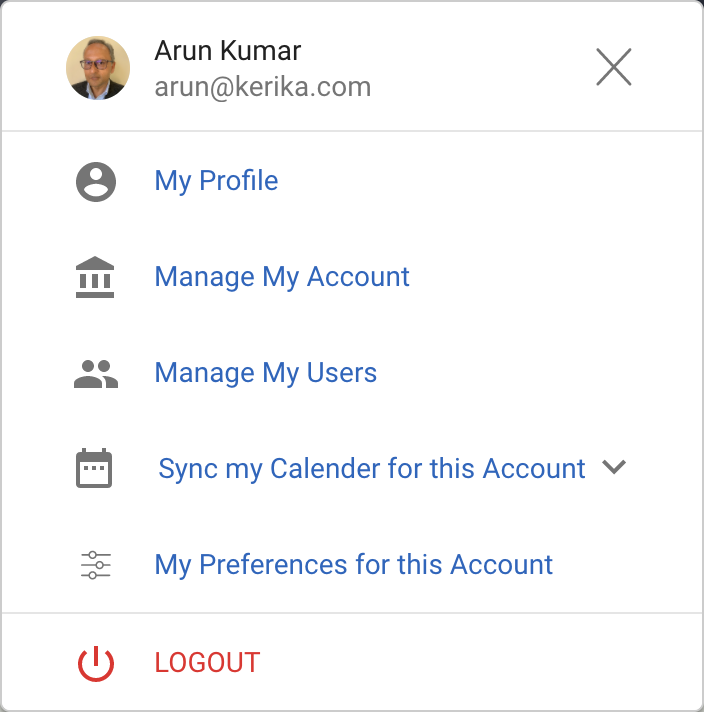
To select a color: click on your user profile photo, which appears on the top-right of Kerika:
User Preferences
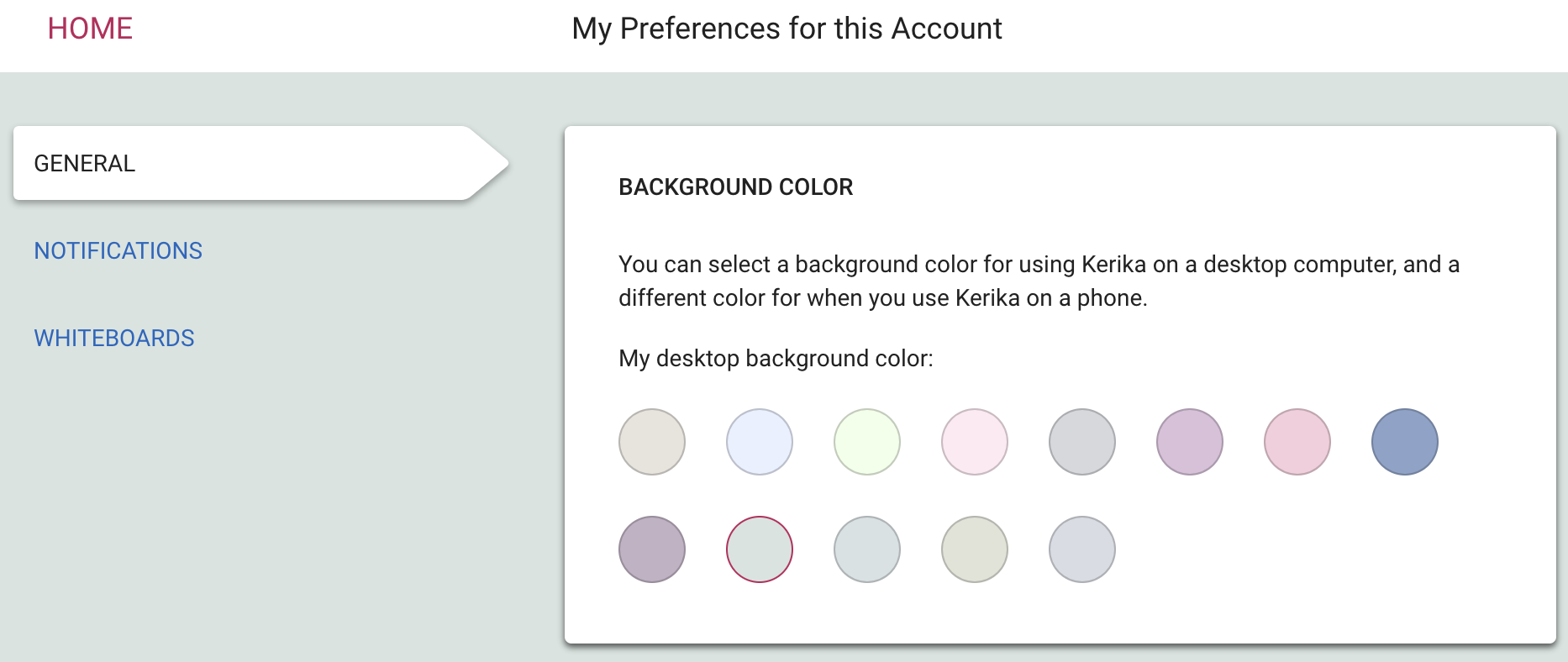
Select My Preferences for this Account from this dialog, and you will land on a revamped Preferences page that now includes options for selecting a background color:
Color Preferences
We are offering a range of light and dark backgrounds; in our own testing we found that the darker backgrounds look better on the desktop, while the lighter backgrounds look better on phones. But, of course, that’s just our opinion — try this out and select what you like best!
A long (45 minutes) video of the presentation that Arun Kumar, CEO of Kerika, made at the Lean Transformation Conference last October, anticipating the need for accommodating remote and virtual teams.
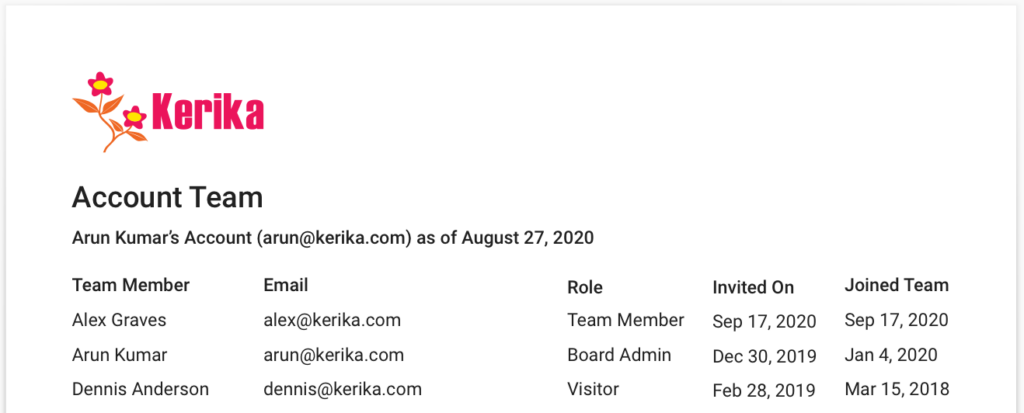
We have improved the invoices generated by Kerika, for both online and offline billing, to include a full listing of the Account Team to make it easier for the finance/purchasing departments of our customers to track changes made to Board Teams and the Account Team.
Here’s an example:
For each person who is currently part of the Account Team, Kerika will list their name, email, role and Invited On and Joined Team dates.
Invited On is the date on which someone was added to a Board Team or the Account Team; this is also the date on which one of the Account’s free subscriptions is used up — or the Account Owner is prompted to purchase an additional subscription, if no free subscriptions remain for that Account.
Joined On is the date on which the invitation was actually accepted by the new team member, which, hopefully, is really close to the Invited Team. (Otherwise the Account is wasting days on a used subscription.)
Role is the highest role a person occupies within an Account, across all the boards where the user is part of the team. If a user is a Team Member on some boards and a Visitor on others, that person’s role will be listed as Team Member.
As Kerika gets adopted by large organizations, we were seeing a disconnect between the active users who were making decisions about adding or removing people from their teams, and the finance/purchasing departments within the same organizations who were being asked to approve invoices. This change fixes that disconnect.