https://www.youtube.com/watch?v=_ACOBCJyepk
All posts by Arun Kumar
Welcoming European University Institute to our community of Academic users
We have added European University Institute to our roster of organizations where users will automatically get free Academic Accounts when they sign up, using their @eui.eu email addresses.
Kerika’s free Academic & Nonprofit Accounts let folks have up to 10 people working on boards owned by each account, and each individual within an approved organization can have their own account: that includes students, teachers and staff.
Our roster of whitelisted organizations now runs in the hundreds, and includes users from across the world.
Welcoming Universidade Federal de Juiz de Fora to our Academic Users community
We have added Universidade Federal de Juiz de Fora (Federal University of Juiz de Fora in Brazil) to our roster of organizations where users will automatically get free Academic Accounts when they sign up, using their @ufjf.br and @facc.ufjf.br email addresses.
Kerika’s free Academic & Nonprofit Accounts let folks have up to 10 people working on boards owned by each account, and each individual within an approved organization can have their own account: that includes students, teachers and staff.
Our roster of whitelisted organizations now runs in the hundreds, and includes users from across the world.
Welcoming Georgia Tech to our Academic Users community
We have added the Georgia Institute of Technology (GaTech) to the list of organizations that automatically qualify for free Kerika Academic Accounts. Anyone signing up with a @gatech.edu email will be able to have up to 10 people working on their projects.
Kerika’s free Academic & Nonprofit Accounts let folks have up to 10 people working on boards owned by each account, and each individual within an approved organization can have their own account: that includes students, teachers and staff.
Our roster of whitelisted organizations now runs in the hundreds, and includes users from across the world.
Why our new mobile app is taking so long to build
We have been working for months now on our new mobile app, and it has been a tough slog! We are building it entirely using React (a Javascript framework) to make it possible to have a single code base across both desktop and mobile devices, and across all operating systems.
We took some time learning to be good with React: previously we had used Polymer, and before that we used JQuery, so there was some learning curve to traverse while we figured out the right way to code in React. But we are beyond that now.
For the past couple of months, it is really performance that has been our bugbear. In the spirit of “eat your own dogfood before trying to sell it”, we are using the emerging mobile app for our own work on a daily basis.
The trouble is: our main Kerika board is huge: it has usually around 600 cards, and 26 columns. This isn’t best practice, by the way, and we are not recommending you create boards like this, but we are talking here about our main board that tracks many different ideas and initiatives, not just product development.
So, when using our mobile app for our own board, we hit performance problems that few of our users are likely to encounter. We could, of course, have written us off as an edge case and ignored the performance issues, because for smaller boards (e.g. with around 20-30 cards), these performance problems completely disappear.
But, we decided to bite the bullet and get our mobile app to be good even with boards that are as wide and deep as our main board. And we have learned a lot from that experience: for example, it wasn’t the number of cards, but the number of columns that had the bigger performance impact.
We have another board with over 2,500 cards in just 2 columns (essentially a historical record of old work items) and we didn’t experience performance problems in the same way as we did with 500-600 cards over 26 columns. In fact, we found that 2,500 cards in 2 columns was much easier to handle than the latter case!
So, a lot of our efforts over the past few months have been trying to handle performance for scenarios that are out of the norm.
We are doing our testing on both iOS and Android at the same time, to catch browser-specific issues early. (We have been less diligent about Firefox testing, to be frank, but we expect clearing iOS and Android issues will effectively cover Firefox as well, making our final testing easier.)
Our end goal is a single code base that runs on any device. Right now that’s not true: our desktop experience is still using (mostly) Polymer, while our mobile is entirely in React, but we are trying to make sure we design all of the new code to work well on the desktop as well, so that we can slowly replace parts of the desktop code as we build the new mobile app.
(It’s not that our desktop code has any problems today — we are very confident about the quality of our desktop user experience — it’s just that we are too small a team to be able to split ourselves into multiple sub-teams to support every platform.)
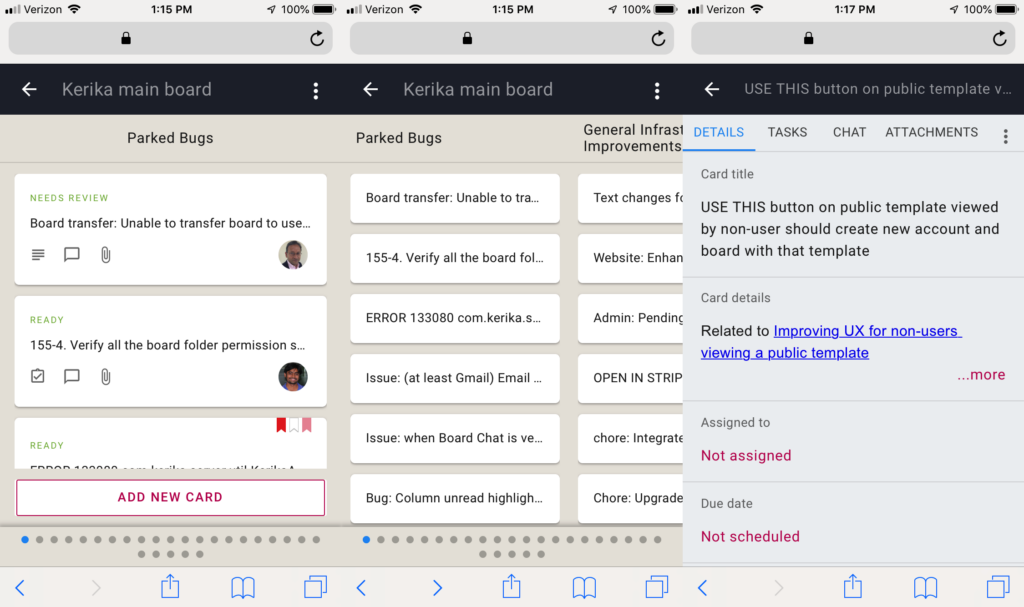
Here’s a composite view of what our mobile app looks like now: in “zoomed-in” view, in “zoomed-out” view, and card details:
Onwards!
Welcoming the Grŵp Llandrillo Menai in Wales
We have added Grŵp Llandrillo Menai to the list of institutions that automatically qualify for free Academic Accounts: anyone signing up with a gllm.ac.uk email can have a project team of up to 10 people.
Grŵp Llandrillo Menai is an umbrella organisation to oversee the operation of the three member colleges: Coleg Llandrillo, Coleg Menai and Coleg Meirion-Dwyfor, all in Wales (United Kingdom).
Improving the process for new users who want to join existing accounts
We have made some improvements to the process that guides new users when they sign up, so they can join the accounts of coworkers they might need to work with.
The new process works like this:
When a user signs in (with a Google ID, Box ID, or their email), Kerika examines the email address associated with that user and compares it against other users who are already registered.
If it finds that other users from the same domain are already active Kerika users, it offers the new user the option of joining a colleague’s account or starting an entirely new account.
In most cases, people are better off joining accounts that have already been established by their coworkers, so they can find the most relevant Kerika boards.
Kerika tries to be smart about this in a couple of ways:
First, it rules out free domains, like Gmail, Yahoo, and Outlook. (There’s a long list of free domains that we check against.) With free domains, there could be thousands of other users who have similar emails but no connection with you.
So if you sign up with a free email, you won’t be offered the possibility of joining an existing account. (Of course, an existing Gmail user could invite you to join their teams; it’s just that Kerika doesn’t suggest these connections.)
Having winnowed out the free domains, Kerika then considers whether the older accounts from the same domain as the new user can actually accommodate new people: do they have free subscriptions available that could be used by the new user?
If the older accounts are still in the Free Trial phase, then the answer will be Yes: trial users can have unlimited Team Members .
If the older accounts are tagged as Academic/Nonprofit, there’s a good chance they can accommodate new users.
If the older accounts are Professional Accounts, the chances are much lower — unless the older account had bought a few extra subscriptions in advance to accommodate this scenario.
Having further narrowed down the list of potential accounts, Kerika considers whether your potential coworkers are, in fact, active users of Kerika. This is important in universities, for example, that have been whitelisted so that everyone joining up from a particular university automatically gets a free Academic Account.
From University of Washington, for example, there are thousands of registered free accounts, set up over the past several years. Not all are still active because the students involved may have graduated already. So even though an account may have free/unused subscriptions, it doesn’t make sense to suggest that to a new user if that account has been dormant for more than a month.
After all this we could still end up with a large set of potential list of collaborators, particularly in large organizations.
So, as the final step, we check the “last active time” of our candidate accounts and then present the 8 most recently active accounts. Our rationale is that a new user may want to join the most recently active account, which perhaps belongs to a fellow user who had suggested the new user sign up for Kerika.
All of this takes place in a fraction of a second, of course, so users don’t experience any wait times. But it helps new users orient themselves within Kerika by trying to connect them to the most likely coworkers.
Guarding against XSS/code-injection
It’s possible to copy-paste text into a Kerika Chat message, and there are legitimate use-cases for this: for example, a developer may ask a question to a coworker who replies with a code snippet.
Kerika handles code in chat messages by storing two versions of the message: as plain-text, and as the original format. When a chat message is displayed, the original format is used but not executed, which means the embedded code is visible, but doesn’t run in the browser. This makes it easy and safe to share code snippets through chat messages.
While making this improvement, we went through all the places where a user can type in text, Card Title and Description, Board Name and Description, Tag, Attachment Name, etc. to make sure we are guarding against malicious code injection.
Welcoming Prisma SO in the Netherlands
We have added Prisma SO schools in the Netherlands to our community of Academic & Nonprofit users: anyone signing up with a scopeshoelen.nl or youscope.nl email address will automatically get set up with a Kerika Academic Account, allowing for up to 10 people to work on boards owned by their account.
Prisma is a school for pupils who have difficulty learning for a variety of reasons, such as an autistic spectrum disorder, ADHD, intellectual disability, attachment disorder, or Down syndrome.
An easier way to search for cards by number
Along with the recent improvements we made to the Auto-Number Cards feature for Task Boards and Scrum Boards, we have also made it easier for you to search for cards by their number.
It’s simple to use: just type in a number in the Search box on the top of the Kerika app and Kerika will assume you are looking for a card with that number. It will also search for anything else with that number, but will prioritize a card matching that number as the first result it shows.