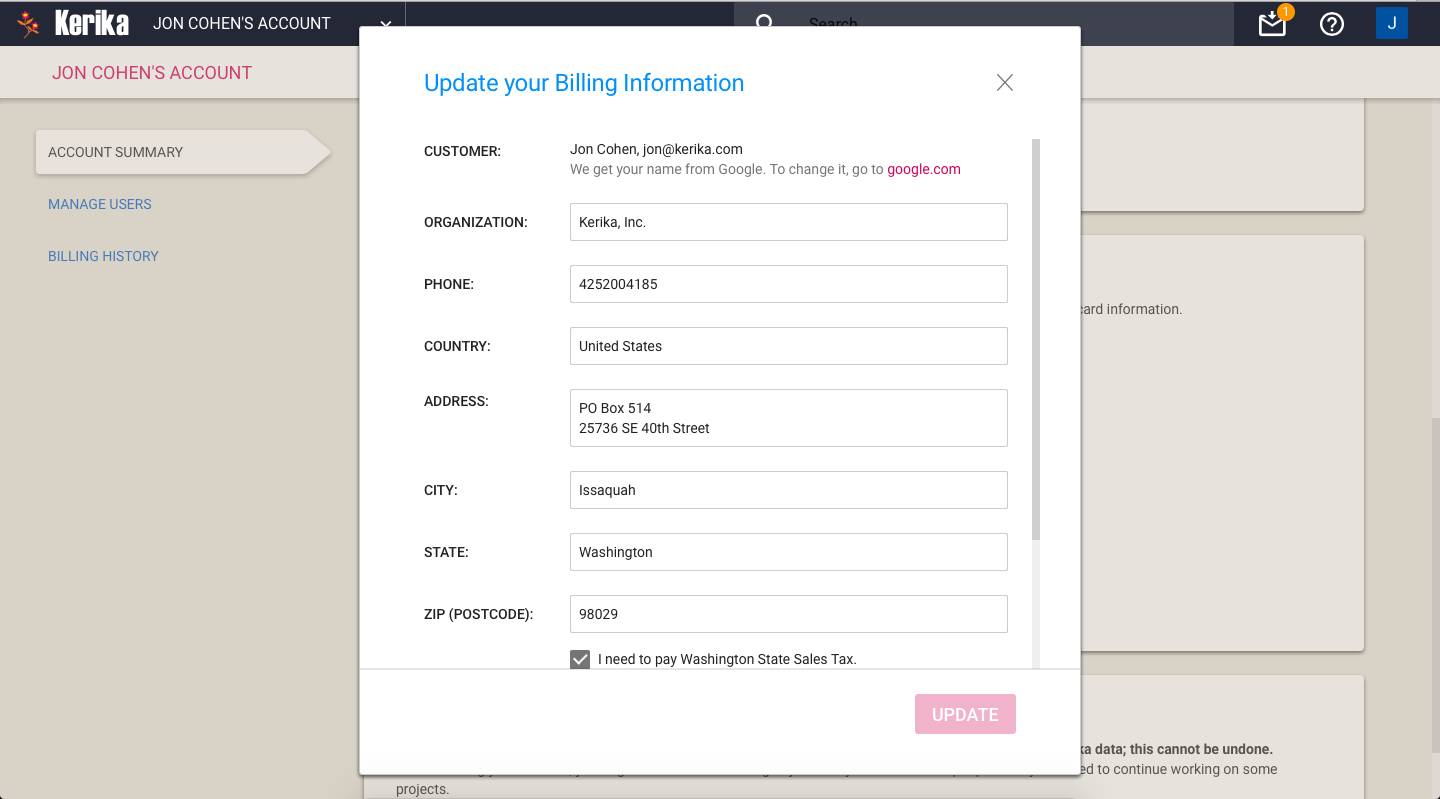
If you purchase subscriptions, or do other actions like request a refund, Kerika prompts you to update your Billing Information:
Updating Billing Information
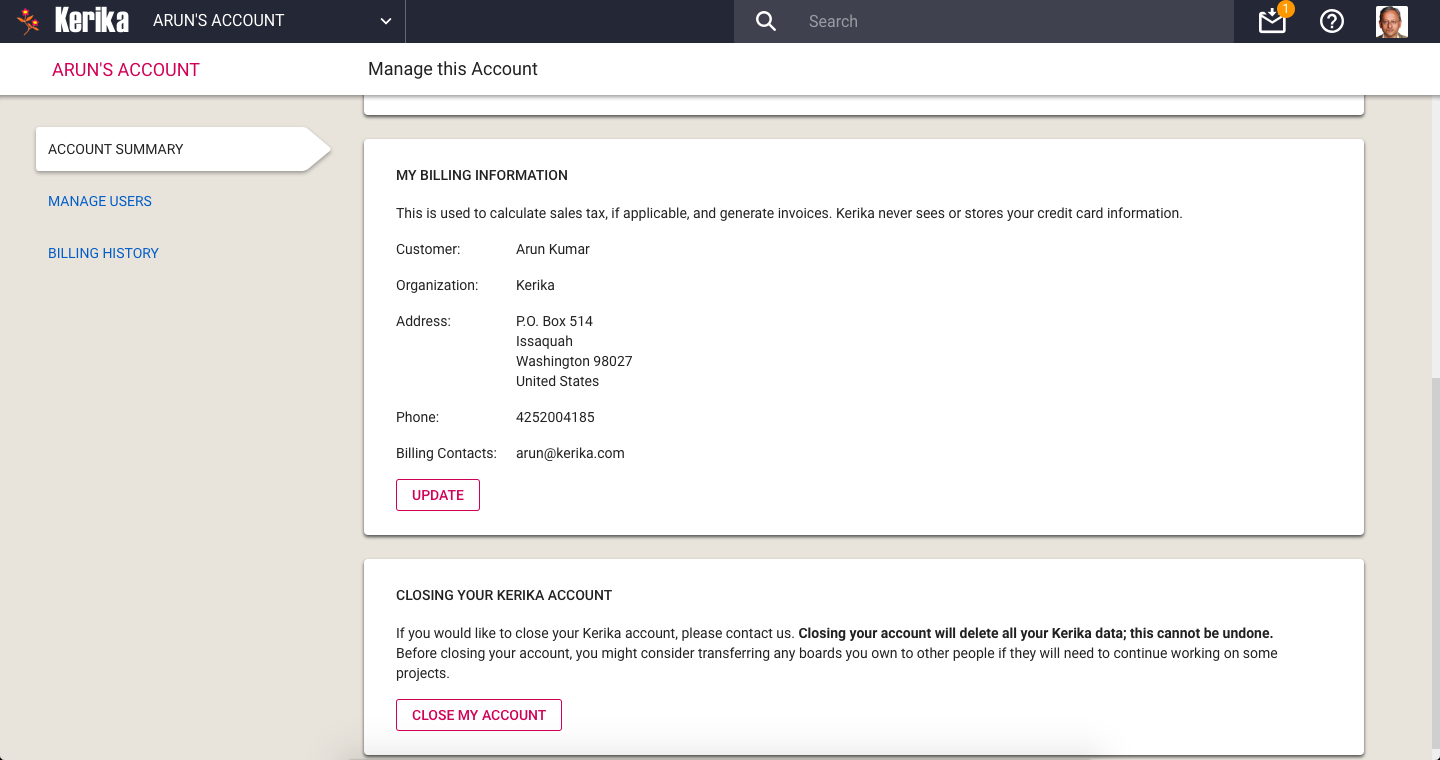
This information is needed to complete a transaction:
Your name or organization (school, college, nonprofit, company, government agency…) are used to ensure invoices and receipts are addressed to the correct person (the purchaser).
Your phone number is needed to handle any problems we face processing your invoices or purchases.
Your address is used to create invoices and receipts, and to check whether we need to charge you Washington State sales tax.
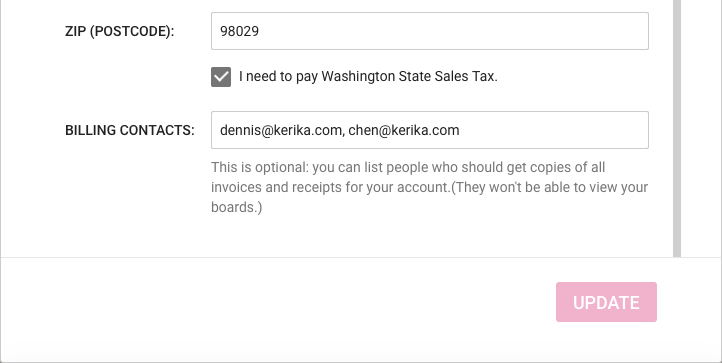
At the bottom of this screen you can optionally include Billing Contacts: people who need to get copies of all your transactions, such as your organization’s Purchasing Department or outside accountants/bookkeepers.
We store this information securely: as you may have already noticed, all access to Kerika servers is done using SSL/HTTPS, and within the Kerika virtual network, our servers communicate with each other using SSL as well.
We never ask for your credit card information: we use Stripe to handle all online payments, and we never see your credit card at any time.
If you pay by bank check or electronic funds transfer, this information is handled by Bank of America: details of these transactions, such as your bank information, are stored only at Bank of America and not stored on the Kerika servers.
The rollout of our new billing system seems to have been smooth — so far, fingers crossed! — and with this you now get better controls over who is part of your Account Team:
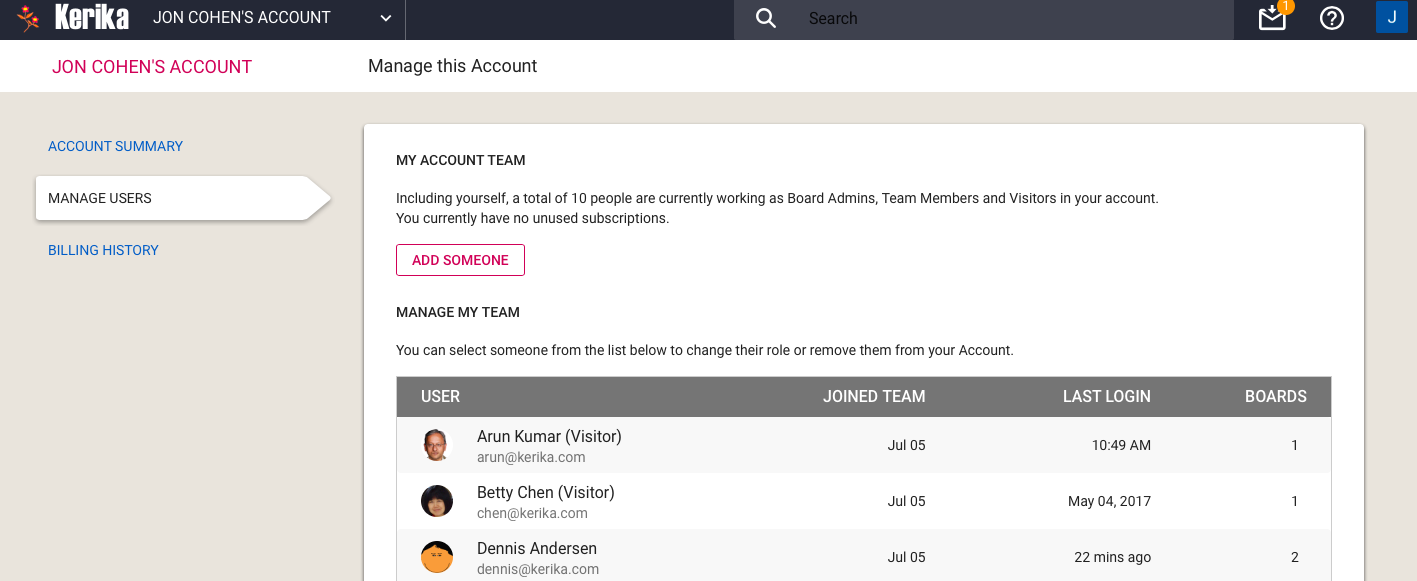
Manage Users
Please note that you don’t get charged for Visitors: if someone is only a Visitor on your boards — i.e. is not a Team Member or Board Admin on any board you own — you don’t need to pay for this person.
It doesn’t matter how many boards this person “visits”.
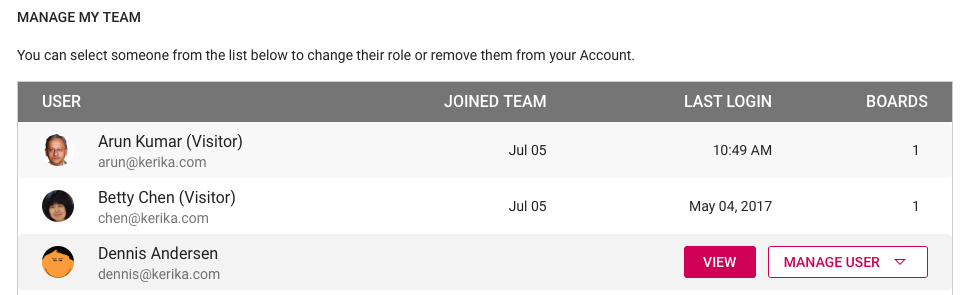
Visitors do show up on your Manage My Team list in the Manage Users tab, so you are reminded that they have access to some, possibly all, of your boards, and you can remove a Visitor entirely from your Account in the same way that you might remove a Team Member or Board Admin.
All of Microsoft’s browser focus is on their Edge browser, which means that as newer HTML5 features and standards get adopted by the browsers, these are going to show up in Edge, not IE 11.
And since Kerika is a pure Web app, one that requires you to download no software of any kind, including browser add-ons and plug-ins, we really need to make use of the latest HTML5 goodies that the browser vendors provide.
These goodies are going to be available only on Chrome, Firefox, Safari and Edge, and that’s where Kerika is gong to work best.
With the new billing system that we will be rolling out next week, Kerika will also be adding a slew of account management features that will make it much easier to purchase subscriptions, manage teams and handle your payments.
Manage Account options
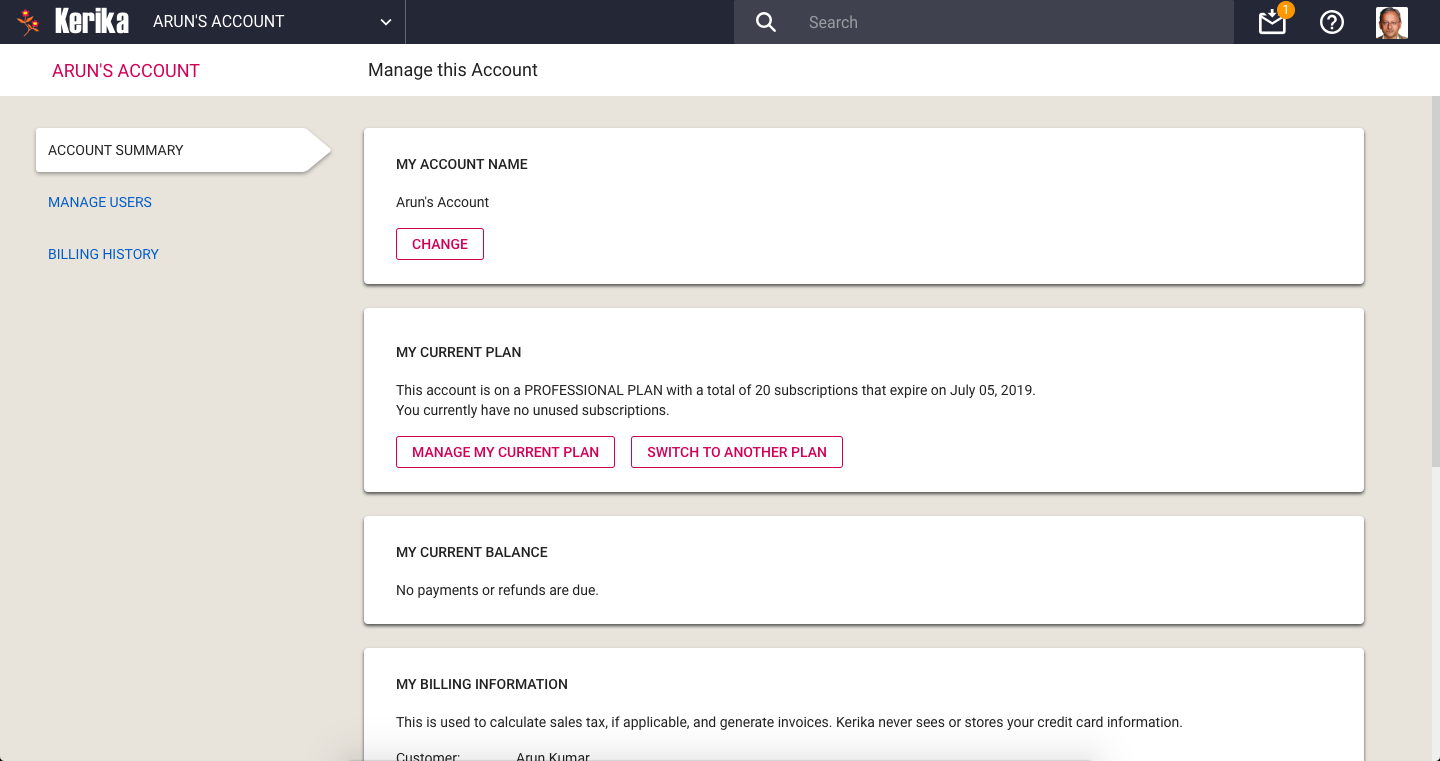
The Manage Account screen has a new layout, with three tabs on the left: Account Summary, Manage Users, and Billing History.
Account Summary
This page has several sections, starting with your Account Name at the top. When you create an Account, you can give it any name that you like, and on this page you can change it if needed. Changes to the Account Name are shown instantly to everyone who is viewing boards owned by your Account.
Next is a section that lets you manage your Kerika subscriptions. You can see which plan you are currently on — Individual, Nonprofit or Professional — and switch to a different plan if needed.
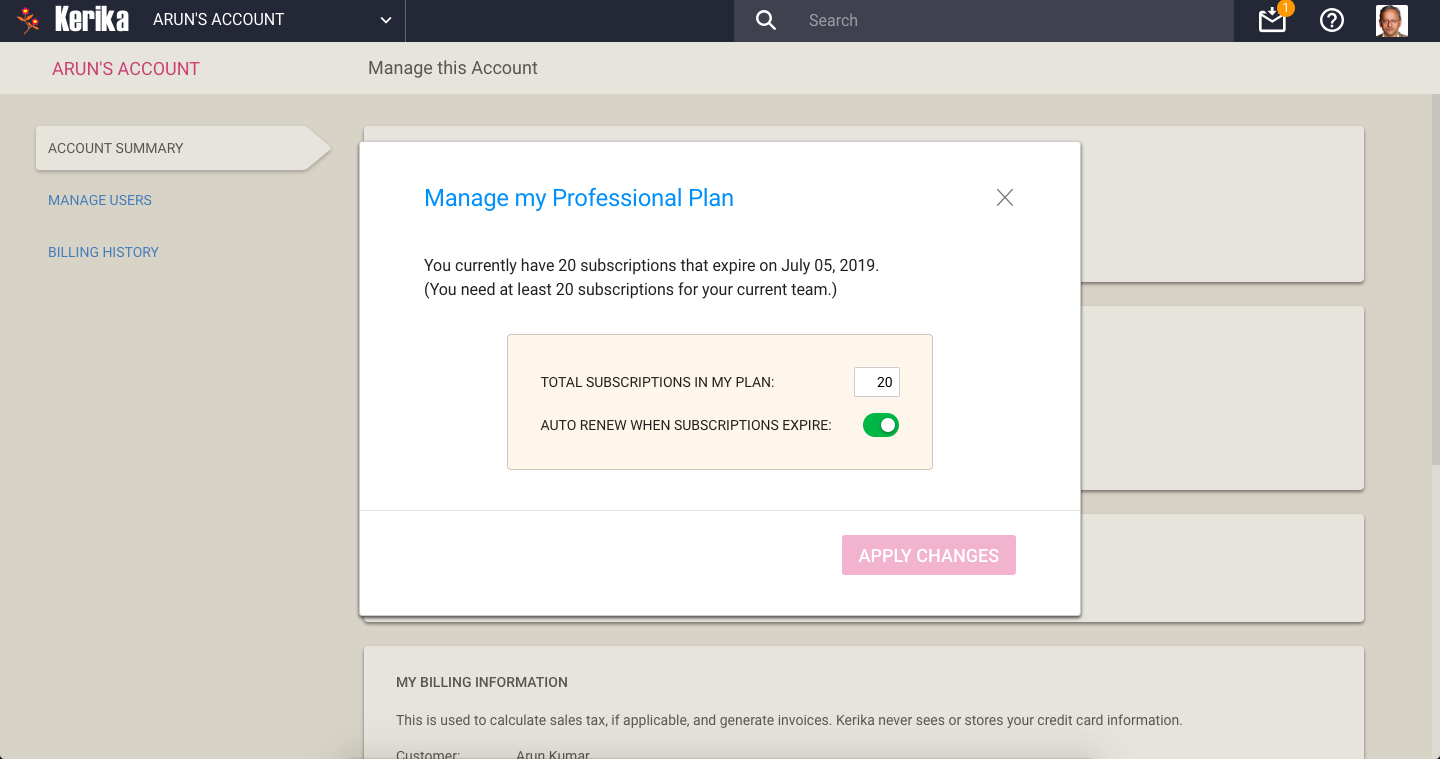
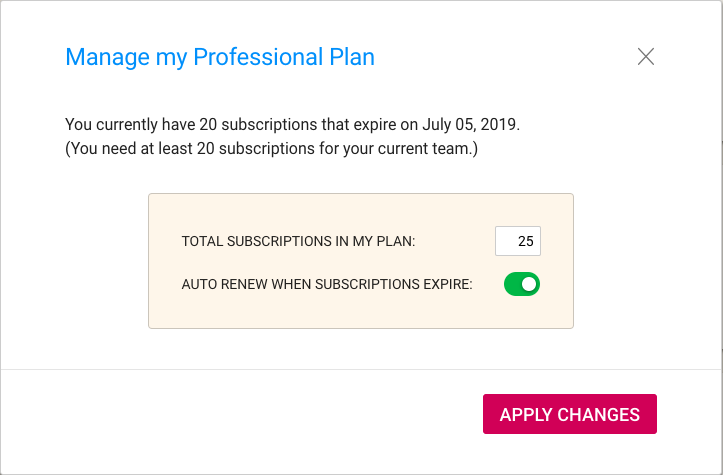
People on a paid Professional Plan can manage the number of subscriptions they currently have (you need enough to cover your current Account Team, which consists of everyone who is currently a Board Admin or Team Member on the boards owned by your Account.)
Managing your Professional Plan is easy: you can increase the number of subscriptions you have, or decrease them.
Manage Professional Plan
All subscriptions have the same end-date: this makes annual reviews and renewals easy for Account Owners. You can also decide whether you want to turn on, or off automatic renewals of your subscriptions.
Changing number of subscriptions
In the example shown above, the user is increasing the number of subscriptions from 20 to 25. The system reminds the user that he needs at least 20, for the size of his current Account Team.
Confirm purchase
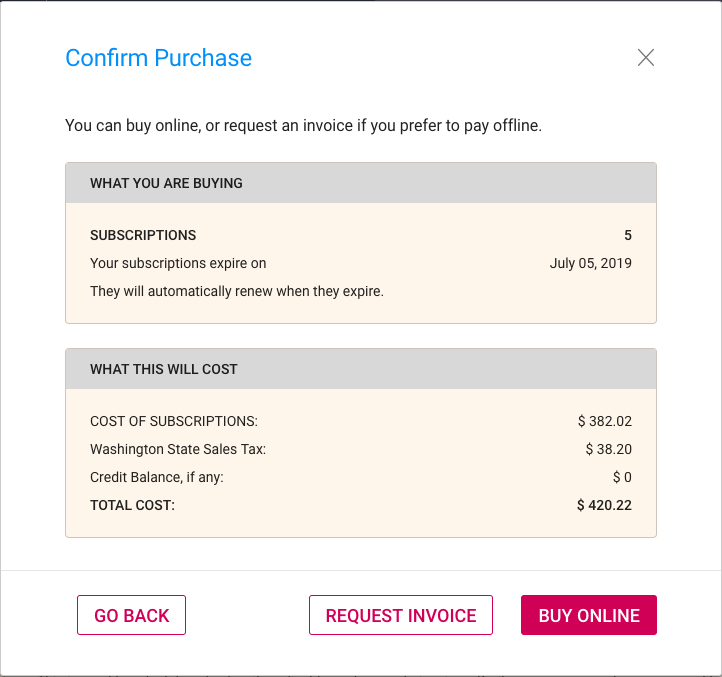
With our new billing system, it’s easy to make purchases online, or request that an invoice be sent to you.
Online purchases are handled by Stripe, so Kerika never sees your credit card information.
If your Account currently has a credit balance, because you had reduced the number of subscriptions, this is reflected in your purchase: by default a credit balance is applied to future purchases, but you can also request a check be mailed to you if you don’t plan to use your credit balance.
If you are located in Washington State (in the USA) we may be required to charge you Washington State Sales Tax. You can specify whether this applies to you by updating your BillingInformation:
Billing Info
Your Billing Information contains just your address and phone number; we never ask for, or store, your credit card or bank information.
Updating Billing Information
One useful new feature we have added is the concept of Billing Contacts:
Billing Contacts
Billing Contacts can be any set of people who need to get copies of all your Kerika transactions, e.g. your manager or Purchasing Department. Every purchase will generate a PDF for the transaction which will be automatically emailed to all the Billing Contacts for the Account.
Billing Contacts can include people from outside your organization, e.g. if you use a bookkeeping service from another company. Billing Contacts only get copies of your receipts and invoices; they don’t have access to your boards, and are not considered part of your Account Team.
Manage Users
The Manage Users page has been enhanced as well: you can see at a glance who is currently part of your Account Team, and now it is possible to invite someone to join the Account as a whole: previously people could be invited to join only a specific board.
Manage Users
For each member of your Account Team, Kerika will list the date when they joined your Account, the date of their last login, and the total number of boards where they are currently a Board Admin or Team Member.
This makes it easy to see at a glance how active someone is, if you are wondering whether to continue paying for their subscriptions.
(Note: in some cases the “Joined Team” information may not be available if it was months or years in the past; we didn’t start tracking this information until we started building the new billing system.)
Selecting a member of your Account Team offers additional actions:
Account Team actions
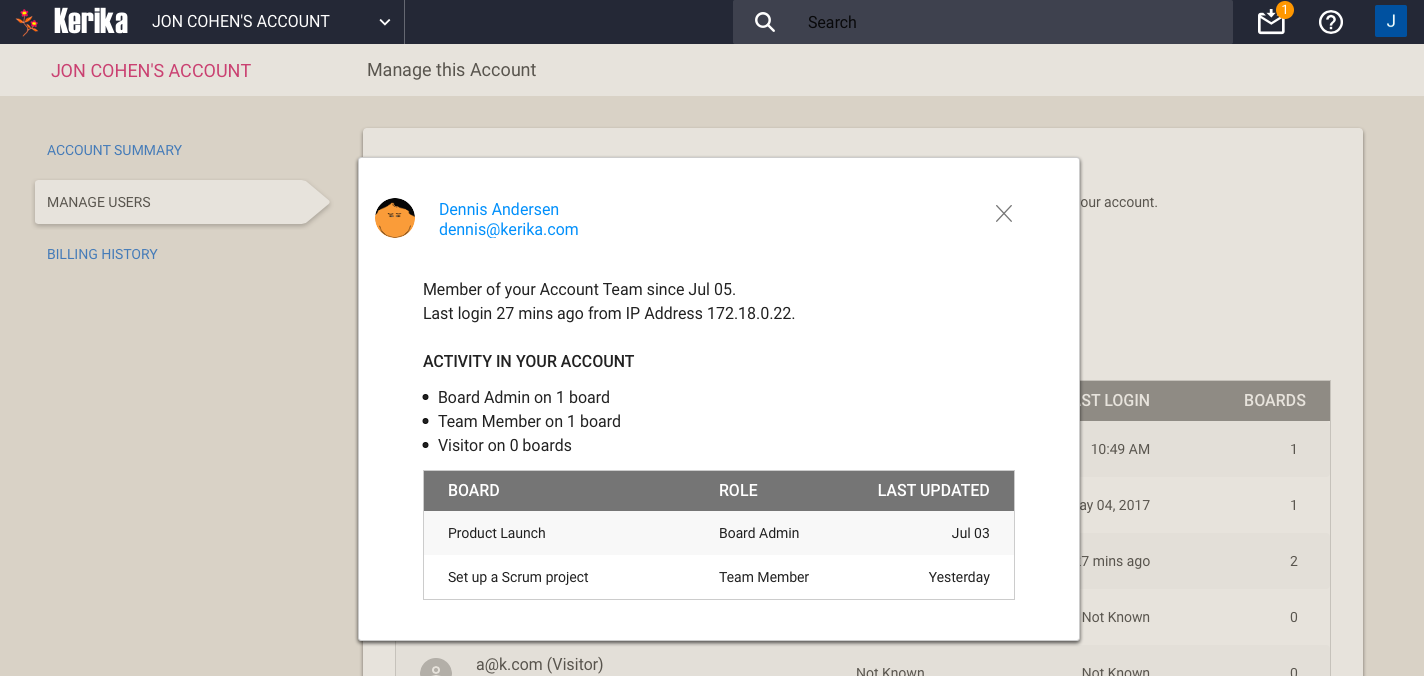
Clicking on the View button gives you a more detailed view of particular member of your Account Team:
Account Team Member detail
One new feature is you can see the IP address last used by the team member: this can be helpful in security reviews.
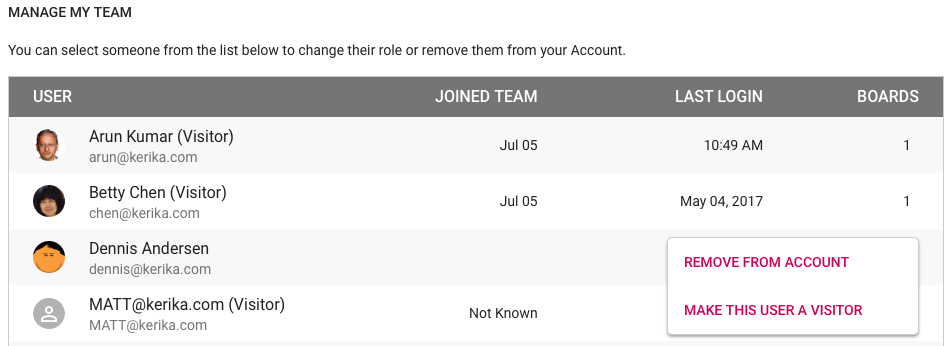
With the Manage User button, you can also remove someone from your Account Team altogether, demote their role to Visitor (across all boards owned by that account).
Remove from Account Team
Billing History
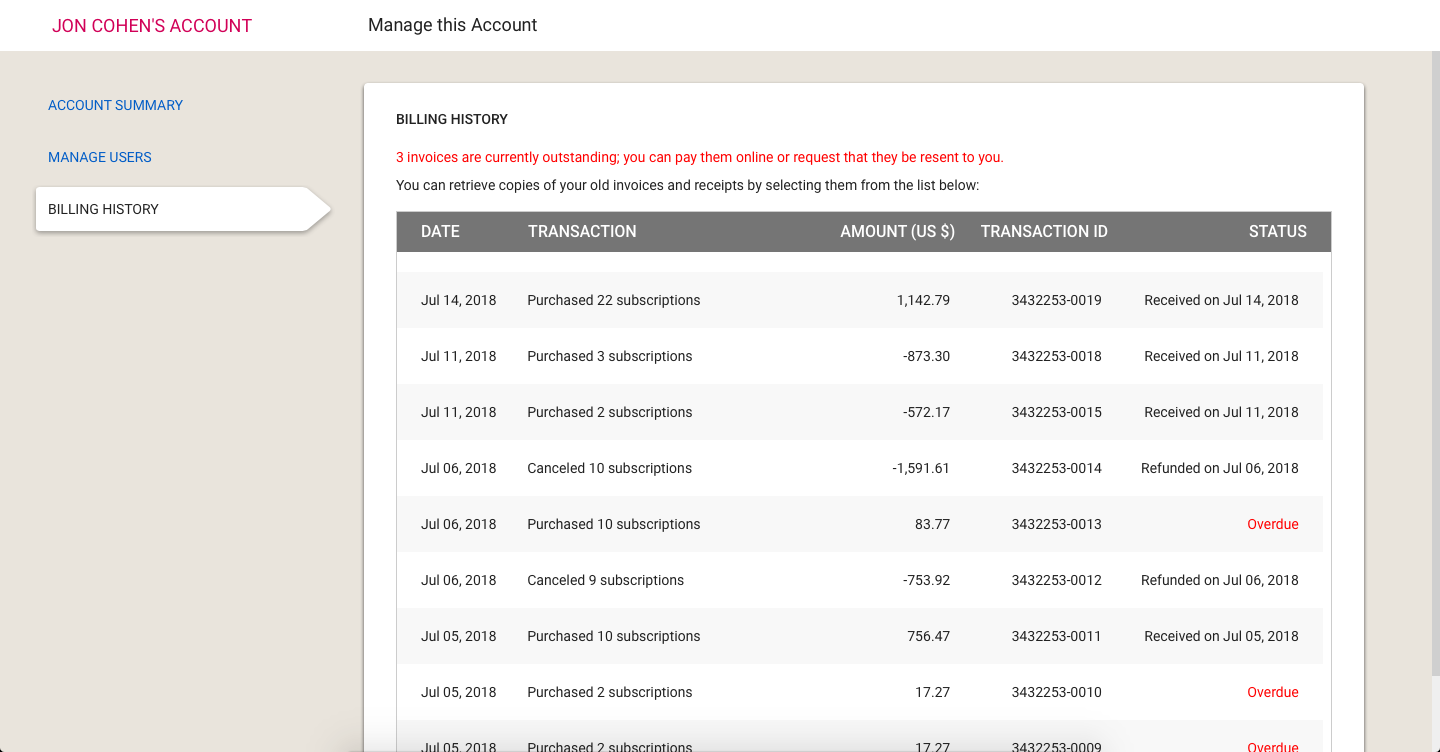
Going forward, all transactions — including online and offline payments — will be tracked automatically by the new billing system.
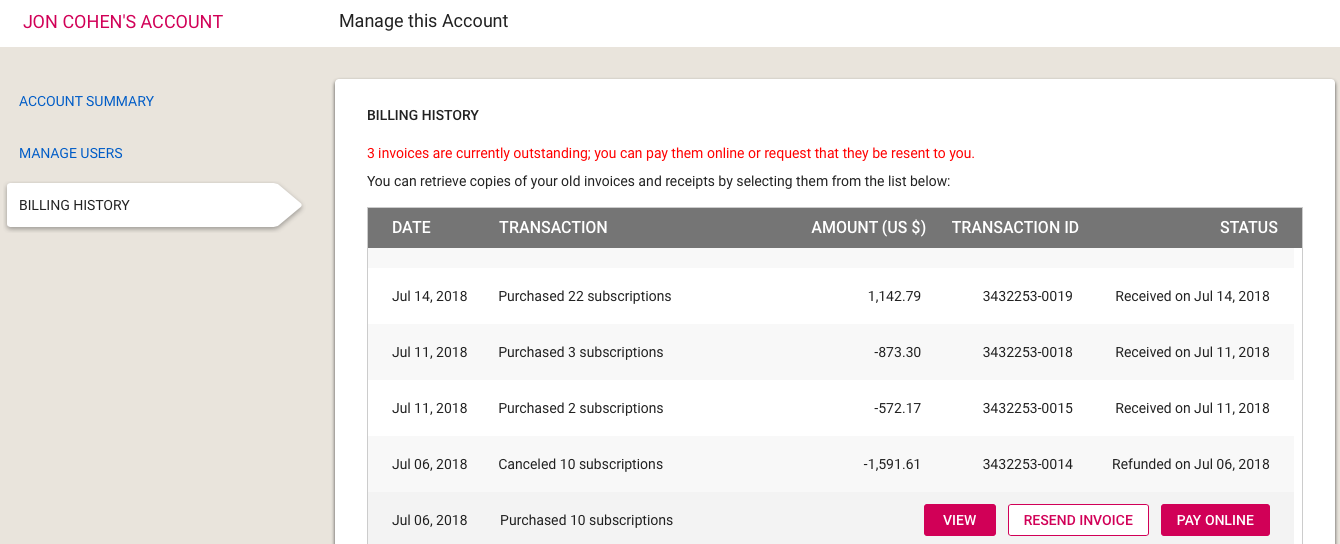
We will start keeping a history of your transactions going forward (we won’t have all the old transactions; sorry) and they can be accessed through the Billing History page:
Billing History
If you have an overdue invoice — and we sincerely hope you don’t! — you can pay it online, or request it to be resent to the billing contacts for the Account:
Overdue Invoice
Summary
The new billing system took a lot of work, over many months, but it was long overdue: our old billing process was largely manual, and somewhat error-prone.
Unlike some of our competitors, we understand that even though Kerika is software-as-a-service (SaaS), not everyone is set up to make online purchases. That’s why we have made it equally easy for people to receive invoices and make payments offline, e.g. by bank check or funds transfer, and have these transactions show up inside their Kerika account with the same flexibility as online purchases.
All of this should go live at the beginning of next week!
As part of our next release, which will include a new billing system, we will make it easier for you to move boards that you own to another account.
This can help in several scenarios:
If someone is leaving a team, it’s good practice to have their boards transferred to someone who will remain, so that ownership of project assets — the boards and all the content in the boards, including documents — remains with the team.
More importantly, it is good practice to stay away from having individuals own boards, and instead use service accounts to be the single Account Owner in your organization.
A service account is an omnibus account, typically set up with an email address like kerika@example.org, that isn’t associated with a single individual. A service account will never quit, never get fired, or take a vacation because a service account is not a real person — it is simply an account/ID used to be the permanent, omnipresent, owner of project assets so that team turnover doesn’t disrupt anyone.
If you own a board, you can move it to another account, i.e. effective change its ownership, by selecting the board on your Account’s Home, and clicking on the Board Actions button which appears on the top-right corner of the board card:
Board Actions Menu
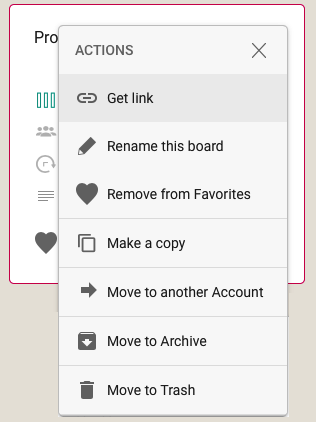
This will bring up a small menu of actions that are available to us as the board’s current owner:
Board Actions
(Note: this menu can also be accessed using the right mouse button.)
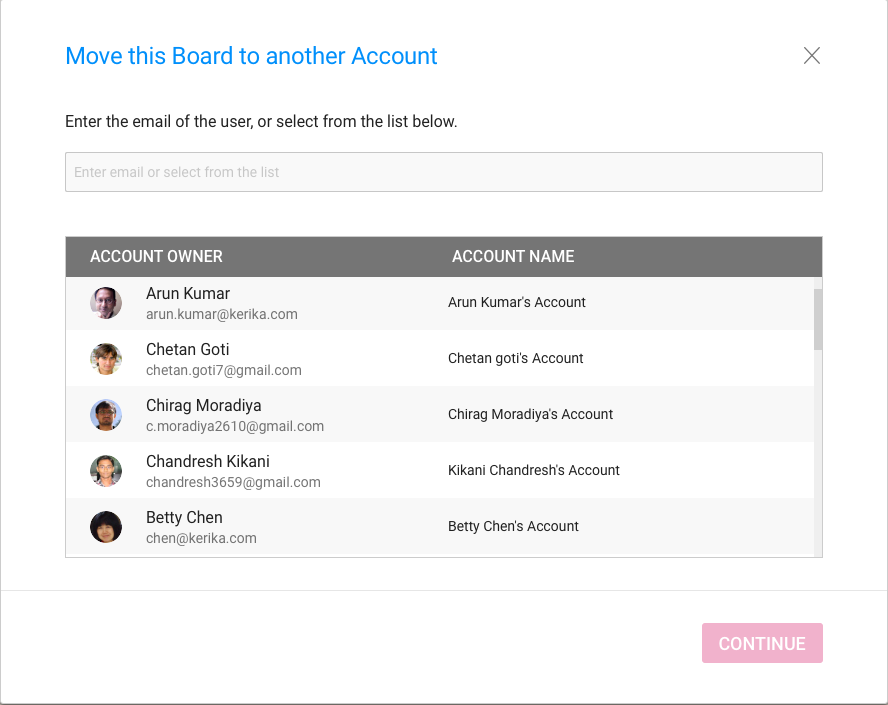
When you select the Move to another Account action from this menu, we will present you with this new dialog box:
Move Board dialog
A list of “known collaborators” is presented to you by Kerika to make it easy to select a coworker with a single mouse click, but you can also move the board to someone else, who isn’t part of your current Kerika collaboration network.
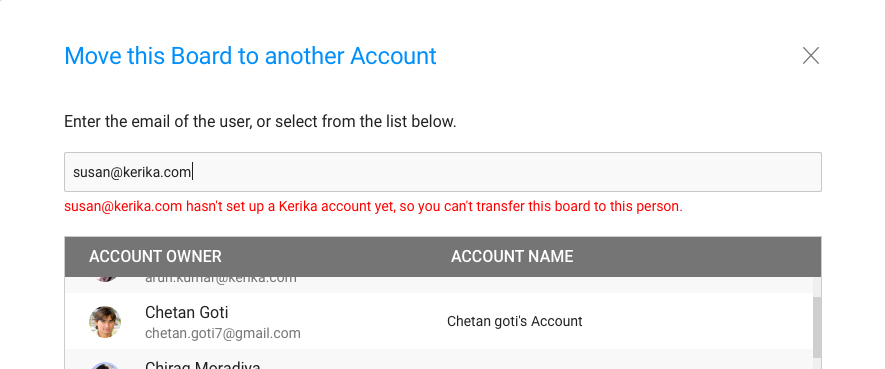
If you type in an email address, Kerika will immediately check to see whether this email address is that of a known Kerika user, before letting you proceed further:
Checking if new owner is a Kerika user
We think these improvements will make it easier for our users to manage their organizations boards, and move towards consolidated ownership for easier asset management.
As you know, Kerika is a Web Application: everything runs inside a browser, without the need for any plug-ins or add-ons.
We achieve all this with a ton of JavaScript code (and a sprinkle of SVG, for our Whiteboards.)
One, significant, disadvantage of JavaScript is that it is “single threaded”: two bits of script cannot run at the same time; they have to run one after another.
So while Kerika is running inside a browser on your laptop, our JavaScript has to share a thread with lots of other stuff that’s going on, such as painting, updating styles, and handling user actions. All of this has the potential to slow down Kerika, while the JavaScript code waits for something else to finish.
To get around this, we used JavaScript’s Promise function: this let Kerika’s code get going with its normal business while waiting for other browser functions to finish. What we didn’t expect, however, was that the Promise function isn’t supported by Internet Explorer 11. (Although it is supported in Microsoft’s Edge browser.)
This caused problems for all of our Internet Explorer 11 users — people using Chrome, Safari, Firefox or Edge were unaffected. We finally figured out what the underlying problem was, and did a workaround using a polyfill, which is a way to provide new functionality in older browsers that don’t support it natively.
The Box Platform has some limitations that you may bump into:
Certain characters are not allowed in file names, e.g. “/”. We noticed people were running into this problem, most probably because they were hitting the wrong keys inadvertently when renaming files.
Kerika is going to take of this silently from now on: if you try to rename a file using a character like “/” that Box can’t handle, Kerika will silently ignore that character in your renaming action.
File names can’t be more than 260 bytes. For people using English and similar languages, this generally means a file name cannot be more than 260 characters (with each character requiring one byte of storage). But for most Asian languages, e.g. Thai or Japanese, one character may require two bytes of storage, because the size of the alphabet is much larger than the Roman alphabet used by English.
This means that in some languages, file names may have to be much shorter, depending upon how many bytes are needed for storing each character, which in turn depends upon the size of their alphabets.
Some folks from Thailand were running into this problem: Kerika will start detecting this better, and provide more useful error messages
We fixed a bug recently that affected the Views feature: when a board was moved from one account (owner) to another, it wasn’t getting included properly in the Views for the new owner.
We recently got hit by spammers signing up as Kerika users, using fake emails from domains like mailinator.com, which seems to exist principally to help people do bad things on the Internet.
After signing up, these spammers (who seemed to be based in the Philippines) would invite hundreds of people with accounts on Tencent’s qq.com service in China. This would result in invitations being sent to these qq.com people to join the spammers on their Kerika boards.
To avoid a repeat of this problem, we are using Google’s reCAPTCHA in “silent” mode, on our signup and login pages — for people who sign up directly with Kerika using their email addresses.
This doesn’t affect the majority of our users, since most people sign up using their Google or Box accounts. And because the reCAPTCHA works silently, it shows up only when Google has reason to doubt that the person at the keyboard isn’t human.
Thanks to a longtime user from Poland, we discovered — and fixed — a bug that crept into one of our recent feature enhancements, where items couldn’t be permanently deleted from the Trash column on Task Boards and Scrum Boards.