We have added the University of Malaya to the list of domains from which people can automatically qualify for a free Academic Account: anyone signing up for Kerika+Google with a um.edu.my email — students, teachers and administrators — can automatically qualify to have up to 10 Team Members working on boards owned by their account.
Kerika makes Scrum easy for everyone, even people who are not techies. This tutorial video shows how you can set up boards for each of your Scrum Sprints.
Most people sign up as new Kerika users using a Google ID or Box ID, but an increasing number of folks are opting for direct signup: this means signing up with your email (any email will do).
For these folks, here’s a quick tutorial video that shows you how your files are stored and shared.
An updated tutorial video shows you how you will always know what changed on all your Kerika boards, even when you are working on the other side of the world.
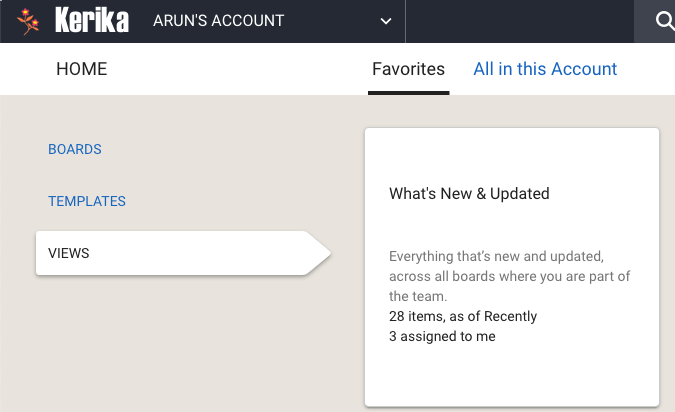
We just updated Kerika today, and along with the usual bug fixes and other behind-the-scenes stuff we have made an improvement to the way Views are shown on your Home Page:
Improved Views in Kerika
Some of our users have dozens of boards in active use at the same time, with large (and sometimes overlapping) teams, and as a result their Views counts are nearly always high.
As you can see from the screenshot above, the Home page now shows two counts for each View:
The total number of items that match for that View, and
The number of items that match that are assigned to you.
This makes it easier to see if you need to go back to a View to catch up on something that’s directly related to you, i.e. is assigned to you.
And yet another tutorial video, part of our ongoing effort to create a bunch of learning materials for new users! This one is about getting a lot done, which means using Kerika for large scale projects.
Kerika’s Highlights feature help you zoom in on what really matters, even when you are working on a Task Board or Scrum Board board with hundreds of cards.
And Kerika’s Views feature helps you stay on top of things no matter how many projects you have underway at any time.
Here’s a quick tutorial video on how to get the most out of Kerika’s Highlights and Views: