Category Archives: Kerika

Posts about Kerika, the company and its people

Bug, fixed: Confirmation emails were not working correctly

Our thanks to Larry Smith from EduTone who initially alerted us to a bug in the process of signing up as a Kerika user: the confirmation email sent by Kerika wasn’t working well, particularly if the user used any browser other than Chrome.

For example, clicking on the confirmation email and having Kerika open that link using Firefox or Chrome produced this kind of behavior:
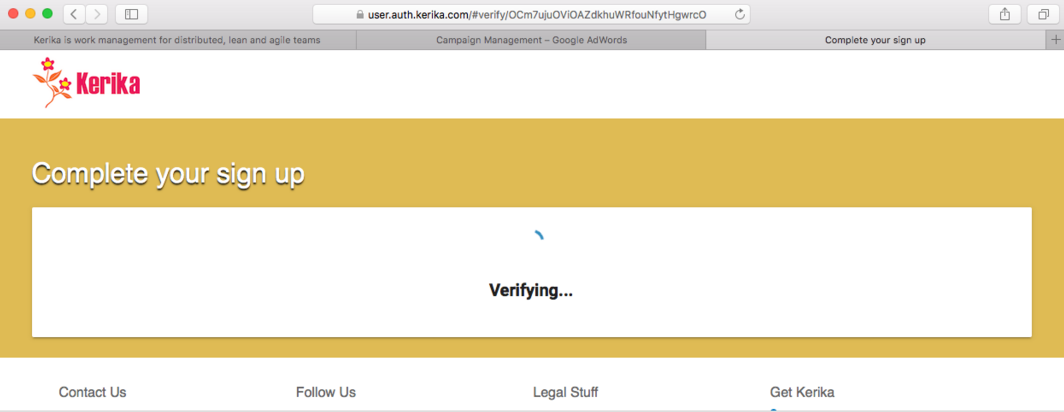
Safari problem

The problem was related to a recent decision we made to use Polymer for parts of our website.

It turns out that Chrome had a different sequence for loading the Polymer components than other browsers.

In Chrome the sequence is

  1. webcomponent-lite.js
  2. element.vulcanized.html
  3. build.min.js
While in browsers like Firefox the sequence is
  1. webcomponent-lite.js
  2. build.min.js
  3. element.vulcanized.html

Our build.min.js file needed components that were loaded only when element.vulcanized.html was loaded, which meant that the sequence in which these files were loaded by the browser was important, and  different browsers were loading these files in different sequences.

We fixed this bug: Polymer has a method to ensure that all imports are ready before the page is rendered.

This has been part of the learning process for us as we adopt Polymer more for our website redesign (which is underway, and should be unveiled by Christmas), and also consider using Polymer to rebuild the Kerika app itself!

Timing is everything when you send email

We occasionally email all of our users, when we have released something significant in terms of functionality or usability improvements.

On average, we probably send these emails 2-3 times a year, although we release software updates much more often.

Not every software update is announced in a mass email, although all the improvements and changes are always noted on this blog: unless the changes were big enough to require some additional explanation, we prefer to let users discover the new features on our own.

What we have noticed with the last couple of announcements is that the timing of the email makes a very big difference in terms of how many people actually open and read the emails.

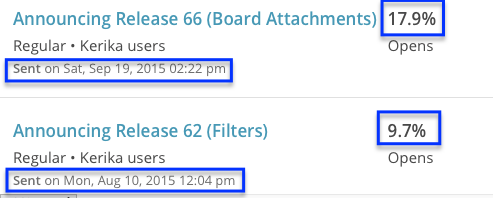
Here are the last two emails we sent:

Timing is everything


The “Release 62” announcement was actually far more significant, in our opinion, than the more recent “Release 66” version, at least in terms of UI changes and new features.

But, the Release 62 announcement went out mid-day on a Monday, and it was largely ignored as a result: only 9.7% of people opened that email.

The Release 66 announcement, on the other hand, went out on a Saturday afternoon, and had nearly double the open rate.

We think the simple explanation is that there was less competition for our emails on Saturday afternoon: fewer emails from colleagues and fewer crises to attend to.

We had long suspected this to be the case, but never had such clear proof that timing is everything when you send email :-)

Join us at the Lean Transformation Conference

Once again Arun Kumar, Kerika’s founder and CEO, will be speaking at the annual Lean Transformation Conference organized by Results Washington.

This conference is all about Lean and Agile in the public sector: thousands of folks from state, county and local (city) government agencies will be attending, and as usual Kerika will also have a display booth on the 5th floor of the Tacoma Convention Center.

Arun’s topic this year is “Can You See It Now? Visualizing your Lean and Agile Workflows”.

We look forward to seeing our Washington users at the conference; please do stop by our booth or sign up for Arun’s talk!


Google Apps last Friday

It looks like we were on the bleeding edge of Google’s problems last Friday (Oct 9): fairly early in the day, Pacific Time, we started seeing authentication failures from Google related to our Kerika+Google users.

The exceptions shown in the Kerika server logs were clearly pointing to problems on Google’s end:

Google Errors
Google Errors


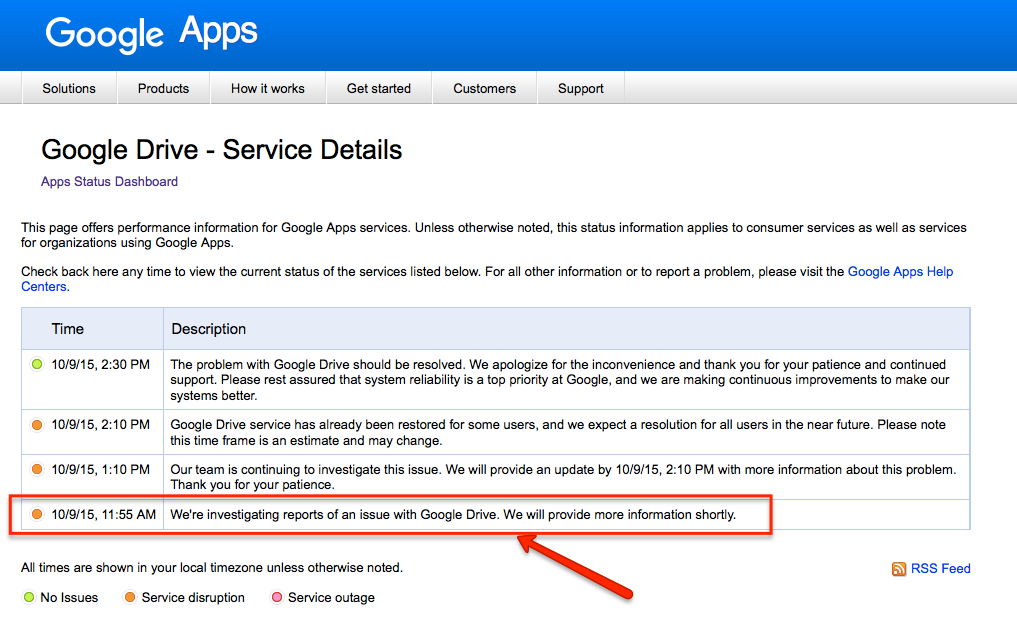
What was a little frustrating for us — and our beloved users — was that Google itself didn’t seem to be acknowledging any problems until fairly late in the day:

Oct 9 Google Apps status

By this time — almost noon, Pacific Time — dozens of Kerika users had been affected. We tried to let folks know via Twitter that there was a problem, and continued to monitor the situation through the day:

Google eventually acknowledged the problem as it became clear that it was widespread.

By mid-afternoon, the issue was largely cleared up, at least as far as Kerika was concerned, although it is possible that other apps, which also use Google for authentication or Google Drive for storage, were affected for much longer.

Once again, our apologies for everyone who was affected.

Amazon burped a little on the weekend

We use a number of Amazon Web Services, including one called Simple Queue Service which Kerika uses to handle communications between our main project database server and a separate server that handles the Search function.

  • As with all search engines, Kerika’s Solr engine does a full indexing of the database only once: when the database is rebuilt for any reason (which happens very rarely), and after that it does incremental indexing which means that it only looks at changes made to individual boards, cards, and canvases.
  • Using a queue helps us manage the load of traffic going to the search engine server: in the unlikely event that a lot of people make a lot of updates to their Kerika boards at the same time, Solr won’t get overwhelmed with a sudden burst of new indexing.
  • There are lots of ways to implement queues in software — in fact, studying queuing theory is a standard course in all computer science programs — and at this point most apps, like Kerika, prefer not re-invent that particular wheel: instead, it is more cost-effective to use some standard queuing facility that’s available as part of the underlying platform.

AWS works very well in our opinion — it has very high reliability across most of its services — but like all software, it isn’t entirely infallible.

Over the weekend we observed a small handful of errors in our services logs where it looked like SQS had a temporary problem.

We cross-checked this time period with other activity on Kerika, and determined that about 7 Kerika boards may have been affected: not in terms of any data loss or corruption on the board itself, but in terms of some changes not being updated in the search index.

Now, 7 boards is a tiny portion of the entire Kerika project database, which numbers in the hundreds of thousands of boards, but we are glad to have spotted the potential for trouble and have re-indexed the data on these particular boards.

If we did our job well, no one will notice.

Vimeo makes for better embedding (than YouTube)

We post our tutorial videos on both YouTube and Vimeo, and get far more traffic on YouTube than we do on Vimeo.

But, as we go through a review/refresh of our website, we are switching over to Vimeo for embedding these tutorials, because Vimeo provides a cleaner look that seems to be less intrusive within our own design.

Here’s the same video, embedded from YouTube (on top) and Vimeo (on bottom):

The YouTube video has a weird grey shadow on the top part of the thumbnail, like it was deliberately trying to provide a retro, cathode-ray-tube (CRT) look.

(We are not fans of CRTs; don’t own vinyl any more…)

The same video on Vimeo has a cleaner framing:


Security within a Virtual Private Network

All of Kerika’s servers, which run on Amazon Web Services (AWS), operate within a Virtual Private Network (VPN), so they can be configured to only listen on local ports, e.g. ports like 10.0.0.1, etc.

This means that they cannot be accessed directly from the Internet: instead, all connections are routed through an Elastic Load Balancer (ELB), which is a special kind of AWS server that handles connections from all users.

The ELB is very secure: it implements SSL 2.0, and when vulnerabilities like Heartbleed and POODLE are discovered, it is relatively easy for us, with Amazon’s help, to quickly ensure that the the ELBs are patched.  Patching the ELBs quickly gives us breathing room to patch all the other servers involved, particularly if vulnerabilities are found at the platform level itself.

But, running a VPN isn’t enough: while it blocks people outside the Kerika server environment from directly accessing our database, there is still — at least a theoretical possibility — that an attacker can find his way inside the VPN, and then try to connect to our database server on a local port.

To avoid this scenario, we use SSL within the VPN as well, so that the connections from the load balancers to the database servers are also authenticated and encrypted.

The Whiteboard Daily Digest: a feature that died quietly, a long time ago

A long time ago we used to have a feature we called the “Daily Digest” which sent an email everyday summarizing all the changes that had been done to your Whiteboard projects overnight.

(This was back before we added Scrum Boards and Task Boards as a feature, when all we had was our patented Whiteboards.)

We never got this feature to work properly: not because it was buggy in a technical sense, but because we could never figure out how to make it a useful feature.

After trying numerous times to tweak it we finally gave up a long time ago.

And promptly forgot all about it.

It turns out that the feature had only been turned off on our server software; it hadn’t actually been ripped out.

We stumbled upon it in an obscure corner of our vast code base recently and were surprised to find it still there, albeit in a “commented-out” form.

Well, it’s gone for good now. It never worked well, it had been turned off for years, and now it’s in the trash…