A new video that is the shortest summary we have ever made of Kerika:
Kerika in 70 seconds from Arun Kumar on Vimeo.
This is going to feature in our all-new website redesign, which we hope to get in place this week.
A new video that is the shortest summary we have ever made of Kerika:
Kerika in 70 seconds from Arun Kumar on Vimeo.
This is going to feature in our all-new website redesign, which we hope to get in place this week.
Arun Kumar, Kerika’s CEO, gave a presentation on Visual Workflows at the Lean Transformation 2015 Conference in Tacoma, Washington, which was very well received.
Here are the slides from that talk:
Once again Arun Kumar, Kerika’s founder and CEO, will be speaking at the annual Lean Transformation Conference organized by Results Washington.
This conference is all about Lean and Agile in the public sector: thousands of folks from state, county and local (city) government agencies will be attending, and as usual Kerika will also have a display booth on the 5th floor of the Tacoma Convention Center.
Arun’s topic this year is “Can You See It Now? Visualizing your Lean and Agile Workflows”.
We look forward to seeing our Washington users at the conference; please do stop by our booth or sign up for Arun’s talk!
When you are writing a chat message, on a card or canvas on any Kerika Task Board, Scrum Board or Whiteboard, what happens if you need to leave that message in the middle and go look at something else in Kerika?
For example, suppose you are in the middle of writing a chat message, but in order to complete it, you need to go off and look at another card’s details, or maybe a file attached somewhere else on the board?
You can leave aside a chat in mid-stream, go somewhere else in Kerika, return to the chat, and pick up where you left off!
That’s because Kerika uses your browser’s local cache storage to keep your unsent message: it means your changes aren’t lost while you go look at something else in Kerika.
This is a handy usability fix we have always had in Kerika, but it may be one that folks didn’t realize existed…
Well, now you know :-)
We have added a new feature that should prove handy for a lot of folks: you can now add content — files from your laptop, images from your mobile or tablet, Web links from your Intranet or the Internet, or canvases — to a Task Board or Scrum Board itself.
If this sounds like something that was always there, maybe we need to say that differently: you used to have the ability to add content to a card, now you can add it to the board itself.
There are many situations we have encountered where we want to share content or a canvas with a team, but there wasn’t any obvious place to still it — no single card on the board that seemed like the right place to attach that content.
And that’s because the content we wanted to add was applicable across the entire board, not just relevant to a single card.
This was getting frustrating, so we decided to scratch our itch: a new button on the top-right area of your Kerika app will let you add files, Web links and canvases to the board itself:
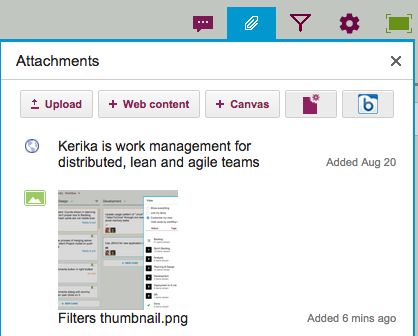
This should make some of you as happy as it has made us!
A new tutorial video on how you can easily draw curved lines and arrows on Kerika’s canvases and Whiteboards:
Did you know that you can embed a Google Map in your Kerika Whiteboards? It’s easy: just copy the Google Map’s URL:
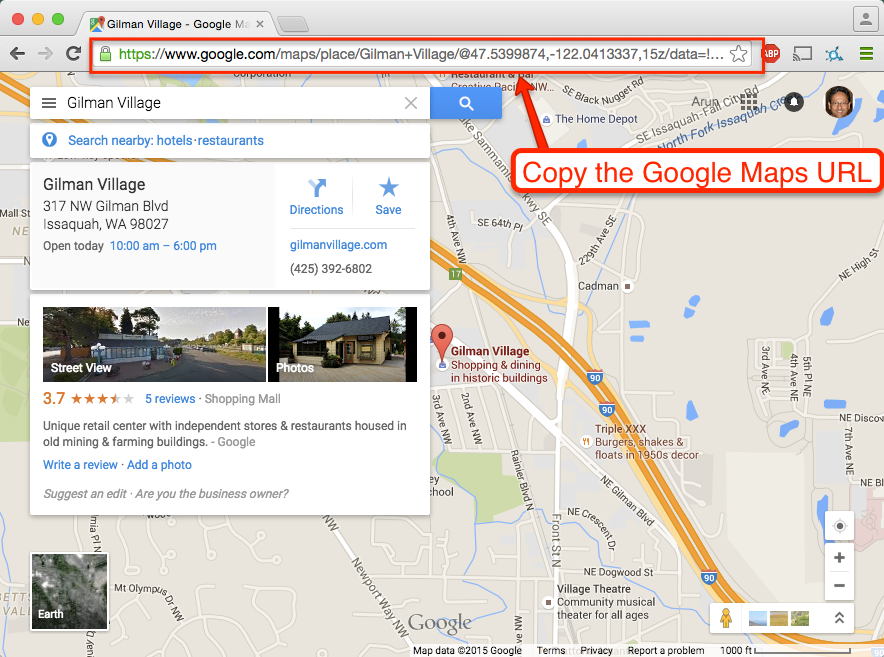
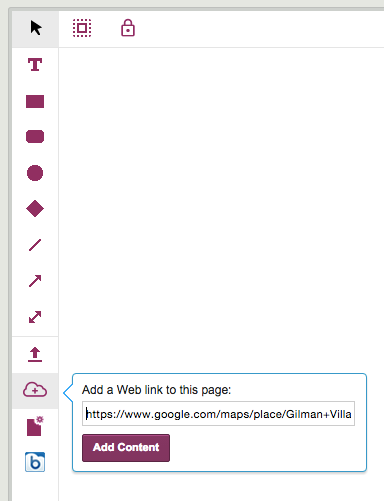
And paste it into the dialog box that appears when you click on the “Add Web Content” button on your canvas toolbar:
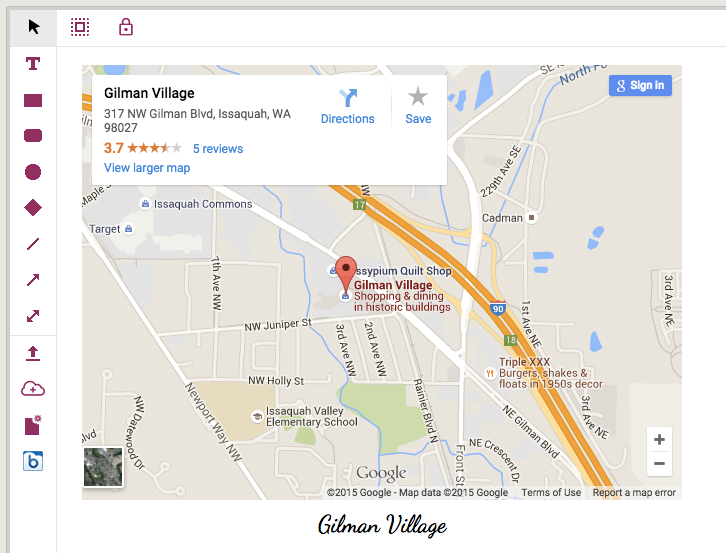
Kerika automatically figures out the URL refers to a Google Map, and shows you an embedded map on your canvas:
You can do the same thing with card attachments, for your Task Boards and Scrum Boards: Kerika shows a small thumbnail of the map in the list of attachments on your card:
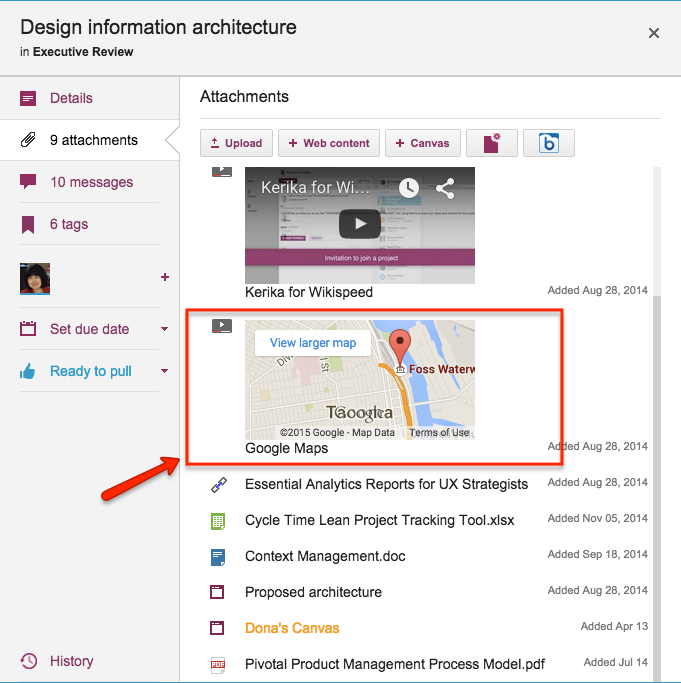
As part of our work on combining tags and colors, we have been cleaning up parts of the Kerika user interface that had minor inconsistencies.
One such inconsistency — in our view — was that you were able to add people to a project team from within the card details dialog itself:
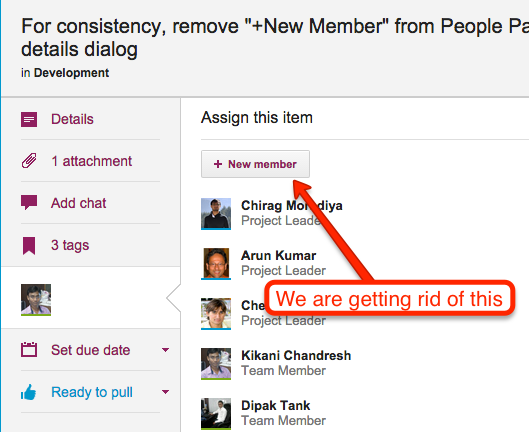
This button has been there in Kerika for a very long time, but it doesn’t really make sense to have this capability within the card details dialog: it just isn’t the best place to decide to add someone to a project team.
Instead, in our new layout the Project Settings dialog consolidates all the board management in one place, including adding people to a team, changing someone’s role within a team, and removing someone from a team:
It used to be that when you added content to a card — files from your laptop or Web content from your Intranet or the Internet, or a canvas — the newest content was added at the top of the list.
Of course, you could always rearrange them, by grabbing and dragging them up or down the list, but this it not a feature that many users discovered on their own :-(
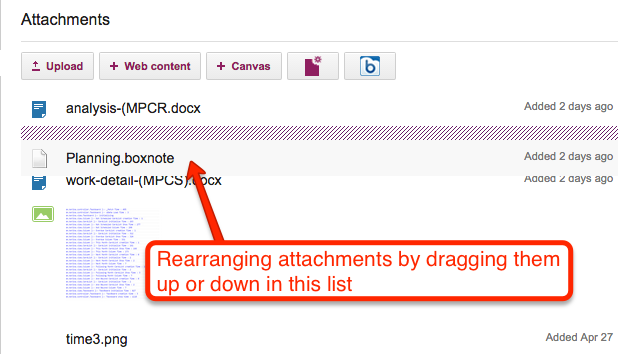
Well, for greater consistency with how the chat and history are shown within a card’s details, we are now going to show attachments in chronological order as well — the latest files and URLs that you added to a card will appear at the bottom of the list, and the view of these will be automatically scrolled to show the latest items:
With our latest update, it’s become easy to keep track of sub-tasks for cards on a Task Board or Scrum Board; here’s an example:
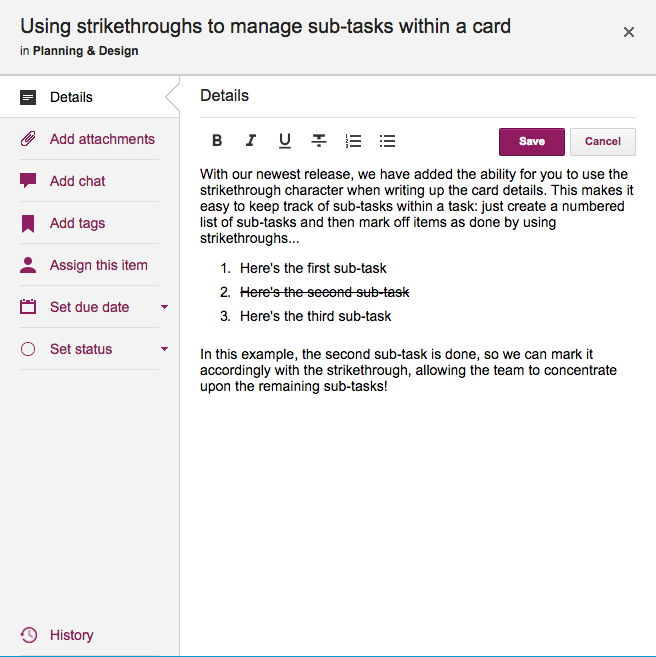
In the example shown above, the second item in the numbered list has been been taken care of, and so it has been struck-through, making it clear to the rest of the team that it isn’t an issue any more.
We have added the capability of marking text within card details with a strike-through, and this, combined with the easy way in which you can create numbered lists, makes it easy to track sub-tasks!