Category Archives: Kerika

Posts about Kerika, the company and its people

G Suite Marketplace listing disappeared

About a week ago, the Kerika listing on the G Suite Marketplace disappeared for reasons we still don’t understand.  We have been working actively with Google’s engineers to fix this, and are confident they will soon deliver a solution — the problem is on their end, not ours — and in the meantime we would like to apologize to anyone who is affected by this.

The underlying problem is that G Suite Marketplace is transitioning, and right now there are some overlapping systems in place that are creating problems for Kerika (and possibly other third-party apps).

Historically, if you wanted to publish your app on the G Suite Marketplace, you did so using the Chrome Web Store — which is where you also published your app for the Chrome Web Store, obviously.

This always led to to some confusion from our perspective: we had to maintain two identical product listings using the same Chrome Web Store Developer Dashboard.  And since this process has been in place, for the past several years, Google itself has been deprecating the use of the Chrome Web Store to distribute browser-based apps through this store.

Meanwhile, the Chrome Web Store Dashboard itself is getting a much-overdue UI makeover, and while this is underway the dashboard doesn’t have all the functionality that the old dashboard does, and there, of course, some bugs remaining in the new dashboard that Google needs to iron out.

(While the old Chrome Web Store Dashboard was ugly as sin, it was old and stable. The new Dashboard is much nicer, but not quite, quite ready yet.)

And there’s also the Google Cloud Platform API Dashboard: newer than the Chrome Web Store Dashboard, and with a completely different user interface and functions, since it manages an app developer’s use of many different cloud services from Google.

This has become another place to maintain your app’s product listing, and this seems to be where our problems originated: the G Suite Marketplace currently takes some information from the Cloud Platform Dashboard, and some information from the Chrome Web Store, to define your product listing.

We have been actively working with Google’s engineers, support and product management to try to resolve this problem — and we are grateful for the attention they have been giving us — and we hope to be out of the woods soon. One unexpected benefit of these problems has been the opportunity to talk to Google about our experience as third-party app developers: hopefully our feedback can help them make the G Suite Marketplace more useful to both Google’s customers and ours :-)
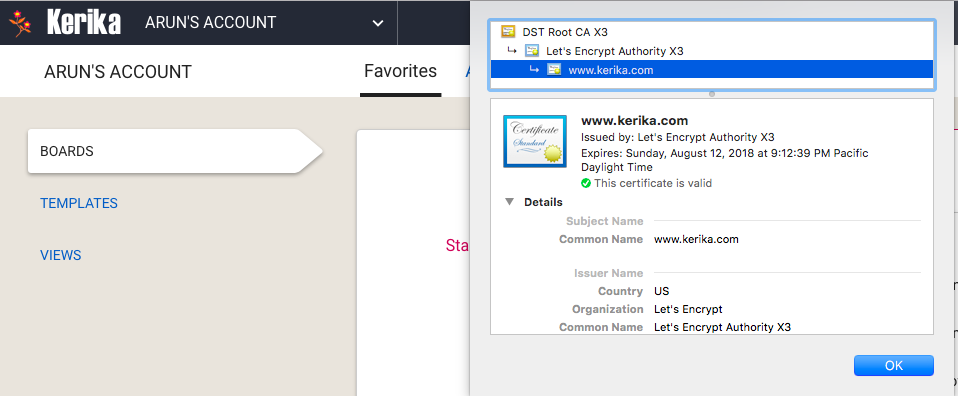
Switching to Let’s Encrypt for our SSL certificates

We have mentioned below the problems we had with GoDaddy’s SSL certificates; we have fixed this by switching to the open-source certificate authority called Let’s Encrypt.

Lets Encrypt SSL
Lets Encrypt SSL

Let’s Encrypt is a free, automated, and open certificate authority brought to you by the non-profit Internet Security Research Group (ISRG). It lets us host our own certificates, so we don’t have to rely upon third parties and can have better control over the quality of our service.

Wrestling with SSL certificates

We had previously been using SSL certificates for our website (kerika.com) and this blog (which is on a subdomain: blog.kerika.com) that we got from GoDaddy, but we have moved away from them.

What pushed us away was their aggressive approach to billing customers: they automatically renewed our SSL certificates after just 9 months into a 12-month contract, which we found unacceptable.  Talking to their customer service people was an unhappy experience as well, so we decided to not do any more business with GoDaddy.

Now we are using a SSL from Amazon for our website and app (kerika.com): Amazon actually provides free SSL certificates to sites hosted on Amazon Web Services, and it was easy and simple to set up.

However, AWS doesn’t provide wildcard SSL certificates so we couldn’t handle our blog as well — particularly as our blog isn’t hosted at AWS. Instead we got a SSL certificate for the blog from RapidSSL which is reasonably priced.

So far, so good.

A style refresh for our Blog

Hope you like it — we finally got around to customizing the WordPress TwentyThirteen theme we have been using for this blog.

Nothing fancy; just making sure the colors and font (especially the fonts!) are consistent with our website and app.  We use Roboto everywhere now: we find this to be a really easy to read font for most screens, and think that Google did a great job in coming up to an alternative to the traditional Arial/Helvetica.

We are also trying to clean up the Categories and Tags we use to help you find older blogs: there were too many overlapping categories/tags that had accumulated over the years so we got rid of a bunch of them.

Let us know what you think…

We are moving away from monthly billing

We used to offer monthly and annual subscriptions, and in the last 5 years we had just two customers ever request the monthly option.

Everyone else found the annual subscriptions far more convenient so they wouldn’t have to process invoices or receipts, or get internal purchase approvals, every month.

The monthly purchase offer wasn’t very good for Kerika either: there’s a certain amount of bookkeeping and overhead for processing every invoice and given the already low $7 price per user, this offer was essentially a money-losing proposition.

So, we are now discontinuing the monthly subscription purchases altogether.  We are asking all our customers to purchase annual subscriptions: the amounts involved are still very reasonable, and if you do change your mind in the middle of the year, you can still request a refund for the unused portion of your annual subscription.

This means you don’t have an risk of overbuying: if you change your mind about using Kerika, you can get a refund for the remaining portion of your subscription.

Our youngest Kerika users do amazing stuff

For the past few years Stéphane Vassort from College La Grange Du Bois in Savigny-le-Temple in France has been using Kerika with his middle-school students who have been building 3-wheel trikes as part of their science curriculum.

He recently shared this heartwarming video of his students — surely among the youngest Kerika users in the world! — with the trikes they have built:

https://youtu.be/2ChNIUaxqW4

We are so happy to be supporting this kind of work!  If you are interested in getting a free Academic & Nonprofit Account like Stéphane, please let us know.

Kanban vs Scrum: what’s the difference, and which should you use?

We have a complete (one-hour long) video of the tutorial presented by Arun Kumar, CEO of Kerika, at the recent Lean Transformation Conference on the subject of Kanban vs Scrum: what’s the difference, and which should you use?

(The slides for this talk, and more, can be found on Slideshare.)

Topics covered:

Forming a team 00:01:32

The Product Owner 00:02:01

The Scrum Master 00:02:55

The Scrum Team 00:03:55

Pulling Work 00:04:04

The Product Backlog 00:05:45

Scrum Stories 00:06:25

Writing a good Story 00:07:35

From Epics to Stories 00:10:25

From Stories to Tasks 00:11:13

Estimating with Story Points 00:13:04

Organizing a Sprint 00:15:00

How long is a Sprint? 00:19:15

Sprints in theory 00:20:32

Sprints in real-life 00:20:53

Daily Standups 00:23:25

Burndown Charts 00:24:13

Team Velocity 00:25:35

Best Practices for Getting Scrum Right 00:28:00

The Nuclear Option 00:30:57

Where does Scrum work best? 00:32:02

Scrum in Government 00:33:25

Where does Kanban work best? 00:35:43

Collaboration Networks 00:37:25

Paper doesn’t scale 00:38:30

Using Kerika for Personal Kanban 00:39:50

Using Kerika for Team Kanban 00:40:24

Using Kerika in the Public Sector 00:40:37

Using Kerika for Scrum Projects 00:40:54

Capturing stories as “virtual sticky notes” 00:41:20

Summary 00:42:57

Question: how do you deal with poor performers on the team? 00:49:15

Question: in Scrum, are units of measure like lines of code still applicable? 00:50:08

Question: how do you measure individual performance? 00:51:03

Question: how do you handle poor performers within a team? 00:52:25

Question: when do you use the Nuclear Option? 00:54:20

Question: how do you estimate stories? 00:55:54

Photo credits: Abdul-Rasul Kassamali, Jama Abdirahman.

An easier way to get in touch with us

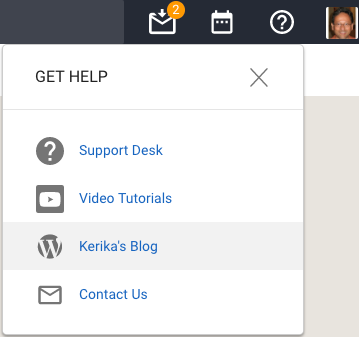
We have made a bunch of improvements to the Contact Us feature in Kerika, which — as before — can be accessed by clicking on the help button (“?”) in the top-right corner of the Kerika app:

Contact Us
Contact Us

Previously this simply opened up your local email client to send us a message; now the feature is built into Kerika itself, and is smarter about how it works.

When we analyzed our old trouble tickets, and emails to support@kerika.com in general, we found there were very few instances of actual bugs being found, but more commonly there was some confusion about how Kerika was working for the users.

And very frequently when people got in touch with us, they didn’t include important information in their original emails that would help us understand what problem they were currently facing.

This meant we had to reply back to ask them some common questions, like “have you already invited this person to join your board?”, and this led to unwelcome delays in resolving the problem for our users, especially when they were located many time-zones away and there was a 24-hour delay before they replied, and then we replied, and so on.

Our new Contact Us dialog, while very simple in appearance, acts as a smart collector of key information that can help us understand the context of the user’s query:

  • Which board was she looking at, when she decided to contact us? Many users assume that the Kerika team can automatically view their boards, but this isn’t true: it’s not just against our privacy policy; our software was designed to protect your privacy from our intrusion as well.
  • Who is part of this board team right now? Again, this isn’t something we would know without being told by the user, since we don’t have any easy way to look at someone else’s boards.  If you think you have added someone to your board, but haven’t yet, this can help us clarify any misunderstanding on your part.
  • What’s the current state of your Inbox and Sentbox? Are there invitations waiting for you to accept that perhaps got missed, because they unfortunately ended up in your spam folder? Are there invitations that you had previously sent to coworkers, that haven’t been accepted yet?
  • What’s your current computer environment? What operating system and browser are you using? In the very few instances when someone reports an actual bug, it’s very important to know which browser and OS they were using, since the bug may be limited to a single environment.

And, finally, the Contact Us process reminds our users that any intermittent problem they are facing can often be resolved simply by refreshing their browser: if they had experienced any fleeting network problem or latency that interfered with their Kerika view, a simple browser refresh will fix that quickly.